cancel
Showing results for 
Search instead for 
Did you mean: 

Get Fabric Certified for FREE during Fabric Data Days. Don't miss your chance! Request now

Reply
Anonymous
Not applicable

Power Query - Transpose

Dear all,


Hi! I started to use Power BI for the last two months. When I try to transpose a certain column I got an issue. It would be very helpful if you could help me to fix the issue.

So my question is...


How to transpose the table format in Sheet 2 to look like Sheet 1 in the power query editor


I have attached the file link for your reference.


https://entuedu-my.sharepoint.com/:x:/g/personal/srinivas010_e_ntu_edu_sg/ERlA7y8yJ8dLuJ_D_nxDTkgBfI...


Thanks


1 ACCEPTED SOLUTION
Mariusz
Community Champion
Community Champion

Hi @Anonymous 

1. Select all month year columns, and press Unpivot in Transform Ribon.

image.png
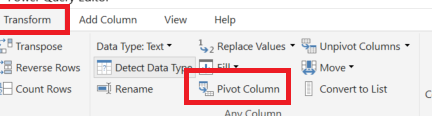
2. Next, select Column TRADE and Values and press on  Pivot Columns.


image.png

Hope this helps.

Best Regards,
Mariusz

If this post helps, then please consider Accepting it as the solution.

Please feel free to connect with me.
Mariusz Repczynski


View solution in original post

1 REPLY 1
Mariusz
Community Champion
Community Champion

Hi @Anonymous 

1. Select all month year columns, and press Unpivot in Transform Ribon.

image.png
2. Next, select Column TRADE and Values and press on  Pivot Columns.


image.png

Hope this helps.

Best Regards,
Mariusz

If this post helps, then please consider Accepting it as the solution.

Please feel free to connect with me.
Mariusz Repczynski


Helpful resources

Announcements
November Power BI Update Carousel

Power BI Monthly Update - November 2025

Check out the November 2025 Power BI update to learn about new features.

Fabric Data Days Carousel

Fabric Data Days

Advance your Data & AI career with 50 days of live learning, contests, hands-on challenges, study groups & certifications and more!

FabCon Atlanta 2026 carousel

FabCon Atlanta 2026

Join us at FabCon Atlanta, March 16-20, for the ultimate Fabric, Power BI, AI and SQL community-led event. Save $200 with code FABCOMM.