cancel
Showing results for 
Search instead for 
Did you mean: 

July 7 - July 17 | Round 2 of the Power BI Dataviz World Championships. Don't miss your chance! Learn more

Reply
Ramakrishna7032
New Member

Power Query To Find Duplicates

Hi,

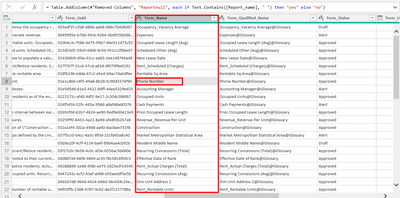
I need to write a power query for a text filed if the same data is repeated in another cell in same column needs to print as duplicate in new column else print unique.

Ex. if phone number is repeated again in same column, in new column it needs to print as duplicate else unique

Ramakrishna7032_0-1662611111980.png


1 ACCEPTED SOLUTION
Vijay_A_Verma
Most Valuable Professional

Look here for steps which you can incorporate
See the working here - Open a blank query - Home - Advanced Editor - Remove everything from there and paste the below code to test

let
    Source = Table.FromRows(Json.Document(Binary.Decompress(Binary.FromText("NYyxDcAwCAR3oXbDm1hunYyB2H+NPDYuXrqTONxFVZosjhDNBZ38coT0x8gfR0hX3HtsH6OckN5LT207T7fqgfv/9HOWEyJ+", BinaryEncoding.Base64), Compression.Deflate)), let _t = ((type nullable text) meta [Serialized.Text = true]) in type table [Term_Guid = _t, Term_Name = _t, Term_XYZ = _t]),
    #"Grouped Rows" = Table.Group(Source, {"Term_Name"}, {{"Term_Name_Count", each Table.RowCount(_), Int64.Type}}),
    #"Merged Queries" = Table.NestedJoin(Source, {"Term_Name"}, #"Grouped Rows", {"Term_Name"}, "Grouped Rows", JoinKind.LeftOuter),
    #"Expanded Grouped Rows" = Table.ExpandTableColumn(#"Merged Queries", "Grouped Rows", {"Term_Name_Count"}, {"Term_Name_Count"}),
    #"Added Custom" = Table.AddColumn(#"Expanded Grouped Rows", "Custom", each if [Term_Name_Count]>1 then "Duplicate" else "Unique"),
    #"Removed Columns" = Table.RemoveColumns(#"Added Custom",{"Term_Name_Count"})
in
    #"Removed Columns"

 

View solution in original post

1 REPLY 1
Vijay_A_Verma
Most Valuable Professional

Look here for steps which you can incorporate
See the working here - Open a blank query - Home - Advanced Editor - Remove everything from there and paste the below code to test

let
    Source = Table.FromRows(Json.Document(Binary.Decompress(Binary.FromText("NYyxDcAwCAR3oXbDm1hunYyB2H+NPDYuXrqTONxFVZosjhDNBZ38coT0x8gfR0hX3HtsH6OckN5LT207T7fqgfv/9HOWEyJ+", BinaryEncoding.Base64), Compression.Deflate)), let _t = ((type nullable text) meta [Serialized.Text = true]) in type table [Term_Guid = _t, Term_Name = _t, Term_XYZ = _t]),
    #"Grouped Rows" = Table.Group(Source, {"Term_Name"}, {{"Term_Name_Count", each Table.RowCount(_), Int64.Type}}),
    #"Merged Queries" = Table.NestedJoin(Source, {"Term_Name"}, #"Grouped Rows", {"Term_Name"}, "Grouped Rows", JoinKind.LeftOuter),
    #"Expanded Grouped Rows" = Table.ExpandTableColumn(#"Merged Queries", "Grouped Rows", {"Term_Name_Count"}, {"Term_Name_Count"}),
    #"Added Custom" = Table.AddColumn(#"Expanded Grouped Rows", "Custom", each if [Term_Name_Count]>1 then "Duplicate" else "Unique"),
    #"Removed Columns" = Table.RemoveColumns(#"Added Custom",{"Term_Name_Count"})
in
    #"Removed Columns"


Helpful resources

Announcements
FabCon and SQLCon Barcelona 2026

FabCon & SQLCon – Barcelona 2026

Join us in Barcelona for FabCon and SQLCon, the Fabric, Power BI, SQL, and AI community event. Save €200 with code FABCMTY200.

60 days of Data Days Carousel

Data Days 2026

Join Data Days 2026: 60 days of free live/on-demand sessions, challenges, study groups, and certification opportunities.

Power BI DataViz World Championships carousel

Power BI DataViz World Championships - June 2026

A new Power BI DataViz World Championship is coming this June! Don't miss out on submitting your entry.

Top Solution Authors
Top Kudoed Authors