

cancel
Showing results for 
Search instead for 
Did you mean: 

The Power BI Data Visualization World Championships is back! Get ahead of the game and start preparing now! Learn more

Reply
GouravKumar001
New Member

Power Query Errors

Hi everyone,

I have created 2 source for the same dataset. 

First I had imported the data from C:\Users\hp\Downloads\archive\sales_data_sample.csv

Now I have changed the source by data source setting in pbi desktop.

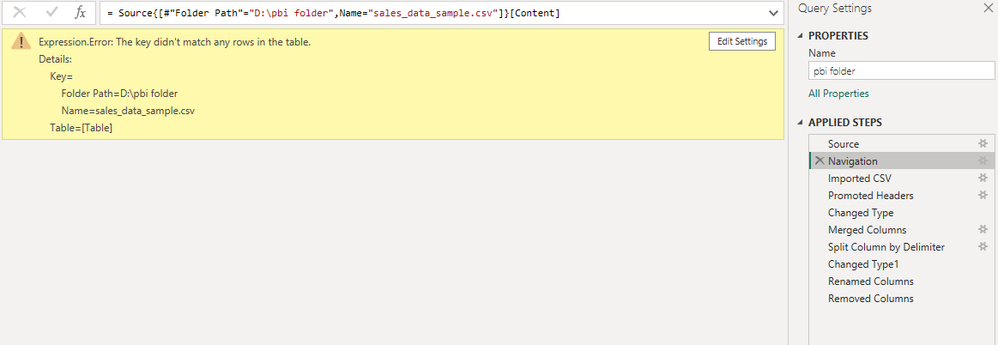
But after changing the path I am getting following errors evenI have changed the source path in power query.


error1.PNGerror3.PNGerror2.PNG

Guys Please have a look at these errors and suggest the solution needed to remove the same.

Thanks.


1 REPLY 1
m_dekorte
Super User
Super User

Hi @GouravKumar001,


I expect that your Source is the Folder-connector

When you first connected to: C:\Users\hp\Downloads\archive\sales_data_sample.csv This path "C:\Users\hp\Downloads\archive" was hard coded in the Source step, when you modified the Navigation step it didn't connect to another folder but it's trying to match the value "D:\pbi folder" the Folder Path field.


If you're Source is still connected to: "C:\Users\hp\Downloads\archive" there won't be a match to "D:\pbi folder" and the key didn't match any rows of the table - error is raised.


Did you set up a folder location parameter?

Page 3 and 4 here show you how to implement that.


Note that if you require the Folder Path inside the Navigation step as part of the key, you'll have to refer to the parameter there as well. See here for more info on key-match lookup


Ps. If this helps solve your query please mark this post as Solution, thanks!


Helpful resources

Announcements
Power BI DataViz World Championships

Power BI Dataviz World Championships

The Power BI Data Visualization World Championships is back! Get ahead of the game and start preparing now!

December 2025 Power BI Update Carousel

Power BI Monthly Update - December 2025

Check out the December 2025 Power BI Holiday Recap!

FabCon Atlanta 2026 carousel

FabCon Atlanta 2026

Join us at FabCon Atlanta, March 16-20, for the ultimate Fabric, Power BI, AI and SQL community-led event. Save $200 with code FABCOMM.