Don't miss your chance to take exam DP-600 or DP-700 on us!
Request nowLearn from the best! Meet the four finalists headed to the FINALS of the Power BI Dataviz World Championships! Register now
Hello Community,
I have a question related to Microsoft Planner Export to Excel function. It gives multiple assigned task values with semi colon as "Name1 Surname1; Name2 Surname2". It is recognized as one collapsed data. I want to be able to filter as two different person with this data so I can get correct "Members Assignment Chart". What is the best possible way for this?
Additional Information
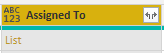
These "Name1 Surname1; Name2 Surname2" persons are belong to a office365 gorup. So I tried to to export this data to an online Sharepoint list. The names are recognized as People inside the group. Then I tried to connect this to Power BI. But the values are recognized as a List. When I extracted the values, again it was recognized as one data in row. The image is below.
Solved! Go to Solution.
Hi @Anonymous ,
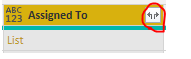
Please expand the data by click the icon.
Hİ @v-frfei-msft ,
Thank you for the solution offer. I expanded the excel data as rows with Split Column button. This option worked for my raw excel data. So, I eliminated the Sharepoint list step.
For planner reporting, going with the row option is very useful since it is possible to count distinct values of rows. Planner Export option gives unique task id for this purpose I believe.
Thanks again for your help.
Hi @Anonymous ,
Please expand the data by click the icon.
Hİ @v-frfei-msft ,
Thank you for the solution offer. I expanded the excel data as rows with Split Column button. This option worked for my raw excel data. So, I eliminated the Sharepoint list step.
For planner reporting, going with the row option is very useful since it is possible to count distinct values of rows. Planner Export option gives unique task id for this purpose I believe.
Thanks again for your help.
Share feedback directly with Fabric product managers, participate in targeted research studies and influence the Fabric roadmap.
Check out the February 2026 Power BI update to learn about new features.