cancel
Showing results for 
Search instead for 
Did you mean: 

Learn from the best! Meet the four finalists headed to the FINALS of the Power BI Dataviz World Championships! Register now

Reply
jcawley
Helper III
Helper III

Parsing Multi-Dimensional Array from json API?


So I need help trying to parse my json file from an API… I haven't been able to succesfully parse this into a table. I am receiving the following error:

"Expression.Error: We cannot convert a value of type Record to type Text.
Details:
Value=
379662=379662
396454=396454
396455=396455" ... etc etc

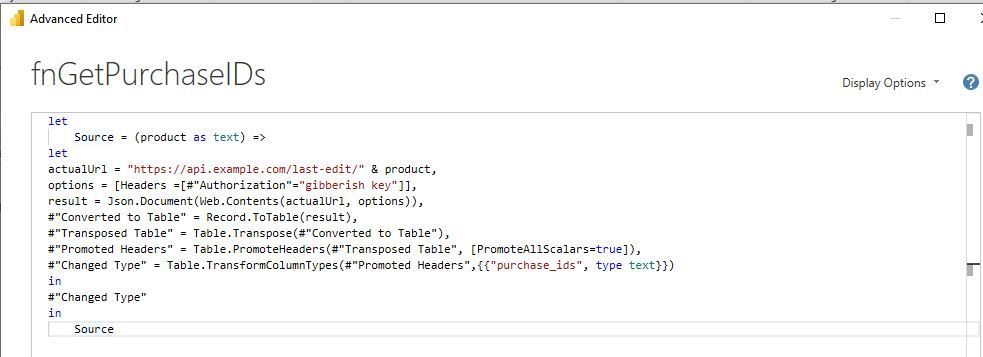
The function I am using looks like:

cap5.JPG

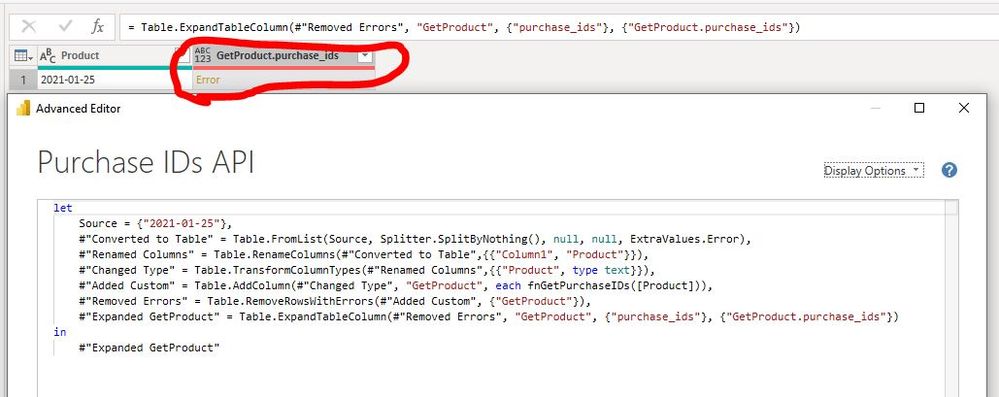
And the table:

yoyo.JPG


In the image above you can also see my table failing. I'm trying to get this information listed in a single table with each row being a seperate purchase ID.

Any help would be greatly appreciated!

1 ACCEPTED SOLUTION
Jimmy801
Community Champion
Community Champion

Hello @jcawley 


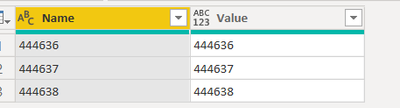
check out this solution. It converts the json to a table with two column, using the field "purchase_ids" from your api output

let
    YourJson = "{""total_found"":3, ""purchase_ids"":{""444636"":""444636"", ""444637"":""444637"", ""444638"": ""444638""}}",
    ReadJson = Json.Document(YourJson),
    CreateTable = Record.ToTable(ReadJson[#"purchase_ids"])
in
    CreateTable

Jimmy801_0-1612369081654.png


Copy paste this code to the advanced editor in a new blank query to see how the solution works.

If this post helps or solves your problem, please mark it as solution (to help other users find useful content and to acknowledge the work of users that helped you)
Kudoes are nice too

Have fun

Jimmy

View solution in original post

2 REPLIES 2
jcawley
Helper III
Helper III

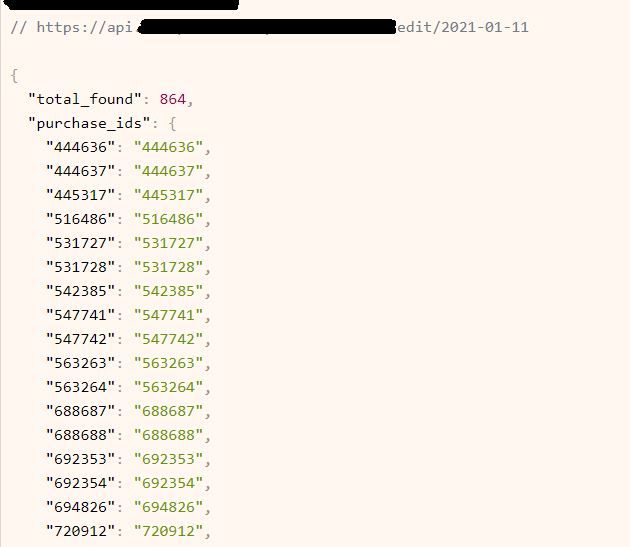
Also, here is an image from the webpage we are trying to parse the data from:

cap4.JPG

Jimmy801
Community Champion
Community Champion

Hello @jcawley 


check out this solution. It converts the json to a table with two column, using the field "purchase_ids" from your api output

let
    YourJson = "{""total_found"":3, ""purchase_ids"":{""444636"":""444636"", ""444637"":""444637"", ""444638"": ""444638""}}",
    ReadJson = Json.Document(YourJson),
    CreateTable = Record.ToTable(ReadJson[#"purchase_ids"])
in
    CreateTable

Jimmy801_0-1612369081654.png


Copy paste this code to the advanced editor in a new blank query to see how the solution works.

If this post helps or solves your problem, please mark it as solution (to help other users find useful content and to acknowledge the work of users that helped you)
Kudoes are nice too

Have fun

Jimmy

Helpful resources

Announcements
Join our Fabric User Panel

Join our Fabric User Panel

Share feedback directly with Fabric product managers, participate in targeted research studies and influence the Fabric roadmap.

February Power BI Update Carousel

Power BI Monthly Update - February 2026

Check out the February 2026 Power BI update to learn about new features.