cancel
Showing results for 
Search instead for 
Did you mean: 

The Power BI Data Visualization World Championships is back! Get ahead of the game and start preparing now! Learn more

Reply
pkumarsharma
Regular Visitor

POWER BI Query Importing incorrect date

Hi All, My first post, so apologies if this has been already asked, but i could not find a solution to this.


In my sharepoint list the dates are correct 

pkumarsharma_0-1679546250603.png


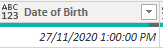
but when imported they are imported to my power query they are a day behind with time attached to it.

pkumarsharma_1-1679546332239.png

I have seen post to manually add a column to reduce it by one day but I have many many tables and each has date column so its too much.


Why is it behaving in such way. 

Please advise.

1 REPLY 1
ppm1
Solution Sage
Solution Sage

It does that because your SharePoint dates are coming in as UTC. You can bring them in as datetimezone to start/confirm and then convert them in added steps from there.


Pat

Microsoft Employee

Helpful resources

Announcements
Power BI DataViz World Championships

Power BI Dataviz World Championships

The Power BI Data Visualization World Championships is back! Get ahead of the game and start preparing now!

December 2025 Power BI Update Carousel

Power BI Monthly Update - December 2025

Check out the December 2025 Power BI Holiday Recap!

FabCon Atlanta 2026 carousel

FabCon Atlanta 2026

Join us at FabCon Atlanta, March 16-20, for the ultimate Fabric, Power BI, AI and SQL community-led event. Save $200 with code FABCOMM.

Top Solution Authors