cancel
Showing results for 
Search instead for 
Did you mean: 

We've captured the moments from FabCon & SQLCon that everyone is talking about, and we are bringing them to the community, live and on-demand. Starts on April 14th. Register now

Reply
diego_martinezn
Frequent Visitor

PDF loading issues with power query

I've posted this question before, but it wasn't explained properly from de beginning and I think it's a good idea to start with the right food. 

So the situation is that I have a folder with some PDFs, while loading them, power query sometimes detects 2 tables and sometimes 3 tables.

When I get 2 tables there are no issues. Both have the same number of columns and I just need to do some changes.
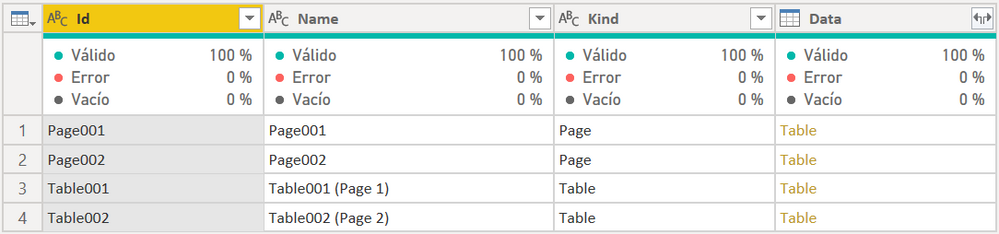
 

PWBI_1.PNG


After some transformations and putting both tables together, I end up with these columns:

{Delegaciones, Total Revenues, Personnel Expenses, Subcontract, Other Expenses, Total Expenses, Gross Margin B. Activity, Indirect Costs Location, Gross Margin Location, Indirect Costs Location, Overheads, MB3}

Where I'm having problems is when power query detects 3 tables instead of 2 for a different PDF, but it has the same structure as the previous one.
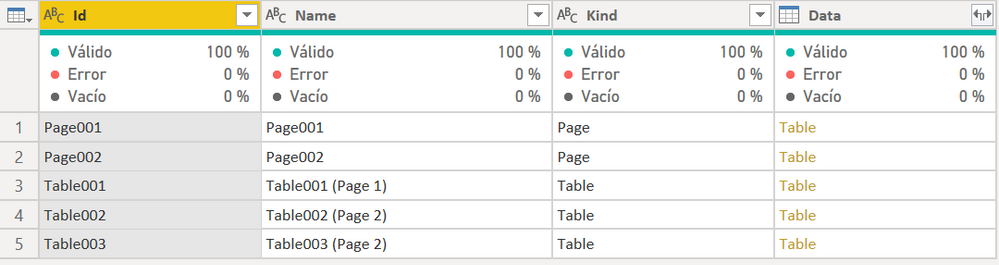
PWBI_2.PNG

In this particular case, the first table has 21 columns with some null columns I need to delete, etc (just like when I get 2 tables). After some transformations, I end up with the same columns I mentioned before. So there are no issues with the first table.

The problems come with the second and third tables. First of all, instead of taking 21 columns with all the data (as it does with the first table or with the previous PDF), it takes in the second table 9 columns and in the third table 11 columns.

The fact that doesn't let me continue is that when this happens, the column "Gross Margin B. Activity" disappears, it never gets loaded neither in table 2 or 3.

So my questions here are two:

  1. If the PDFs have the exact same structure, why sometimes does it detect two tables and others 3? Is there something I can do to change this?
  2. If I can't change this fact, is there a solution to not losing that column when it detects three tables?

Hope we can find a solution 🙂

2 REPLIES 2
v-jingzhang
Community Support
Community Support

Hi @diego_martinezn 


I'm afraid we are not able to affect How PDF connector works. The tables are detected and extracted by the connector automatically. It uses Pdf.Tables function to do that.


While there are some additional optional properties you can modify or add. You can find all of them in above link. For example, currently Implementation property is "1.3". You can try changing it into other valid values to see whether it would work better. 


I guess it detects 3 tables in some specific PDFs. Can you open those PDFs to check whether they display the column "Gross Margin B. Activity" completely? Is it possible that in some PDFs, the column is missing and the table is split into two tables? 


Or if you expand Page002 instead of Table002/Table003, can you see the column "Gross Margin B. Activity" in this page?


Best Regards,
Community Support Team _ Jing
If this post helps, please Accept it as Solution to help other members find it.

Hi @v-jingzhang, thanks very much for replying.

Your answer was very useful, I'll try changing the implementation to see if it changes something.

On the other hand, I've tried to work with the pages but it's a complete mess, every page has a different number of columns and it's very difficult to automate that. But you gave me an idea, I'll try it.

Thanks!

Helpful resources

Announcements
New to Fabric survey Carousel

New to Fabric Survey

If you have recently started exploring Fabric, we'd love to hear how it's going. Your feedback can help with product improvements.

Power BI DataViz World Championships carousel

Power BI DataViz World Championships - June 2026

A new Power BI DataViz World Championship is coming this June! Don't miss out on submitting your entry.

Join our Fabric User Panel

Join our Fabric User Panel

Share feedback directly with Fabric product managers, participate in targeted research studies and influence the Fabric roadmap.

March Power BI Update Carousel

Power BI Community Update - March 2026

Check out the March 2026 Power BI update to learn about new features.