Don't miss your chance to take exam DP-600 or DP-700 on us!
Request nowLearn from the best! Meet the four finalists headed to the FINALS of the Power BI Dataviz World Championships! Register now
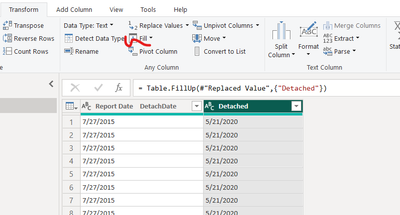
I have two date columns, Report Date and Detach Date. I have some missing Detach Dates (filled with null). The Report Date column does not have any missing dates. Is there a function in M Language that will populate the missing dates. Here is a sample of the data. The null values need to have the actual detach date (The report date of 7/27/2015 has a Detach Date of 5/21/2020) and the null vlaue should have 5/21/2020 in the cells.
The data set I am working on have several thousand rows of data and I am missing thousands of the detach dates.
Can some one help?
Report Date DetachDate
| 7/27/2015 | null |
| 7/27/2015 | null |
| 7/27/2015 | null |
| 7/27/2015 | null |
| 7/27/2015 | null |
| 7/27/2015 | null |
| 7/27/2015 | null |
| 7/27/2015 | null |
| 7/27/2015 | 5/21/2020 |
| 7/27/2015 | null |
| 7/27/2015 | null |
| 7/27/2015 | 5/21/2020 |
| 7/27/2015 | 5/21/2020 |
| 7/27/2015 | null |
| 7/27/2015 | 5/21/2020 |
| 7/27/2015 | 5/21/2020 |
| 7/27/2015 | 5/21/2020 |
| 4/6/2018 | null |
| 4/6/2018 | null |
| 4/6/2018 | null |
| 4/6/2018 | null |
| 4/6/2018 | null |
| 4/6/2018 | null |
| 4/6/2018 | null |
| 4/6/2018 | null |
| 4/6/2018 | null |
| 4/6/2018 | null |
| 4/6/2018 | null |
| 4/6/2018 | null |
| 4/6/2018 | 4/2/2021 |
| 4/6/2018 | 4/2/2021 |
Solved! Go to Solution.
Hi @BennyA ,
Consider using Fill up if the last record of each group [DetachDate] is not the null.
In other cases, consider grouping [report date] first and then using conditional judgment to replace null.
= Table.Group(YourPreviousStepName, {"Report Date"}, {{"DetachDate", each List.Transform([DetachDate],(x) => if x = null then List.Max([DetachDate]) else x )}})
All codes in Adavance Editor.
let
Source = Table.FromRows(Json.Document(Binary.Decompress(Binary.FromText("i45WMtc3AiIDQ1MlHaW80pwcpVidQS9oqm9kCGQbGdDEDBJNJ8cgVBkTfTOQhAWyDSNEzETfCBQOhrjFYwE=", BinaryEncoding.Base64), Compression.Deflate)), let _t = ((type nullable text) meta [Serialized.Text = true]) in type table [#"Report Date" = _t, DetachDate = _t]),
#"Changed Type" = Table.TransformColumnTypes(Source,{{"Report Date", type date}, {"DetachDate", type date}}),
#"Grouped Rows" = Table.Group(#"Changed Type", {"Report Date"}, {{"DetachDate", each List.Transform([DetachDate],(x) => if x = null then List.Max([DetachDate]) else x )}}),
#"Expanded DetachDate" = Table.ExpandListColumn(#"Grouped Rows", "DetachDate")
in
#"Expanded DetachDate"
Best Regards,
Gao
Community Support Team
If there is any post helps, then please consider Accept it as the solution to help the other members find it more quickly. If I misunderstand your needs or you still have problems on it, please feel free to let us know. Thanks a lot!
How to get your questions answered quickly -- How to provide sample data in the Power BI Forum
Hi @BennyA ,
Consider using Fill up if the last record of each group [DetachDate] is not the null.
In other cases, consider grouping [report date] first and then using conditional judgment to replace null.
= Table.Group(YourPreviousStepName, {"Report Date"}, {{"DetachDate", each List.Transform([DetachDate],(x) => if x = null then List.Max([DetachDate]) else x )}})
All codes in Adavance Editor.
let
Source = Table.FromRows(Json.Document(Binary.Decompress(Binary.FromText("i45WMtc3AiIDQ1MlHaW80pwcpVidQS9oqm9kCGQbGdDEDBJNJ8cgVBkTfTOQhAWyDSNEzETfCBQOhrjFYwE=", BinaryEncoding.Base64), Compression.Deflate)), let _t = ((type nullable text) meta [Serialized.Text = true]) in type table [#"Report Date" = _t, DetachDate = _t]),
#"Changed Type" = Table.TransformColumnTypes(Source,{{"Report Date", type date}, {"DetachDate", type date}}),
#"Grouped Rows" = Table.Group(#"Changed Type", {"Report Date"}, {{"DetachDate", each List.Transform([DetachDate],(x) => if x = null then List.Max([DetachDate]) else x )}}),
#"Expanded DetachDate" = Table.ExpandListColumn(#"Grouped Rows", "DetachDate")
in
#"Expanded DetachDate"
Best Regards,
Gao
Community Support Team
If there is any post helps, then please consider Accept it as the solution to help the other members find it more quickly. If I misunderstand your needs or you still have problems on it, please feel free to let us know. Thanks a lot!
How to get your questions answered quickly -- How to provide sample data in the Power BI Forum
Share feedback directly with Fabric product managers, participate in targeted research studies and influence the Fabric roadmap.
Check out the February 2026 Power BI update to learn about new features.
| User | Count |
|---|---|
| 4 | |
| 4 | |
| 3 | |
| 2 | |
| 2 |
| User | Count |
|---|---|
| 9 | |
| 9 | |
| 8 | |
| 7 | |
| 7 |