Get certified for free when you join Fabric Data Days 2026 and dive into Fabric, Power BI, SQL, AI, and other essential data skills.
Join nowData Days is here! Join us now for 60+ days of learning, challenges, and connection. Learn more
Hi All,
I'm looking to merge query without duplicates and failing miserably. Could you please help?
table 1 contains ID and table 2 contains same ID but can contain multiple times.
Output what i'm wanting is only to see table 1 data where table1.ID is also present in table2.ID without any duplicate rows.
Any help with this is greatly appreciated.
Regards
Sanjay
Solved! Go to Solution.
Hi @dandamudisanjay ,
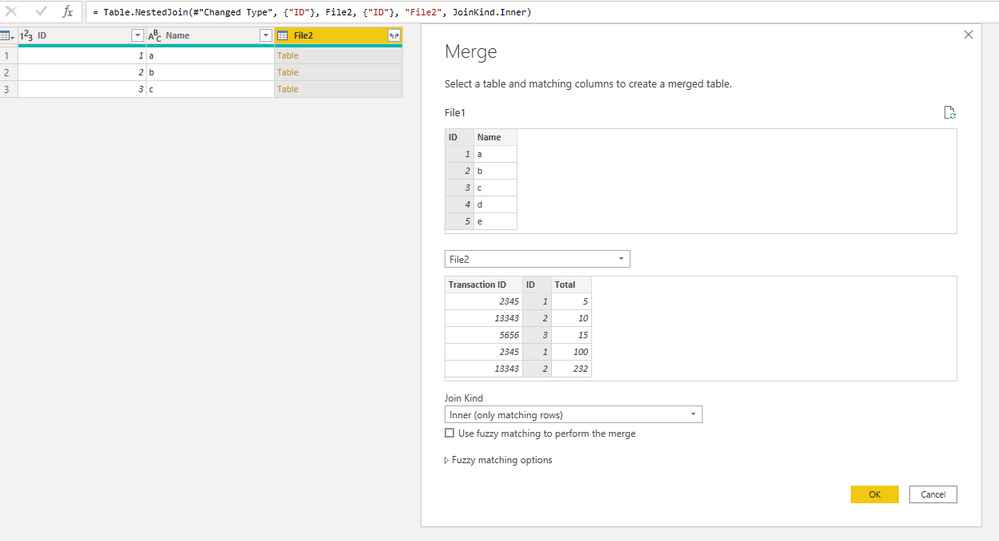
You can do it:
After, just drop the File2 Column.
If you consider it as a solution, please mark as a solution and kudos.
Ricardo
File 1
ID | NAme |
1 | a |
2 | b |
3 | c |
4 | d |
5 | e |
File 2
Transaction ID | ID | Total |
2345 | 1 | 5 |
13343 | 2 | 10 |
5656 | 3 | 15 |
2345 | 1 | 100 |
13343 | 2 | 232 |
909 | 2 | 876
|
Output
ID | Name |
1 | a |
2 | b |
3 | c |
Hi @dandamudisanjay ,
You can do it:
After, just drop the File2 Column.
If you consider it as a solution, please mark as a solution and kudos.
Ricardo
Don't miss out on Data Days, June 15 through August 7. Learn Fabric, Power BI, SQL, AI and more.
Check out the May 2026 Power BI update to learn about new features.
| User | Count |
|---|---|
| 4 | |
| 4 | |
| 3 | |
| 2 | |
| 1 |
| User | Count |
|---|---|
| 11 | |
| 11 | |
| 4 | |
| 4 | |
| 4 |