Don't miss your chance to take the Fabric Data Engineer (DP-700) exam on us!
Learn moreWe've captured the moments from FabCon & SQLCon that everyone is talking about, and we are bringing them to the community, live and on-demand. Starts on April 14th. Register now
Hi,
So I have this data in multiple files in a folder. The data is formated in the following way:
First column: Date and time
Second column: Measured value of series 1
Third column: Status of measured value series 1
Forth column: Measure value of series 2
Fifth column: Status value of series 2
Sample:
| Timestamp | Value 1 | Status 1 | Value 2 | Status 2 | ... | Value N | Status N |
| 2017-12-01 00:00 | 4 | Calculated | 3 | 1 | |||
| 2017-12-01 01:00 | 3 | Calculated | 2 | Estimated | 6 | ||
| 2017-12-01 02:00 | 2 | Calculated | 6 | 8 | Calculated | ||
| 2017-12-01 03:00 | 0 | Calculated | 8 | 5 | Calculated |
The amount of columns is dependent on how many series is in that file. I would like to make a function to clean and make the data neat for all the files in the folder. I do this by merging the column Measured value and Status and then splitting it and normalizing it. But since the data has different amount of columns cross the files I'm having a hard time creating a function for this. Anybody have any good suggestions to create a function to merge every other column except the first one, independent on number of columns?
Solved! Go to Solution.
Hi @Anonymous
If all files in a folder have the same format, you could Get Data from Folder with Power BI,
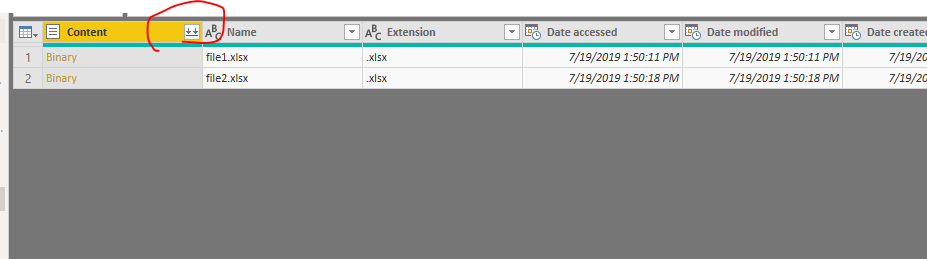
Then Click Edit, expand the "Content"
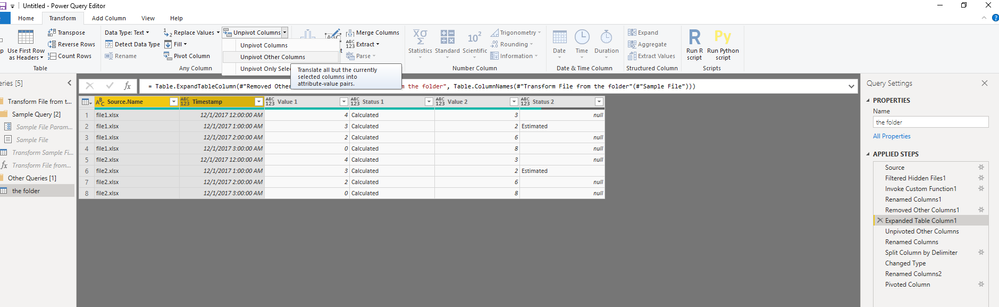
Select "Source.Name" and "Timestamp" columns and unpivot other columns
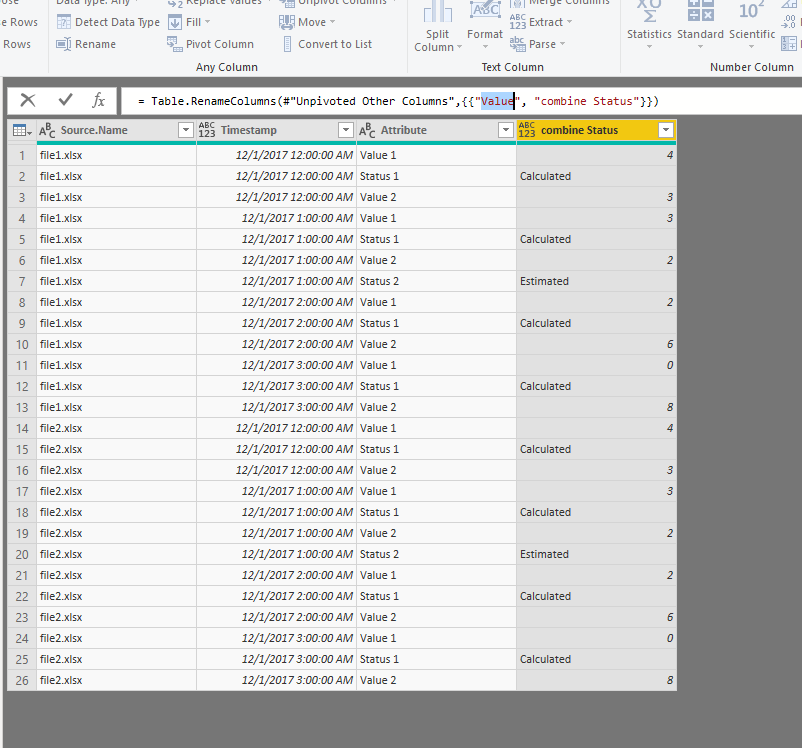
Rename the "Value" column to "combine Status"
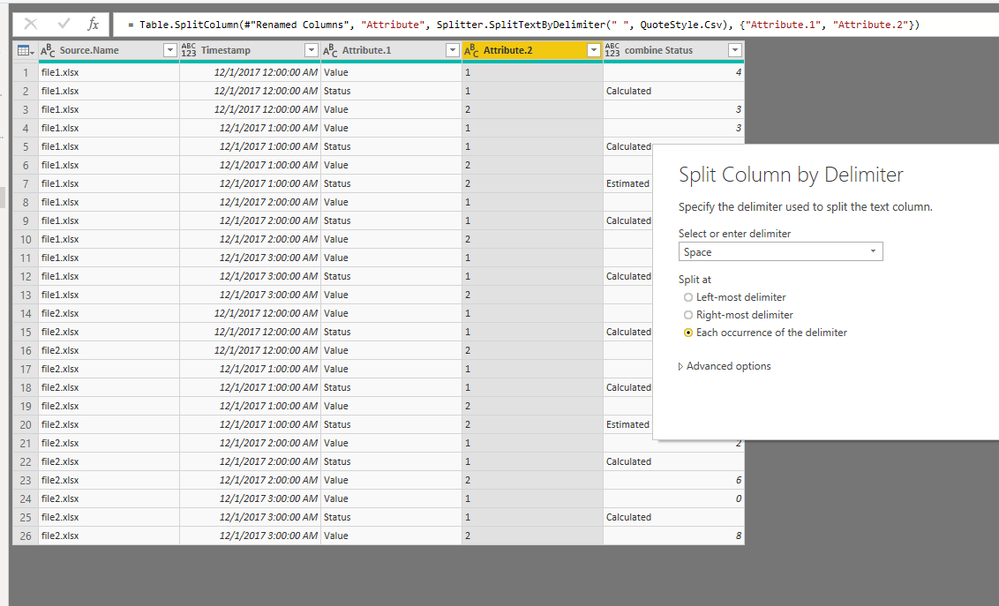
Spilt the "Attribute" column
rename "Attribute.2" to "Series"
Select ""Attribute.2" and pivot columns
Best Regards
Maggie
Community Support Team _ Maggie Li
If this post helps, then please consider Accept it as the solution to help the other members find it more quickly.
Hi @Anonymous
If all files in a folder have the same format, you could Get Data from Folder with Power BI,
Then Click Edit, expand the "Content"
Select "Source.Name" and "Timestamp" columns and unpivot other columns
Rename the "Value" column to "combine Status"
Spilt the "Attribute" column
rename "Attribute.2" to "Series"
Select ""Attribute.2" and pivot columns
Best Regards
Maggie
Community Support Team _ Maggie Li
If this post helps, then please consider Accept it as the solution to help the other members find it more quickly.
Hi @Anonymous,
you've already get a solution from @v-juanli-msft.
But an alternative could be using functions like Table.ColumnNames or Record.FieldNames. You get a list of all columns of a table or a record which you can filter with List.Select. And then you can do your magic. It expects more programming skills in M.
If you have recently started exploring Fabric, we'd love to hear how it's going. Your feedback can help with product improvements.
A new Power BI DataViz World Championship is coming this June! Don't miss out on submitting your entry.
Share feedback directly with Fabric product managers, participate in targeted research studies and influence the Fabric roadmap.
| User | Count |
|---|---|
| 5 | |
| 4 | |
| 3 | |
| 2 | |
| 2 |
| User | Count |
|---|---|
| 8 | |
| 7 | |
| 6 | |
| 6 | |
| 5 |