Get certified for free when you join Fabric Data Days 2026 and dive into Fabric, Power BI, SQL, AI, and other essential data skills.
Join nowJuly 7 - July 17 | Round 2 of the Power BI Dataviz World Championships. Don't miss your chance! Learn more
I'm searching a solution for my situation using merge with a time range, but I could not find anything about my specific situation.
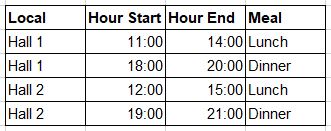
I have the following data:
table_time_meal
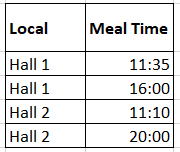
table_used_meals
In this scenario I need to find what's the meal based on time from table_used_meals to table_time_meals. I know I could to merge by Local, add a custom column to check the time and remove the rows. The problem is that I need to keep the not found rows with a alert. I've tried to use SelectRows also, but it's too slow with the size of data I have here.
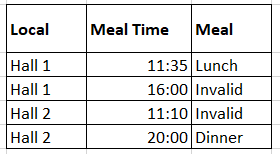
The result should be:
table_used_meals
If I merge only by Local in this example, the merge will repeat the data (because there's more than one row for each Local in table_time_meals) and I'll not be able to find the rows I should remove.
Any ideas, please?
Solved! Go to Solution.
Not sure if this will be any faster but it does create your end result from your data and does not duplicate any rows.
Note that the tables are Excel based, but this will also work in Power BI
let
Source = Excel.CurrentWorkbook(){[Name="table_time_meal"]}[Content],
table_time_meal = Table.TransformColumnTypes(Source,{
{"Local", type text}, {"Hour Start", type time}, {"Hour End", type time}, {"Meal", type text}}),
Source2 = Excel.CurrentWorkbook(){[Name="table_used_meals"]}[Content],
table_used_meals = Table.TransformColumnTypes(Source2,{
{"Local", type text}, {"Meal Time", type time}}),
join = Table.NestedJoin(table_used_meals,"Local",table_time_meal,"Local","Joined", JoinKind.FullOuter),
#"Added Custom" = Table.AddColumn(join, "Custom", each
let
Meal = Table.SelectRows([Joined], (r)=> r[Hour Start] <= [Meal Time] and r[Hour End] >= [Meal Time])[Meal]
in
if List.Count(Meal) = 0
then "Invalid"
else Meal{0}, type nullable text),
#"Removed Columns" = Table.RemoveColumns(#"Added Custom",{"Joined"})
in
#"Removed Columns"
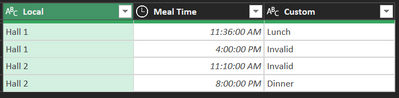
Not sure if this will be any faster but it does create your end result from your data and does not duplicate any rows.
Note that the tables are Excel based, but this will also work in Power BI
let
Source = Excel.CurrentWorkbook(){[Name="table_time_meal"]}[Content],
table_time_meal = Table.TransformColumnTypes(Source,{
{"Local", type text}, {"Hour Start", type time}, {"Hour End", type time}, {"Meal", type text}}),
Source2 = Excel.CurrentWorkbook(){[Name="table_used_meals"]}[Content],
table_used_meals = Table.TransformColumnTypes(Source2,{
{"Local", type text}, {"Meal Time", type time}}),
join = Table.NestedJoin(table_used_meals,"Local",table_time_meal,"Local","Joined", JoinKind.FullOuter),
#"Added Custom" = Table.AddColumn(join, "Custom", each
let
Meal = Table.SelectRows([Joined], (r)=> r[Hour Start] <= [Meal Time] and r[Hour End] >= [Meal Time])[Meal]
in
if List.Count(Meal) = 0
then "Invalid"
else Meal{0}, type nullable text),
#"Removed Columns" = Table.RemoveColumns(#"Added Custom",{"Joined"})
in
#"Removed Columns"
Join us in Barcelona for FabCon and SQLCon, the Fabric, Power BI, SQL, and AI community event. Save €200 with code FABCMTY200.
Join Fabric Data Days 2026: 60 days of free live/on-demand sessions, challenges, study groups, and certification opportunities.