cancel
Showing results for 
Search instead for 
Did you mean: 

The Power BI Data Visualization World Championships is back! Get ahead of the game and start preparing now! Learn more

Reply
xtro
Regular Visitor

Mapping a value based on list sequence

Hello all, 


I'm sorry if the subject is not clear, but I'll try to explain it here.


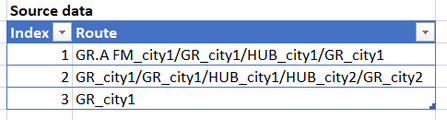
So, I have data containing branch city and function type every time a package gets scanned IN through logistics shipping. Here's the example data :


xtro_0-1677316466412.png


My goal is to identify function type "GR" as "GR FM" or "GR LM".


The logic is :

  1. If a route has function type "GR.A FM", then all of the following function type "GR" should be "GR LM"
  2. if a route has not function type "GR. A FM", then the first function type "GR" will be "GR FM" and the rest "GR" will be "GR LM"
  3. Any other function will stay as is


Here's the expected result :

xtro_1-1677316514260.png


I tried to do it in my manually back and forth using reference and merge, but I think there's another simpler and cleaner solution using list function or something. Here's the link to my version : link 


Anyone have another solution?


Thank you


1 ACCEPTED SOLUTION
v-jingzhang
Community Support
Community Support

Hi @xtro 


Here is my solution. Hope it helps. 

let
    Source = data,
    #"Added Custom" = Table.AddColumn(Source, "RouteSplit", each Text.Split([Route], "/")),
    #"Added Custom1" = Table.AddColumn(#"Added Custom", "Types", each List.Transform([RouteSplit], each Text.BeforeDelimiter(_, "_"))),
    #"Added Custom2" = Table.AddColumn(#"Added Custom1", "New Types", each 
        if List.Contains([Types], "GR.A FM") 
        then List.Transform([Types], each if _ = "GR" then "GR LM" else _) 
        else 
            let 
                _firstGR = List.PositionOf([Types], "GR") 
            in 
                if _firstGR = -1 
                then [Types] 
                else List.ReplaceValue(List.ReplaceRange([Types], _firstGR, 1, {"GR FM"}), "GR", "GR LM", Replacer.ReplaceValue)),
    #"Added Custom3" = Table.AddColumn(#"Added Custom2", "Route Mapped", each Text.Combine(List.Transform(List.Zip({[New Types],List.Transform([RouteSplit], each Text.AfterDelimiter(_, "_"))}), each Text.Combine(_, "_")), "/")),
    #"Removed Other Columns" = Table.SelectColumns(#"Added Custom3",{"Index", "Route", "Route Mapped"})
in
    #"Removed Other Columns"

vjingzhang_0-1677476410194.png


Best Regards,
Community Support Team _ Jing
If this post helps, please Accept it as Solution to help other members find it.

View solution in original post

4 REPLIES 4
v-jingzhang
Community Support
Community Support

Hi @xtro 


Here is my solution. Hope it helps. 

let
    Source = data,
    #"Added Custom" = Table.AddColumn(Source, "RouteSplit", each Text.Split([Route], "/")),
    #"Added Custom1" = Table.AddColumn(#"Added Custom", "Types", each List.Transform([RouteSplit], each Text.BeforeDelimiter(_, "_"))),
    #"Added Custom2" = Table.AddColumn(#"Added Custom1", "New Types", each 
        if List.Contains([Types], "GR.A FM") 
        then List.Transform([Types], each if _ = "GR" then "GR LM" else _) 
        else 
            let 
                _firstGR = List.PositionOf([Types], "GR") 
            in 
                if _firstGR = -1 
                then [Types] 
                else List.ReplaceValue(List.ReplaceRange([Types], _firstGR, 1, {"GR FM"}), "GR", "GR LM", Replacer.ReplaceValue)),
    #"Added Custom3" = Table.AddColumn(#"Added Custom2", "Route Mapped", each Text.Combine(List.Transform(List.Zip({[New Types],List.Transform([RouteSplit], each Text.AfterDelimiter(_, "_"))}), each Text.Combine(_, "_")), "/")),
    #"Removed Other Columns" = Table.SelectColumns(#"Added Custom3",{"Index", "Route", "Route Mapped"})
in
    #"Removed Other Columns"

vjingzhang_0-1677476410194.png


Best Regards,
Community Support Team _ Jing
If this post helps, please Accept it as Solution to help other members find it.

Wow, it works! List in power query really is powerful. Thank you for the help!


If you don't mind, can you explain this part ? @v-jingzhang 

I get the hang it's to define "GR FM" and "GR LM". But what's the purpose of inside "let" and "in"?


xtro_0-1677553921506.png


Hi @xtro 


You could refer to Let - PowerQuery M | Microsoft Learn


In this case, I defined a variable _firstGR to get the position of the first "GR" in [Types] list, then used it in the expression to return. It is used at more than one place, so I define it as a variable to avoid evalulating it multiple times. This is my habit. In fact, in your case, the "let ... in" is not a must. You may have a try that if you modify this part into below, it also works as expected. 


vjingzhang_0-1677562494939.png


Best Regards,
Community Support Team _ Jing

Thank you for the explanation!🙏

Helpful resources

Announcements
Power BI DataViz World Championships

Power BI Dataviz World Championships

The Power BI Data Visualization World Championships is back! Get ahead of the game and start preparing now!

December 2025 Power BI Update Carousel

Power BI Monthly Update - December 2025

Check out the December 2025 Power BI Holiday Recap!

FabCon Atlanta 2026 carousel

FabCon Atlanta 2026

Join us at FabCon Atlanta, March 16-20, for the ultimate Fabric, Power BI, AI and SQL community-led event. Save $200 with code FABCOMM.

