Get certified for free when you join Fabric Data Days 2026 and dive into Fabric, Power BI, SQL, AI, and other essential data skills.
Join nowJuly 28 - August 9 | Final Round of the Power BI Dataviz World Championships. This is your chance. Learn more
hi All,
I am able to created a calculated column for MAXIFS in power BI. However, I am not able to see the calculated column when editing query. (If I'm wrong about the ability to edit query for calculated column, let me know how can i do it. Thanks). Is there a way to created a MAXIFS using edit query-add custom column ? How should i write the formula to do that ? Any guidance is greatly appreciated.
Andrew
Solved! Go to Solution.
Hi, @AndrewHam ;
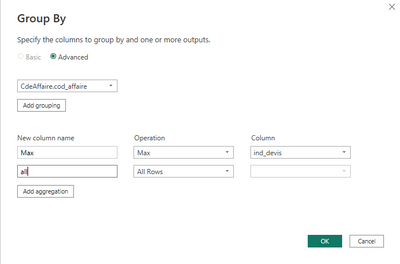
If you create columns with DAX, you can't see them in Power Query, and if you create custom columns in Power Query, you can see them on desktop, which is by design. Depending on your formula, if you convert to Power Query, you can use Group By.
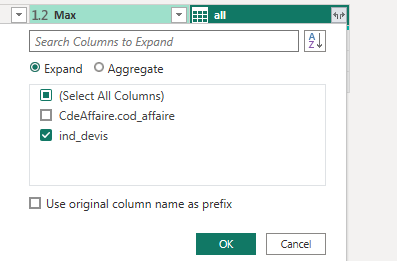
Then expand it.
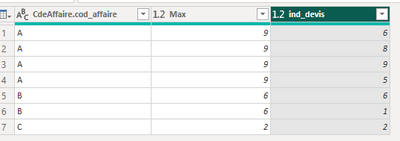
The final result:
Best Regards,
Community Support Team _ Yalan Wu
If this post helps, then please consider Accept it as the solution to help the other members find it more quickly.
Hi, @AndrewHam ;
If you create columns with DAX, you can't see them in Power Query, and if you create custom columns in Power Query, you can see them on desktop, which is by design. Depending on your formula, if you convert to Power Query, you can use Group By.
Then expand it.
The final result:
Best Regards,
Community Support Team _ Yalan Wu
If this post helps, then please consider Accept it as the solution to help the other members find it more quickly.
Thanks for the advice. Let me explore the solution provided and see the outcome.
I have included the calculated column formula here;
If you love stickers, then you will definitely want to check out our community sticker challenge, Barcelona edition!
Check out the July 2026 Power BI update to learn about new features.