Join us at FabCon Atlanta from March 16 - 20, 2026, for the ultimate Fabric, Power BI, AI and SQL community-led event. Save $200 with code FABCOMM.
Register now!The Power BI Data Visualization World Championships is back! Get ahead of the game and start preparing now! Learn more
I have a dashboard that has over 30 different queries. I just needed to load a new Kusto query and do not wish to do anything with the other queries that were existing.
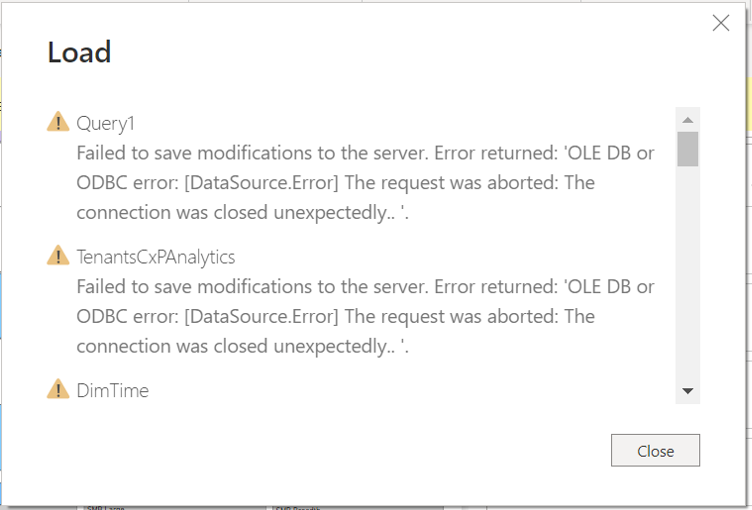
But when I load the one query I am interested in, all of the other queries appear also in the "Load" pop up. After a while, I get a bunch of "failed to save modifications....Error returned: 'OLE DB or ODBC error' " messages from the other queries
I even went through all of those queries and selected "do not refresh" just so Power BI will just focus on the one query I need to load
The other queries really don't appear to have issues, since they refresh okay when refreshed individually. I have attached the error message. The one with the name "Query" is the only one that I wish to load
Solved! Go to Solution.
The issue was that the query results set was too large, therefore causing time out errors, resulting in the above errors
Hi @charlie7491 ,
First, you can try to upgrade Power BI Desktop to the latest version.
Or check your data source credentials and check your steps in the Power Query Editor are deployed correctly.
Dashboards and reports are different. Are you sure you mean dashboards?
Best Regards,
Stephen Tao
If this post helps, then please consider Accept it as the solution to help the other members find it more quickly.
Thank you. it was a data size issue
The issue was that the query results set was too large, therefore causing time out errors, resulting in the above errors
The Power BI Data Visualization World Championships is back! Get ahead of the game and start preparing now!
Check out the November 2025 Power BI update to learn about new features.
| User | Count |
|---|---|
| 10 | |
| 6 | |
| 5 | |
| 4 | |
| 2 |