cancel
Showing results for 
Search instead for 
Did you mean: 

The Power BI Data Visualization World Championships is back! Get ahead of the game and start preparing now! Learn more

Reply
foged
Regular Visitor

List.Transform referencing column returns different data

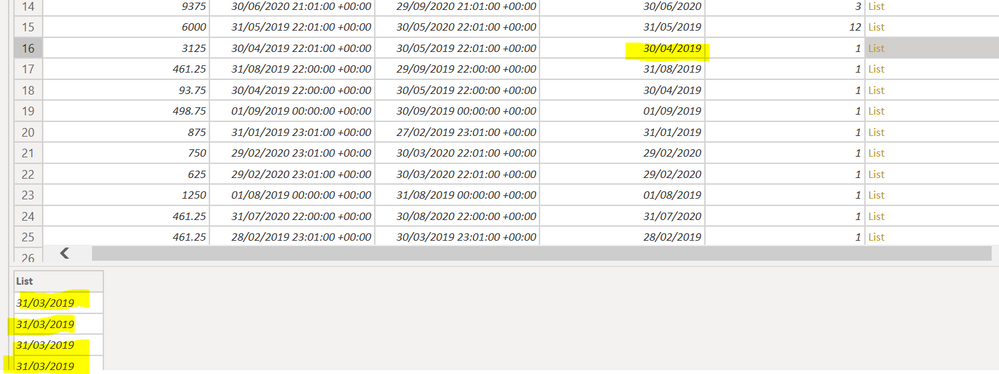
I am building a power query adding a list of dates using List.Transform. I reference an existing column using (thisrow) inline custom function, however the populated list, referencing the same column returns random data:


let
Source = OData.Feed("....", null, [Implementation="2.0"]),
#"Add Custom" = Table.AddColumn(Source, "ReportDate", each [PeriodStart], type date),
#"Add Months" = Table.AddColumn(#"Add Custom", "Months", each (Duration.Days([PeriodEnd]-[PeriodStart]))),
#"MonthList" = Table.AddColumn(
#"Add Months", "DateList",
(ThisRow) => List.Transform(
{0..3},
each
ThisRow[Months] )
, type list
)
in
MonthList

When I look at the List generated (0..3) each item in the list, does not corrospond with the data stored in the ReportDate column. Any idea?

5 REPLIES 5
Jimmy801
Community Champion
Community Champion

Hello @foged 


your code is saying, that you are a creating a list with 4 items, and all items have the value of the column "months", not with the column "ReportDate"


What exactly should this list contain?


BR


Jimmy

Hi Jimmy, thanks for reaching the item. My sample (was posted) was referencing both [months] (number column) to test and also the [reportdate] (date column). 


Here is the sample view when referencing the [ReportDate] column. 


rrerror.PNG

Jimmy801
Community Champion
Community Champion

Hello @foged 


the code you posted will not create this result. It will create a list with 4 items and each will get the value of the "months"-column. What exactly you need?


BR


Jimmy

Hi Jimmy,


That is the whole point - the value of "months" column is various from the rows of the table, not actually the value of the (ThisRow) parameter. I've narrowed it down by sorting the list from A-Z on the date column, which then produces the right results, but I've never had to do this before. Seems like a bug in Power BI desktop.

Jimmy801
Community Champion
Community Champion

Hello @foged 

try this code if now its working


let
Source = OData.Feed("....", null, [Implementation="2.0"]),
#"Add Custom" = Table.AddColumn(Source, "ReportDate", each [PeriodStart], type date),
#"Add Months" = Table.Buffer(Table.AddColumn(#"Add Custom", "Months", each (Duration.Days([PeriodEnd]-[PeriodStart])))),
#"MonthList" = Table.AddColumn(
#"Add Months", "DateList", 
(ThisRow) => List.Transform(
{0..3}, 
each 
ThisRow[Months] )
, type list
)
in
MonthList


If this post helps or solves your problem, please mark it as solution (to help other users find useful content and to acknowledge the work of users that helped you)
Kudoes are nice too

Have fun

Jimmy

Helpful resources

Announcements
Power BI DataViz World Championships

Power BI Dataviz World Championships

The Power BI Data Visualization World Championships is back! Get ahead of the game and start preparing now!

December 2025 Power BI Update Carousel

Power BI Monthly Update - December 2025

Check out the December 2025 Power BI Holiday Recap!

FabCon Atlanta 2026 carousel

FabCon Atlanta 2026

Join us at FabCon Atlanta, March 16-20, for the ultimate Fabric, Power BI, AI and SQL community-led event. Save $200 with code FABCOMM.

Top Solution Authors