This time we’re going bigger than ever. Fabric, Power BI, SQL, AI and more. We're covering it all. You won't want to miss it.
Learn moreGet Fabric Certified for FREE during AI Skills Fest. This week only. Secure your voucher now.
Hello,
My organization is currently attempting to integrate some of our Power BI reports and dashboards into Microsoft Teams using the Power BI "Add a tab" or website "Add a tab", but we are noticing that when we do so, the links that we have on our reports and dashboards do not take us to their intended targets after clicking on them. It is as if Teams completely ignores the links in the report.
Has anyone else noticed this or experienced a similar issue?
Thanks,
Alex
Hi @Anonymous,
Based on my test, after add the Power BI report to Microsoft Teams, left click on the link will not go to target page. Regarding this issue, I will consult it internally. If I get any information, will update here.
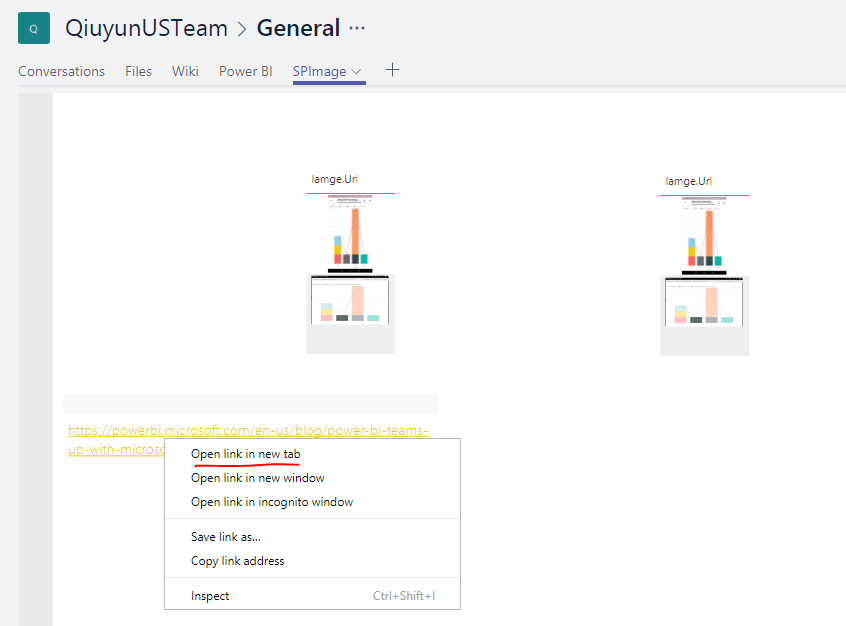
Besides, please try to right click on the link and select the "Open link in a new tab" to open target web page. This is working on my side.
Best Regards,
QiuyunYu
Hi QiuyunYu,
Thanks for your suggestion. Right clicking and selecting open link in new tab seems to be working and links to the desired Power BI report in Internet Explorer. For some reason, we were not seeing that as an option for a little while.
Do you know if it will be possible to keep everything contained within Teams in the future? It would be nice to not have to switch between the teams and report windows.
Thanks again,
Alex
Hi @Anonymous I have the same issue. The right click works for me but would also like to have a normal left click bring me where I want to go. Please let me know if you found any new information on this topic.
Cheers!!
Check out the May 2026 Power BI update to learn about new features.
Sign up to receive a private message when registration opens and key events begin.
If you have recently started exploring Fabric, we'd love to hear how it's going. Your feedback can help with product improvements.
| User | Count |
|---|---|
| 4 | |
| 3 | |
| 3 | |
| 1 | |
| 1 |
| User | Count |
|---|---|
| 11 | |
| 10 | |
| 3 | |
| 3 | |
| 3 |