cancel
Showing results for 
Search instead for 
Did you mean: 

The Power BI Data Visualization World Championships is back! Get ahead of the game and start preparing now! Learn more

Reply
JulieP
Frequent Visitor

LOOKUP VALUE between two dates

I have posted this question on a different thread and was suggested to create it here. and tag @ImkeF @edhans 


I have a specific date, and I want to look this up to return a value against two dates.


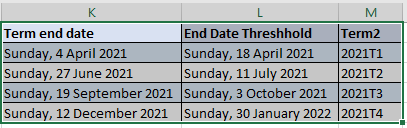
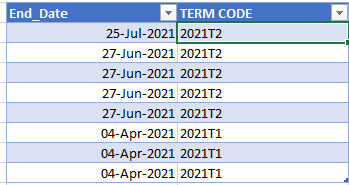
Table 1: I am trying to find the value of Term Code from Table 2 that is between the Term_End_Date and the End_Date_Threshold:

Table 1.PNG

Table 2: Where the lookup value is to be retrieved from


 Table 2.PNG


I achieved this in excel by using the formula: XLOOKUP(C1,$K$2:K5,$M$2:M5,"",-1,1), and I want to replicate this PowerQuery or DAX. All I need is a resulting table like this:


resulting Table.PNG


There are no relationships between the tables, and I am not sure merging a table is an option, as I would like the value to be updated once the data source is updated.


I would really appreciate any feedback and guidance.


Kind regards,


JulieP


1 ACCEPTED SOLUTION
edhans
Community Champion
Community Champion

Try this @JulieP 

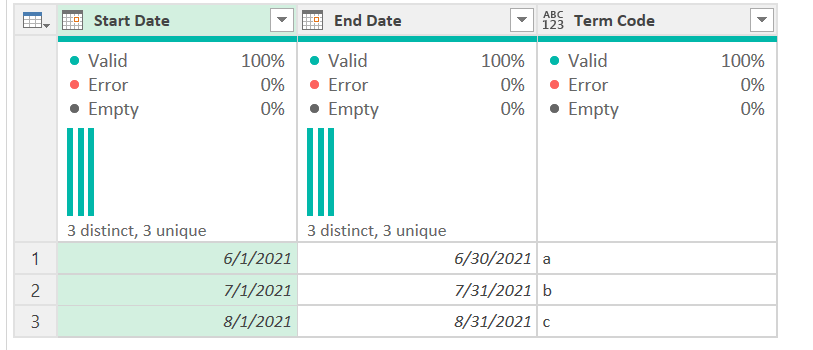
I did 2 things. First, I took your table of ranges and converted it to a table that had all dates between the ranges. It looks like this (I used my own data as I wasn't going to key data in from those images)

It originally looked like this:
edhans_1-1635116010974.png

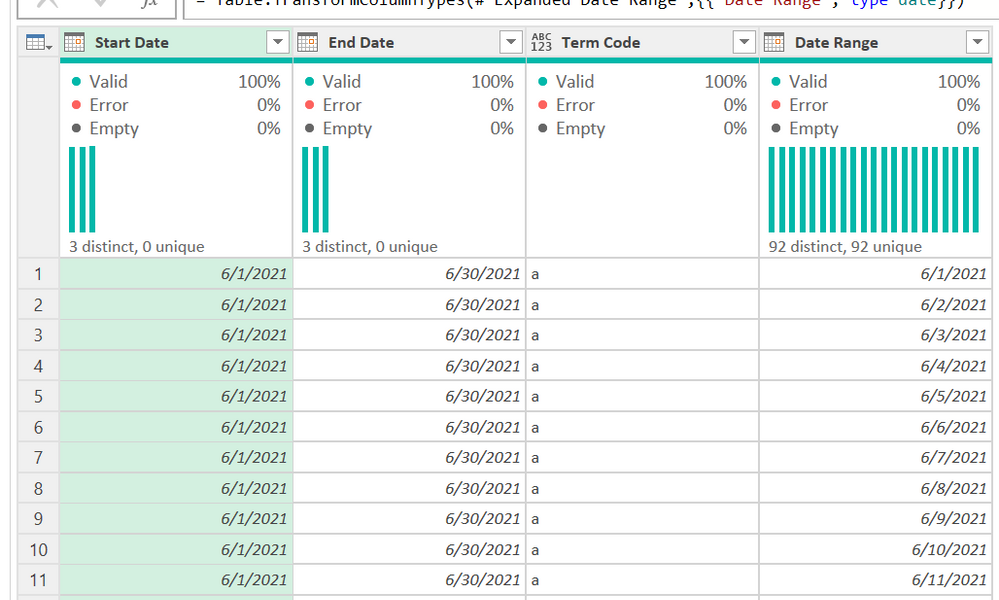
After the new column, it looks like this:
 

edhans_0-1635115913045.png

It used this simple formula in a new column:

{Number.From([Start Date])..Number.From([End Date])}

I then expanded that list of numbers to new rows and changed the type to date.

Then, in the 2nd table, I just merged back to the first table. It looks like this now:
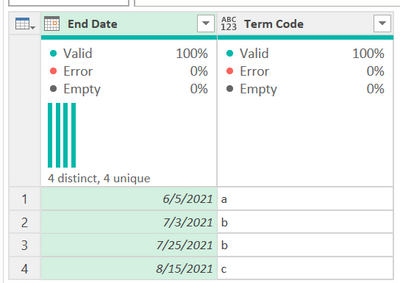
edhans_2-1635116069815.png

You can see my file here. It is Excel, just open up Power Query. The same logic will work in Power BI. Just set the range table to not load in Power BI, only the final table you need.


You can so an equivalent to a VLOOKUP in Power Query, and Imke might have some more complex code to do it, but you cannot do it simply with a Table.SelectRows and use a filter to < and > as it will be super slow to the point of not completing as the data size grows beyond a few thousand rows. Power Query is horrible at scanning tables. Isn't designed for it.


Did I answer your question? Mark my post as a solution!
Did my answers help arrive at a solution? Give it a kudos by clicking the Thumbs Up!

DAX is for Analysis. Power Query is for Data Modeling


Proud to be a Super User!

MCSA: BI Reporting

View solution in original post

2 REPLIES 2
edhans
Community Champion
Community Champion

Try this @JulieP 

I did 2 things. First, I took your table of ranges and converted it to a table that had all dates between the ranges. It looks like this (I used my own data as I wasn't going to key data in from those images)

It originally looked like this:

edhans_1-1635116010974.png

After the new column, it looks like this:


edhans_0-1635115913045.png

It used this simple formula in a new column:

{Number.From([Start Date])..Number.From([End Date])}

I then expanded that list of numbers to new rows and changed the type to date.

Then, in the 2nd table, I just merged back to the first table. It looks like this now:

edhans_2-1635116069815.png

You can see my file here. It is Excel, just open up Power Query. The same logic will work in Power BI. Just set the range table to not load in Power BI, only the final table you need.


You can so an equivalent to a VLOOKUP in Power Query, and Imke might have some more complex code to do it, but you cannot do it simply with a Table.SelectRows and use a filter to < and > as it will be super slow to the point of not completing as the data size grows beyond a few thousand rows. Power Query is horrible at scanning tables. Isn't designed for it.


Did I answer your question? Mark my post as a solution!
Did my answers help arrive at a solution? Give it a kudos by clicking the Thumbs Up!

DAX is for Analysis. Power Query is for Data Modeling


Proud to be a Super User!

MCSA: BI Reporting
JulieP
Frequent Visitor

Thank you so much! I think i got it handled. I was trying to directly copy the xlookup logic. which I am slowly realising that may not apply in powerquery.


Thanks again!


Helpful resources

Announcements
Power BI DataViz World Championships

Power BI Dataviz World Championships

The Power BI Data Visualization World Championships is back! Get ahead of the game and start preparing now!

December 2025 Power BI Update Carousel

Power BI Monthly Update - December 2025

Check out the December 2025 Power BI Holiday Recap!

FabCon Atlanta 2026 carousel

FabCon Atlanta 2026

Join us at FabCon Atlanta, March 16-20, for the ultimate Fabric, Power BI, AI and SQL community-led event. Save $200 with code FABCOMM.

Top Solution Authors