cancel
Showing results for 
Search instead for 
Did you mean: 

The Power BI Data Visualization World Championships is back! Get ahead of the game and start preparing now! Learn more

Reply
davidwhite83
Frequent Visitor

Joining Rows

I am trying to create a financial report from our companies financial data. I want to compute the total gross profit from our labor sales and labor cost. Once the GP is generated I want it deduct from the expenses to give me a net profit. 


Question1: How to combine Rows so that I get overall gross profit:


Labor TypeAcct#Acct TypeAmount
CP - CP Labor4400Sale

$25.00

CC - CP Labor COS6400COS

$12.00

WP - WP Labor4600Sale

$30.00

WC - WP Labor COS6600COS

$13.00


So I want to combine CP and WP so that the Total Sales amount is $55.00. Create a calculation to combine CP and CC to show gross as $13.00, and then combine CP Gross and WP Gross to show over gross profit of $30.00.


Any assistance will be good. 

1 ACCEPTED SOLUTION
v-yingjl
Community Support
Community Support

Hi @davidwhite83 ,

You can create a calculated column to define the category first:


Category = 
IF (
    CONTAINSSTRING ( 'Table'[Labor Type], "CP" ),
    "CP",
    IF ( CONTAINSSTRING ( 'Table'[Labor Type], "WP" ), "WP" )
)


Then create two measures to calculate the total and gross profit.


Total Sales = 
CALCULATE (
    SUM ( 'Table'[Amount] ),
    FILTER ( 'Table', 'Table'[Acct Type] = "Sale" )
)
Gross profit = 
VAR tab =
    SUMMARIZE (
        'Table',
        'Table'[Category],
        'Table'[Acct Type],
        'Table'[Amount],
        "A",
            CALCULATE (
                SUM ( 'Table'[Amount] ),
                FILTER (
                    ALL ( 'Table' ),
                    'Table'[Category] = EARLIER ( 'Table'[Category] )
                        && 'Table'[Acct Type] = "Sale"
                )
            )
                - CALCULATE (
                    SUM ( 'Table'[Amount] ),
                    FILTER (
                        ALL ( 'Table' ),
                        'Table'[Category] = EARLIER ( 'Table'[Category] )
                            && 'Table'[Acct Type] = "COS"
                    )
                )
    )
RETURN
    SUMX ( SUMMARIZE ( tab, [A] ), [A] )
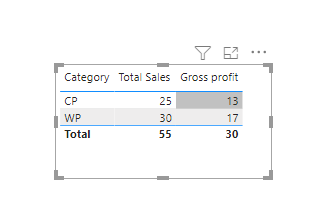
 

sale.png

Attached a sample file in the below, hopes to help you.


Best Regards,
Community Support Team _ Yingjie Li
If this post helps, then please consider Accept it as the solution to help the other members find it more quickly.

View solution in original post

2 REPLIES 2
v-yingjl
Community Support
Community Support

Hi @davidwhite83 ,

You can create a calculated column to define the category first:


Category = 
IF (
    CONTAINSSTRING ( 'Table'[Labor Type], "CP" ),
    "CP",
    IF ( CONTAINSSTRING ( 'Table'[Labor Type], "WP" ), "WP" )
)


Then create two measures to calculate the total and gross profit.


Total Sales = 
CALCULATE (
    SUM ( 'Table'[Amount] ),
    FILTER ( 'Table', 'Table'[Acct Type] = "Sale" )
)
Gross profit = 
VAR tab =
    SUMMARIZE (
        'Table',
        'Table'[Category],
        'Table'[Acct Type],
        'Table'[Amount],
        "A",
            CALCULATE (
                SUM ( 'Table'[Amount] ),
                FILTER (
                    ALL ( 'Table' ),
                    'Table'[Category] = EARLIER ( 'Table'[Category] )
                        && 'Table'[Acct Type] = "Sale"
                )
            )
                - CALCULATE (
                    SUM ( 'Table'[Amount] ),
                    FILTER (
                        ALL ( 'Table' ),
                        'Table'[Category] = EARLIER ( 'Table'[Category] )
                            && 'Table'[Acct Type] = "COS"
                    )
                )
    )
RETURN
    SUMX ( SUMMARIZE ( tab, [A] ), [A] )


sale.png

Attached a sample file in the below, hopes to help you.


Best Regards,
Community Support Team _ Yingjie Li
If this post helps, then please consider Accept it as the solution to help the other members find it more quickly.

ToddChitt
Super User
Super User

This is the Power Query forum, but that won't stop us from giving DAX advice:


Create 2 new measures:

Total Sales = CALCULATE ( SUM ('Table Name'[Amount]), 'Table Name'[Type] = "Sales" )

Total COS = CALCULATE ( SUM ('Table Name'[Amount]), 'Table Name'[Type] = "COS" )


That should get you started. For more comples calculations, you will need the OR operator in the FILTER portion of the CALCULATE statement like this:


Total CC and CP = CALCULATE ( SUM ('Table Name'[Amount]), 'Table Name'[Labor Type] = "CP - CP Labor" ) ||  'Table Name'[Labor Type] = "CC - CP Labor COS" )


Hope that helps.


Did I answer your question? If so, mark my post as a solution. Also consider helping someone else in the forums!

Proud to be a Super User!


Helpful resources

Announcements
Power BI DataViz World Championships

Power BI Dataviz World Championships

The Power BI Data Visualization World Championships is back! Get ahead of the game and start preparing now!

December 2025 Power BI Update Carousel

Power BI Monthly Update - December 2025

Check out the December 2025 Power BI Holiday Recap!

FabCon Atlanta 2026 carousel

FabCon Atlanta 2026

Join us at FabCon Atlanta, March 16-20, for the ultimate Fabric, Power BI, AI and SQL community-led event. Save $200 with code FABCOMM.

Top Solution Authors