cancel
Showing results for 
Search instead for 
Did you mean: 

The Power BI Data Visualization World Championships is back! Get ahead of the game and start preparing now! Learn more

Reply
rcyber
Resolver I
Resolver I

JavaScript errors in Custom connector

Hi everyone!


I developed a custom connector for Power BI and it works fine.

However I've got a little problem.

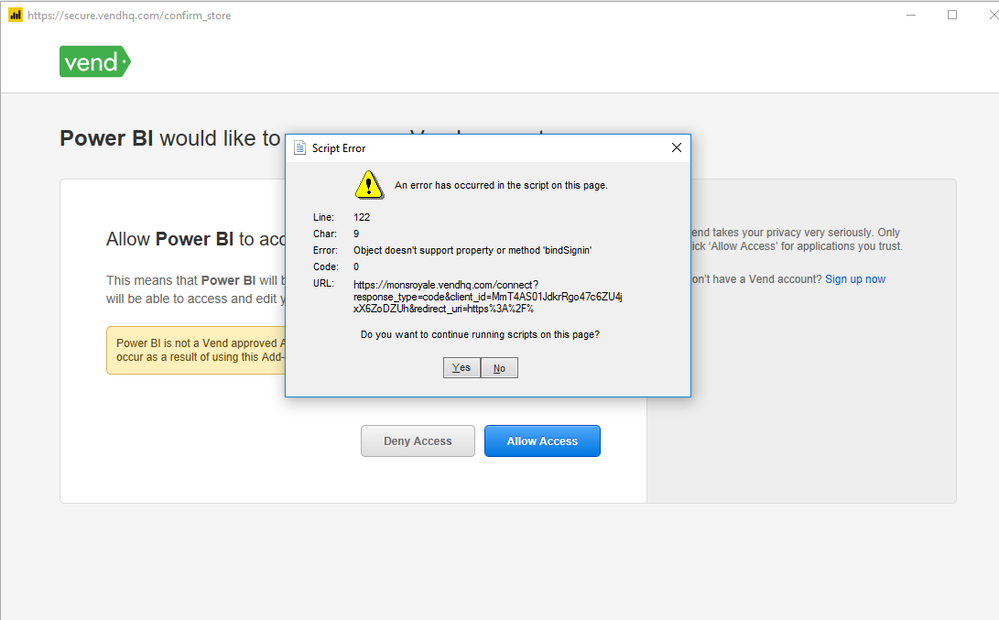
I'm connecting to a site through REST API. It uses OAuth2 authentification model. Unfortunately they have an error on their auth page.

So when I'm signing in I see the following window:


2019-02-11_12-59-58.png


It does not matter my choice on this window. Anyway Auth process will finish successful. But the window irritates me. How can I disable this window?


Thanks in advance,

Alex.

3 REPLIES 3
v-juanli-msft
Community Support
Community Support

Hi @rcyber

Which kind of your data source is?

See limitation here:

  • Implementing OAuth v2 authentication flow for a SaaS offering

Maybe your data source is not supported for OAuth v2 authentication, or you configure the wrong function for OAuth v2 authentication.

Check if you did it correctly?

https://docs.microsoft.com/en-us/power-query/handlingauthentication


Best Regards

Maggie

Thank you for reply.

The datasource I'm connecting to supports OAuth2.
As I wrote above the connector works fine and authorization process completes successfull.
Just the auth page includes a javascript that contains an error and I see the message about that error.
I've made a little research and found out the Power BI desktop uses its own browser so I can't disable running javascript using standard setting of IE.
Any ideas?

Cheers,
Alex.

First things first: you've exposed your client_id in a public forum, which is a major security vulnerability for your app. Before you do anything, I suggest you regenerate a new client_id and client_secret from the Vend developer console and update your app with those new values.


Second, do not disable running JavaScript; the whole OAuth authentication process relies on it.


You're experiencing a bug on the Vend sign-in page. My guess is that the Vend developers haven't fully tested the sign-in page on older browsers. Power BI uses the internal browser that comes shipped with your version of Windows. I'm on a Windows 10 machine through an Azure VM and the version Power BI is using is:


Mozilla/4.0 (compatible; MSIE 7.0; Windows NT 6.2; Win64; x64; Trident/7.0; .NET4.0C; .NET4.0E)


You can check which browser version Power BI is using by running the following Power Query M script:


let
    Source = Web.Page("<script>document.write(navigator.userAgent);</script>")[Data]{0}[Children]{0}[Children]{1}[Text]{0}
in
    Source


I suggest contacting Vend and letting them know about this JavaScript error. Let them know what browser version you're using, which again, is the output of the query above. Hopefully, they'll appreciate your input and fix it quickly.

Helpful resources

Announcements
Power BI DataViz World Championships

Power BI Dataviz World Championships

The Power BI Data Visualization World Championships is back! Get ahead of the game and start preparing now!

December 2025 Power BI Update Carousel

Power BI Monthly Update - December 2025

Check out the December 2025 Power BI Holiday Recap!

FabCon Atlanta 2026 carousel

FabCon Atlanta 2026

Join us at FabCon Atlanta, March 16-20, for the ultimate Fabric, Power BI, AI and SQL community-led event. Save $200 with code FABCOMM.

Top Solution Authors