Join us in Barcelona for FabCon and SQLCon, September 28 - October 1, 2026.
This is best Fabric, Power BI, SQL and AI community event. How do we know? The last event sold out! Save €200 with code FABCMTY200.
Register now- Power BI forums
- Get Help with Power BI
- Desktop
- Service
- Report Server
- Power Query
- Mobile Apps
- Developer
- DAX Commands and Tips
- Custom Visuals Development Discussion
- Health and Life Sciences
- Power BI Spanish forums
- Translated Spanish Desktop
- Training and Consulting
- Instructor Led Training
- Dashboard in a Day for Women, by Women
- Galleries
- Data Stories Gallery
- Themes Gallery
- Contests Gallery
- QuickViz Gallery
- Quick Measures Gallery
- Visual Calculations Gallery
- Fabric Apps Gallery
- Notebook Gallery
- Translytical Task Flow Gallery
- TMDL Gallery
- R Script Showcase
- Webinars and Video Gallery
- Ideas
- Custom Visuals Ideas (read-only)
- Issues
- Issues
- Events
- Upcoming Events
The Fabric community is now in read-only for platform upgrade. Learn more
- Power BI forums
- Forums
- Get Help with Power BI
- Power Query
- Issue with using Web API code to pull in Dynamics ...
- Subscribe to RSS Feed
- Mark Topic as New
- Mark Topic as Read
- Float this Topic for Current User
- Bookmark
- Subscribe
- Printer Friendly Page

- Mark as New
- Bookmark
- Subscribe
- Mute
- Subscribe to RSS Feed
- Permalink
- Report Inappropriate Content
Issue with using Web API code to pull in Dynamics saved query
I am currently in the process of trying to query and existing Dynamics query using the Web API query method and have received the below error:
DataSource.Error: Microsoft.Mashup.Engine1.Library.Resources.HttpResource: Request failed:
OData Version: 3 and 4, Error: The remote server returned an error: (400) Bad Request. (Could not find a property named 'Test' on type 'Microsoft.Dynamics.CRM.savedquery'.)
OData Version: 4, Error: The remote server returned an error: (400) Bad Request. (Could not find a property named 'Test' on type 'Microsoft.Dynamics.CRM.savedquery'.)
Details:
DataSourceKind=OData
DataSourcePath=https://myorgurl.com/api/data/v8.0/savedqueries
I have confirmed that my query is saved accurately. Is there any other issues that could be causing this? I have queried information via web api using alternatives methods successfully so I know it is just related to this single query.
Just fyi - the original code I am using was provided in the below post:
Thank you for any help you can provide,
Alex K.
Solved! Go to Solution.
- Mark as New
- Bookmark
- Subscribe
- Mute
- Subscribe to RSS Feed
- Permalink
- Report Inappropriate Content
@miniquark,
Does userqueryid column exist in the above returned result?
Regards,
Lydia

- Mark as New
- Bookmark
- Subscribe
- Mute
- Subscribe to RSS Feed
- Permalink
- Report Inappropriate Content
@miniquark,
Based on the above error message, the Test property is not available, have you checked that if the property exists in the Dynamics query?
Regards,
Lydia
- Mark as New
- Bookmark
- Subscribe
- Mute
- Subscribe to RSS Feed
- Permalink
- Report Inappropriate Content
Hi Lydia,
Thanks for your quick reply.
Here is the code I am using:
let
GetQueryByName =
let
QueryType = "saved"
,return = OData.Feed(
"https://orgurl.api.crm.dynamics.com/api/data/v8.2/" & accounts & "queries?$select="& QueryType & "queryid&$filter=" & "Test"
)[userqueryid]{0}
in
return,
QueryAll =
(nextURL, prev) =>
let
prevList = if prev <> null then prev else {},
responseData = Json.Document(Web.Contents(nextURL, [Headers=[Prefer="odata.include-annotations=""OData.Community.Display.V1.FormattedValue"""]])),
return = if responseData[#"@odata.nextLink"]? <> null then @QueryAll(responseData[#"@odata.nextLink"], prevList & responseData[value]) else responseData[value] & prevList
in return,
NamedQuery = "https://orgurl.api.crm.dynamics.com/api/data/v8.2/" & "accounts" & "?userQuery=" & GetQueryByName(OrgUrl as text, QueryName as text, UserView as logical),
return = Table.FromList(QueryAll(NamedQuery, null), Splitter.SplitByNothing(), null, null, ExtraValues.Error)
in return
I have confirmed that the name of my query is accurate. It is currently set to "Test".
-Alex
- Mark as New
- Bookmark
- Subscribe
- Mute
- Subscribe to RSS Feed
- Permalink
- Report Inappropriate Content
return = OData.Feed(
"https://orgurl.api.crm.dynamics.com/api/data/v8.2/" & accounts & "queries?$select="& QueryType & "queryid&$filter=" & "Test"
)[userqueryid]{0}
@miniquark,
Please change the above code to the following:
return = OData.Feed(
"https://orgurl.api.crm.dynamics.com/api/data/v8.2/" & accounts & "queries?$select="& QueryType & "queryid&$filter=name eq 'Test'
)[userqueryid]{0}
Regards,
Lydia
- Mark as New
- Bookmark
- Subscribe
- Mute
- Subscribe to RSS Feed
- Permalink
- Report Inappropriate Content
Hello,
Here is the updated code -
(OrgUrl as text, QueryName as text, LogicalCollectionName as text, UserView as logical) =>
let
GetQueryByName =
(OrgUrl as text, QueryName as text, UserView as logical) =>
let
QueryType = if UserView then "user" else "saved"
,return = OData.Feed(
OrgUrl & "/api/data/v8.2/" & QueryType & "queries?$select="& QueryType & "queryid&$filter=name eq '" & QueryName & "'"
)[userqueryid]{0}
in
return,
QueryAll =
(nextURL, prev) =>
let
prevList = if prev <> null then prev else {},
responseData = Json.Document(Web.Contents(nextURL, [Headers=[Prefer="odata.include-annotations=""OData.Community.Display.V1.FormattedValue"""]])),
return = if responseData[#"@odata.nextLink"]? <> null then @QueryAll(responseData[#"@odata.nextLink"], prevList & responseData[value]) else responseData[value] & prevList
in return,
NamedQuery = OrgUrl & "/api/data/v8.2/" & LogicalCollectionName & "?userQuery=" & GetQueryByName(OrgUrl, QueryName, UserView),
return = Table.FromList(QueryAll(NamedQuery, null), Splitter.SplitByNothing(), null, null, ExtraValues.Error)
in return
To which I received the below error -
An error occurred in the ‘’ query. Expression.Error: The column 'userqueryid' of the table wasn't found.
Details:
userqueryid
It appears that it is communicating with the system, but can't resolve this error still for some reason.
- Mark as New
- Bookmark
- Subscribe
- Mute
- Subscribe to RSS Feed
- Permalink
- Report Inappropriate Content
@miniquark,
I would recommend you firstly connect to the OData URL without parameters, then check if it is successful.
Regards,
Lydia
- Mark as New
- Bookmark
- Subscribe
- Mute
- Subscribe to RSS Feed
- Permalink
- Report Inappropriate Content
@Anonymous,
Thanks for your continued assistance.
I have used the odata method to pull various records from the system already. My issue is when I try to reference a specific advanced find via the odata method.
Here is the proof of concept for the odata method in general:
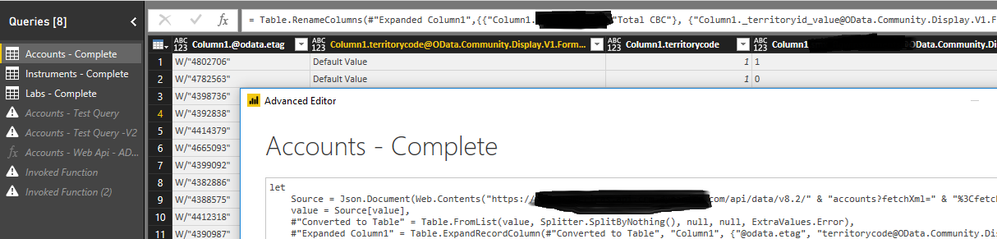
Regards,
Alex
- Mark as New
- Bookmark
- Subscribe
- Mute
- Subscribe to RSS Feed
- Permalink
- Report Inappropriate Content
@miniquark,
Directly paste the code below to the Advanced Editor of a blank query and check if userqueryid column exists in the returned result.
let
   Source= OData.Feed(query URL)
in
   Source
You can review the following article to get query URL.
https://msdn.microsoft.com/en-us/library/mt607533.aspx
Regards,
Lydia
- Mark as New
- Bookmark
- Subscribe
- Mute
- Subscribe to RSS Feed
- Permalink
- Report Inappropriate Content
Hello,
Thanks for your continued help!
I have confirmed that this code is working as intended. Please see below for a sample:
let
Source = OData.Feed("https://orgurl/api/data/v8.2/savedqueries?$select=name,savedqueryid&$filter=name eq 'Active Accounts'")
in
Source
The original code I am working with is still resulting in the query expression error related to user query id. Could something else be contributing to this?
-Alex
- Mark as New
- Bookmark
- Subscribe
- Mute
- Subscribe to RSS Feed
- Permalink
- Report Inappropriate Content
@miniquark,
Does userqueryid column exist in the above returned result?
Regards,
Lydia
- Mark as New
- Bookmark
- Subscribe
- Mute
- Subscribe to RSS Feed
- Permalink
- Report Inappropriate Content
Thanks. I did have an issue with incorrectly 'saved' vs. 'user' in my query.
I was able to switch it and now it works.
Helpful resources

FabCon & SQLCon – Barcelona 2026
Join us in Barcelona for FabCon and SQLCon, the Fabric, Power BI, SQL, and AI community event. Save €200 with code FABCMTY200.

Power BI DataViz World Championships - June 2026
A new Power BI DataViz World Championship is coming this June! Don't miss out on submitting your entry.


