cancel
Showing results for 
Search instead for 
Did you mean: 

The Power BI Data Visualization World Championships is back! Get ahead of the game and start preparing now! Learn more

Reply
Matt78
Helper II
Helper II

Issue with sales budgets which have several factors

Hello Dear Experts!


I have an issue with sales budgets which changes during the year. The story goes like this:


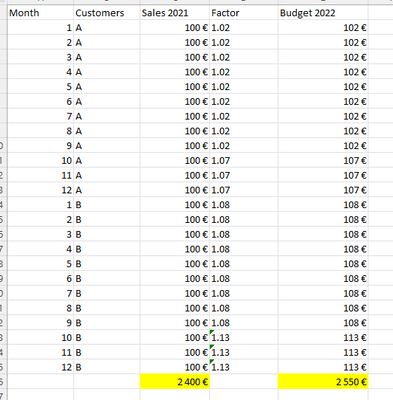
It was decided that budget year 2022 is sales last year (2021) +2% for customer group A and +7% for customer group B. Meaning if sales for customers was 100EUR last year, then sales budget for 2022 is 102EUR and 107EUR. This was easy...


Now during the summer we decided that for period 10-12/2022 both customer groups will get +5% increase on their budgets. So, starting from October percentages are +7% for A and +13% for B.


I have tried to do this in Power Query and it was fine with just two different percentages, I just multiplied last year sales with 1,02 and 1,07 which went ok. But now when we have 4 different factors during the year,  


I tried this kind of formula to get new budgets for each month but Power BI vizualisations cannot manage this and it shows grand total wrong


if [Month] = 10 and [Budget] = 1.02

then 1.07

else if [Month] = 10 and [Budget] = 1.08 then 1.13

else if [Month] = 11 and [Budget] = 1.02 then 1.07

else if [Month] = 11 and [Budget] = 1.08 then 1.13

else if [Month] = 12 and [Budget] = 1.08 then 1.13

else if [Month] = 12 and [Budget] = 1.02 then 1.07

else if [Month] = 1 and [Budget] = 1.02 then 1.02

else if [Month] = 2 and [Budget] = 1.02 then 1.02

else if [Month] = 3 and [Budget] = 1.02 then 1.02

else if [Month] = 4 and [Budget] = 1.02 then 1.02

else if [Month] = 5 and [Budget] = 1.02 then 1.02

else if [Month] = 6 and [Budget] = 1.02 then 1.02

else if [Month] = 7 and [Budget] = 1.02 then 1.02

else if [Month] = 8 and [Budget] = 1.02 then 1.02

else if [Month] = 9 and [Budget] = 1.02 then 1.02

else 1.08


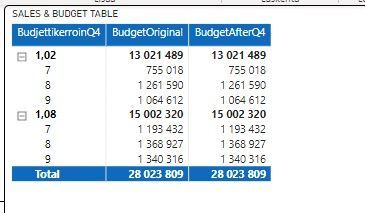
As you can see Budget original is OK, but with Q4 where we have new factors, it calculates amounts wrong. Any help is highly appriciated
Matt78_0-1664887419097.png

BR

Matt

5 REPLIES 5
Matt78
Helper II
Helper II

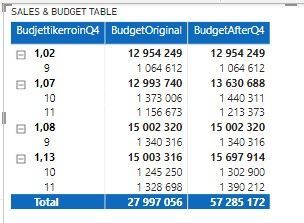
This sort of thing I tried to achive with DAX. But now it seems to calculate incorrectly if I have chosen months of the period where factor increases..

Matt78_0-1665393265288.png


wdx223_Daniel
Super User
Super User

to bring in a new table with columns of Month, Budget and Factors, say the table name is newTab

NewStep=let a=Table.Buffer(newTab) in Table.AddColumn(PreviousStepName,"custom",each a{[Month=[Month],Budget=[Budget]]}?[Factors]? ??1.08)


v-yanjiang-msft
Community Support
Community Support

Hi @Matt78 ,

Is the BudgetAfterQ4 a custom column you created in Power Query, what's the formula of it?

Is your main problem that the total is incorrect in the BudgetAfterQ4 column?


Best Regards,
Community Support Team _ kalyj

Hi


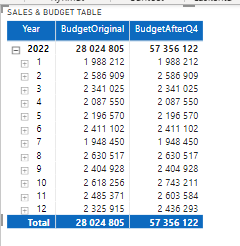
custom column are the factors as mentioned in a first message, then I created a new column using multiplication. Sales x factors For example: 1200€ x 1,07 = 1284€.


The issue is that if I choose months between 1-9, the amounts are ok, and if 10-12 all is good. The issue starts if I choose moths for example 9-11, meaning when new factors should be in use.

month 8-9.jpgmonth 9-11.jpg

I assume I should have my DAX differently if it sums the amounts incorrectly? I just cannot figure it out how to change it..?

Helpful resources

Announcements
Power BI DataViz World Championships

Power BI Dataviz World Championships

The Power BI Data Visualization World Championships is back! Get ahead of the game and start preparing now!

December 2025 Power BI Update Carousel

Power BI Monthly Update - December 2025

Check out the December 2025 Power BI Holiday Recap!

FabCon Atlanta 2026 carousel

FabCon Atlanta 2026

Join us at FabCon Atlanta, March 16-20, for the ultimate Fabric, Power BI, AI and SQL community-led event. Save $200 with code FABCOMM.