cancel
Showing results for 
Search instead for 
Did you mean: 

Vote for your favorite vizzies from the Power BI Dataviz World Championship submissions. Vote now!

Reply
Anonymous
Not applicable

Issue with Excel drilldown and hidden columns

I have an SSAS Tabular model where I hide several columns.  In Excel 2013 I do not see the columns in the Pivot Table Field List.  When I double click on a value and drilldown, the hidden columns appear.  What am I missing?
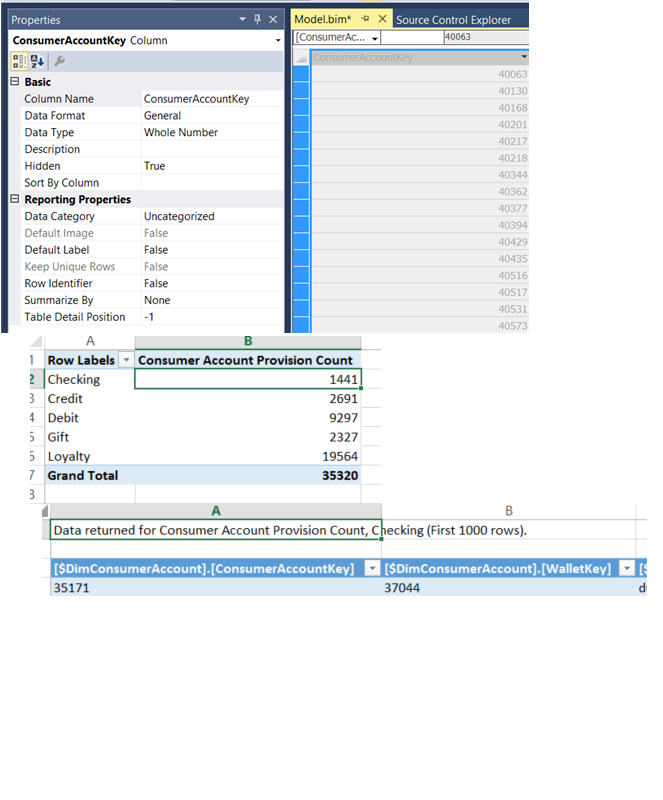
 

model.png

1 REPLY 1
Rémi
Resolver III
Resolver III

Hi,


The drill down option into Excel is for Power View.

Activate "Power View" complement, then do Insertion > Power View.

It will add a new tab PowerView1 and you can do visualisations or pivot table here.

You can do a drill down now.

Helpful resources

Announcements
Power BI DataViz World Championships

Power BI Dataviz World Championships

Vote for your favorite vizzies from the Power BI World Championship submissions!

Sticker Challenge 2026 Carousel

Join our Community Sticker Challenge 2026

If you love stickers, then you will definitely want to check out our Community Sticker Challenge!

January Power BI Update Carousel

Power BI Monthly Update - January 2026

Check out the January 2026 Power BI update to learn about new features.

FabCon Atlanta 2026 carousel

FabCon Atlanta 2026

Join us at FabCon Atlanta, March 16-20, for the ultimate Fabric, Power BI, AI and SQL community-led event. Save $200 with code FABCOMM.