Don't miss your chance to take the Fabric Data Engineer (DP-700) exam on us!
Learn moreThe FabCon + SQLCon recap series starts April 14th at 8am Pacific. If you’re tracking where AI is going inside Fabric, this first session is a can't miss. Register now
HI,
I was wondering if there is a way to grab the Sub Group titles and move them to its own column. The use case is that we have reports that contain the sub-group and the item name in the same column. The items are the same in each sub-group so it is difficult to distingish Item "A" from Sub Group 1 vs item "A" from Sub Group 2. Please see images below.
Raw Data:
| ITEM | AMOUNT |
| Sub Group 1 | |
| A | 10 |
| B | 20 |
| Sub Group 2 | |
| A | 30 |
| B | 40 |
Desired Result:
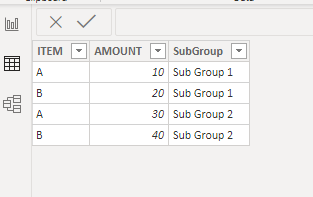
| Sub Group | Item | Amount |
| Sub Group 1 | A | 10 |
| Sub Group 1 | B | 20 |
| Sub Group 2 | A | 30 |
| Sub Group 2 | B | 40 |
Thank you!
Solved! Go to Solution.
Thank you so much Richardo! That worked like a charm!
Warm regards,
Kevin
If you have recently started exploring Fabric, we'd love to hear how it's going. Your feedback can help with product improvements.
A new Power BI DataViz World Championship is coming this June! Don't miss out on submitting your entry.
Share feedback directly with Fabric product managers, participate in targeted research studies and influence the Fabric roadmap.
| User | Count |
|---|---|
| 5 | |
| 4 | |
| 3 | |
| 2 | |
| 2 |
| User | Count |
|---|---|
| 8 | |
| 6 | |
| 6 | |
| 6 | |
| 5 |