Join us at FabCon Atlanta from March 16 - 20, 2026, for the ultimate Fabric, Power BI, AI and SQL community-led event. Save $200 with code FABCOMM.
Register now!The Power BI Data Visualization World Championships is back! Get ahead of the game and start preparing now! Learn more
Hello folks,
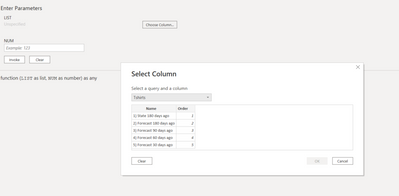
I am trying to create a custom function that has 2 parameter: list and number. For example it can look like this:
(LIST as list, NUM as number) => 1
When I want to invoke it I am unable to click on the roll down menu to select column.
However, when I want to invoke it normally (not with the invoke custom function button) I am able to select the column and it works just fine.
Can you please help me to find out where is the problem?
Thank you 🙂
Solved! Go to Solution.
Hi, @sima_na_zemi ;
This is an example of a blog I once wrote about list as a variable, you can refer to it.
= (values as list, grouping as list) as list =>
let
GRTList = List.Generate(
()=> [ GRT = values{0}, i = 0 ],
each [i] < List.Count(values),
each try
if grouping{[i]} = grouping{[i] + 1}
then if [GRT]>0 then [GRT = [GRT] + values{[i] + 1}, i = [i] + 1]
else [GRT = values{[i] + 1}, i = [i] + 1]
otherwise [i = [i] + 1],
each [GRT])
in
GRTList
Accumulative, conditional accumulative in Power Qu... - Microsoft Power BI Community
Best Regards,
Community Support Team _ Yalan Wu
If this post helps, then please consider Accept it as the solution to help the other members find it more quickly.
Hi, @sima_na_zemi ;
This is an example of a blog I once wrote about list as a variable, you can refer to it.
= (values as list, grouping as list) as list =>
let
GRTList = List.Generate(
()=> [ GRT = values{0}, i = 0 ],
each [i] < List.Count(values),
each try
if grouping{[i]} = grouping{[i] + 1}
then if [GRT]>0 then [GRT = [GRT] + values{[i] + 1}, i = [i] + 1]
else [GRT = values{[i] + 1}, i = [i] + 1]
otherwise [i = [i] + 1],
each [GRT])
in
GRTList
Accumulative, conditional accumulative in Power Qu... - Microsoft Power BI Community
Best Regards,
Community Support Team _ Yalan Wu
If this post helps, then please consider Accept it as the solution to help the other members find it more quickly.
The Power BI Data Visualization World Championships is back! Get ahead of the game and start preparing now!