cancel
Showing results for 
Search instead for 
Did you mean: 

The Power BI Data Visualization World Championships is back! Get ahead of the game and start preparing now! Learn more

Reply
IntaBruce
Resolver I
Resolver I

Int Overflow

Hi,

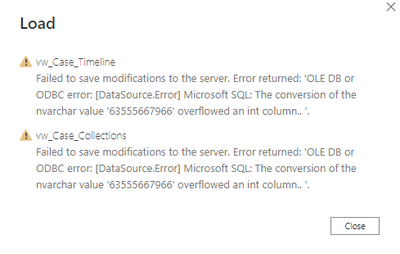
I am receiving the following error when trying to import tables from SQL Server to Power BI

As far as I can tel none of the numeric fields are integer because I have told the query editor to treat them all ast text.  So what is going wrong?

I'm not sure exactly how many rows there are in the table but it fails at around 480,000

IntaBruce_0-1641926619358.png


7 REPLIES 7
IntaBruce
Resolver I
Resolver I

I have managed to avoid but not actually solve the issue.

The Case_Timeline table had columns in the database for number of days, hours and minutes and these were decimal values.  The columns were actually not required because Open and Close date and time are available so the duration can be caluclated in Power BI if I ever need it.  But since (at this time) I don't then I simply excluded those columns from the load and it worked fine.

v-angzheng-msft
Community Support
Community Support

Hi, @IntaBruce 


Returning the appropriate data types for the above two queries will solve your problem.

This value 63555667966 is outside the maximum data range for int-type data.

Int: (-2,147,483,648 to 2,147,483,647)

Unsigned int: (0 to 4,294,967,295)


Data Type Ranges


Best Regards,
Community Support Team _ Zeon Zheng

If this post helps, then please consider Accept it as the solution to help the other members find it more quickly.

AlexisOlson
Super User
Super User

Can you share your query M code?

Do you mean this?

IntaBruce_0-1641938670687.png


Yes. I don't see anything wrong with it though.


If you change all of the types to text in that last step, do you get the same error? If so, I'm guessing it's an issue in the view definition or something similar on the database. Do the views load as expected on the database?

@IntaBruce  do you still get the same error if you delete the following step and load?

 #"Changed Type"


Did I answer your question? Mark my post as a solution!
Proud to be a Super User!
My custom visualization projects
Plotting Live Sound: Viz1
Beautiful News:Viz1, Viz2, Viz3
Visual Capitalist: Working Hrs

Yes I do

Helpful resources

Announcements
Power BI DataViz World Championships

Power BI Dataviz World Championships

The Power BI Data Visualization World Championships is back! Get ahead of the game and start preparing now!

December 2025 Power BI Update Carousel

Power BI Monthly Update - December 2025

Check out the December 2025 Power BI Holiday Recap!

FabCon Atlanta 2026 carousel

FabCon Atlanta 2026

Join us at FabCon Atlanta, March 16-20, for the ultimate Fabric, Power BI, AI and SQL community-led event. Save $200 with code FABCOMM.

Top Solution Authors