cancel
Showing results for 
Search instead for 
Did you mean: 

The Power BI Data Visualization World Championships is back! Get ahead of the game and start preparing now! Learn more

Reply

Infinite loop in pagination (API)

Hi All, 


Hope you are well, 


Probably a really simple explanation but just can't work it out for some reason. 


So I have a loop for my API to iterate over as many pages that are available (in this case around 13 loops are required) however although I get the results I need, it's not using the correct sequence and then it infinitely loops even though there are no more pages available. 


For your info; 


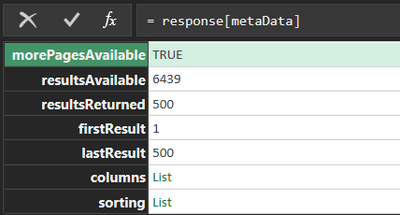
The Maximum results per call is 500

the pagination info is returned in response but is inside a few records.


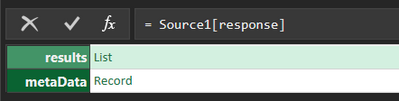
The first response looks like this; 


WillBatesHydro_0-1650642566395.png

Inside 'response' Record

WillBatesHydro_1-1650642589312.png

Inside 'metaData' Record

WillBatesHydro_2-1650642612566.png


So this is my Function; 


(search as text)=>
let


Source = List.Generate(
()=> [Result = try Json.Document(Web.Contents("https://euw1.brightpearlconnect.com/public-api/XXX/order-service/sales-order-search?columns=customer..." & "&firstResult=1", [Headers=[#"brightpearl-app-ref"="XXX", #"brightpearl-account-token"="XXX"]])) otherwise null, Page = 500],
each [Result] <> null,
each [Result =try Json.Document(Web.Contents("https://euw1.brightpearlconnect.com/public-api/XXX/order-service/sales-order-search?columns=customer..." & "&firstResult="& Number.ToText([Page]+1), [Headers=[#"brightpearl-app-ref"="XXX", #"brightpearl-account-token"="XXX"]])) otherwise null, Page = [Page] + 500],
each [Result]
)
in
Source


Below is the paginated results I get back for your reference. As you can see the first 13 calls work but after that its just infinite calls with no results.
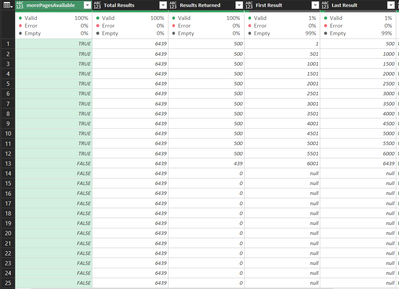
 

WillBatesHydro_3-1650642944822.png

The secondary issue is, which I am sure you will spot is that it doesn't follow to correct sequence I dont think


shouldnt it be; 


First call - First result 1, last result 500, 

Second call - First result 501, last result 1001 

Third call - First result 1002, last result 1502

etc?


Would really apricate a rapid response as I am on a really tight deadline


Thank you so much!


Will

1 ACCEPTED SOLUTION
mahoneypat
Microsoft Employee
Microsoft Employee

Looks like your condition is never returning null. I would try a hard-coded call with a page # well above the max to see what is returned (perhaps an empty table, but not a null). You probably need to change your condition to something like this.


each List.Count([Result][response][results]) > 0,


Pat


Did I answer your question? Mark my post as a solution! Kudos are also appreciated!

To learn more about Power BI, follow me on Twitter or subscribe on YouTube.


@mahoneypa HoosierBI on YouTube


View solution in original post

1 REPLY 1
mahoneypat
Microsoft Employee
Microsoft Employee

Looks like your condition is never returning null. I would try a hard-coded call with a page # well above the max to see what is returned (perhaps an empty table, but not a null). You probably need to change your condition to something like this.


each List.Count([Result][response][results]) > 0,


Pat


Did I answer your question? Mark my post as a solution! Kudos are also appreciated!

To learn more about Power BI, follow me on Twitter or subscribe on YouTube.


@mahoneypa HoosierBI on YouTube


Helpful resources

Announcements
Power BI DataViz World Championships

Power BI Dataviz World Championships

The Power BI Data Visualization World Championships is back! Get ahead of the game and start preparing now!

November Power BI Update Carousel

Power BI Monthly Update - November 2025

Check out the November 2025 Power BI update to learn about new features.

FabCon Atlanta 2026 carousel

FabCon Atlanta 2026

Join us at FabCon Atlanta, March 16-20, for the ultimate Fabric, Power BI, AI and SQL community-led event. Save $200 with code FABCOMM.