Join us at FabCon Atlanta from March 16 - 20, 2026, for the ultimate Fabric, Power BI, AI and SQL community-led event. Save $200 with code FABCOMM.
Register now!The Power BI Data Visualization World Championships is back! Get ahead of the game and start preparing now! Learn more
Hi,
I created a folder on a network drive containing multiple MDB files, which i´d like to use as my primary data source for an analysis.
Each MDB file holds several tables, all in an identical structure which i want to append to several individual tables. E.g. MDB file 1 to 12 contain table A, B, C ... - with the folder method i want to append these to one big table A and B etc. On a daily basis every MDB file is replaced by a fresh export over night via a VBA script to keep them up to date. File and table names etc. all stay the same
So far i could succesfully import the data and create all necesary relationships. Once i hit "Refresh all" within PBI though, i receive an error message saying there is an unrecognized file format in the source folder with the ending ".ldb" due to the automatic lock-file creation of Access. Is there any chance i can circumvent those "ldb."-lock-files and still use the folder method?
I would very much appreciate your help. Thank you very much in advance
Tobi
@Toby87,
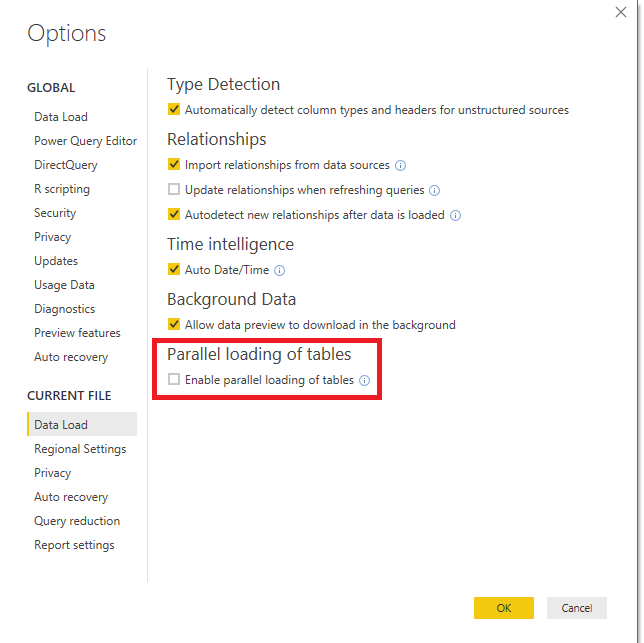
How about the result if you disable the "Enable parallel loading of tables" option and click specific table in Power BI Desktop to refresh?
I am not sure if the LDB files can be circumvented, based on this article, the file is used to keep track of all users that are currently accessing the database. I would recommend you also consult Access suppport to check if there are any methods.
Regards,
Lydia
Thank you very much for the advice. Unfortunately, disabling "Parallel loading of tables" doesn´t solve the issue. The error keeps on popping up. What surprises me though – it works when I don´t initiate a global refresh but instead manually refresh each individual source. Since I have quite a lot of sources, this is not very convenient. I was hoping to find a way to globally refresh all sources with just one click respectively even be able to automatic this process with a scheduler.
Regards,
Tobi
@Toby87,
Do you need to load all the tables or a specific append table from query editor to report view of Power BI Desktop?
Regards,
Lydia
All of the tables contain relevant information for the report, thus i have to refresh all of them daily. I am afraid there is no other way around it, unless you can think of something else. Thanks again for your help.
Regards,
Tobi
The Power BI Data Visualization World Championships is back! Get ahead of the game and start preparing now!
| User | Count |
|---|---|
| 17 | |
| 9 | |
| 9 | |
| 7 | |
| 7 |