Get certified for free when you join Fabric Data Days 2026 and dive into Fabric, Power BI, SQL, AI, and other essential data skills.
Join nowJuly 7 - July 17 | Round 2 of the Power BI Dataviz World Championships. Don't miss your chance! Learn more
Hello, everyone,
I am again in the process of improving my data model and this time it is the import from a SQL server. I am currently loading the entire table from the server into PowerBi, and I only need two columns from the table. Is there a possibility, instead of using select *, to go to the two columns directly?
And 2nd question, could the list be restricted to certain import parameters? for example on the date?
many thanks and best regards Nick!
Solved! Go to Solution.
@Nick001
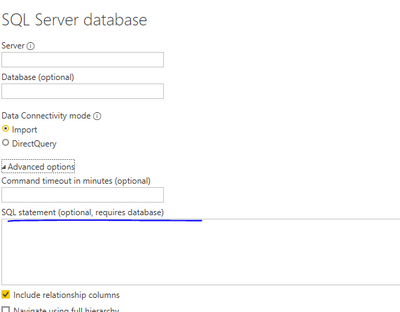
And for Q1, you can only connect to the db table first, then use sql statement or remove others column in power bi to get the 2 columns only.
Paul Zheng _ Community Support Team
If this post helps, please Accept it as the solution to help the other members find it more quickly.
Hi @Nick001 ,
you can work on using SQL statement as what @Anonymous stated.
Like
select
[column1],
[column2]
from
[dbname].[dbo].[tablename]
where
[date] filter/parameter goes here
--------------
hope this helps
@Nick001
And for Q1, you can only connect to the db table first, then use sql statement or remove others column in power bi to get the 2 columns only.
Paul Zheng _ Community Support Team
If this post helps, please Accept it as the solution to help the other members find it more quickly.
Value.NativeQuery() does the trick in your scenario; it works with intact SQL supported by your database.
| Thanks to the great efforts by MS engineers to simplify syntax of DAX! Most beginners are SUCCESSFULLY MISLED to think that they could easily master DAX; but it turns out that the intricacy of the most frequently used RANKX() is still way beyond their comprehension! |
DAX is simple, but NOT EASY! |
Join us in Barcelona for FabCon and SQLCon, the Fabric, Power BI, SQL, and AI community event. Save €200 with code FABCMTY200.
Check out the July 2026 Power BI update to learn about new features.
Join Data Days 2026: 60 days of free live/on-demand sessions, challenges, study groups, and certification opportunities.