cancel
Showing results for 
Search instead for 
Did you mean: 

Try your skills in the Power BI Dataviz World Championship! Round one ends June 26. Join now

Reply
Carlospa
Regular Visitor

Import filtering by some fields

Hi All
I wanna be able to import data from my database, but filtering  by some field, p.e. "FECHACREACION" 

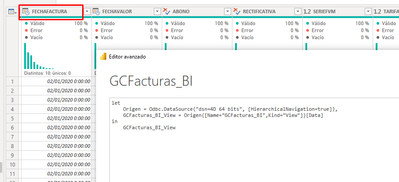
Example if i importa table "GCFacturas_BI" i usually import data with this commands

let
Origen = Odbc.DataSource("dsn=4D 64 bits", [HierarchicalNavigation=true]),
GCFacturas_BI_View = Origen{[Name="GCFacturas_BI",Kind="View"]}[Data]
in
GCFacturas_BI_View  

Carlospa_1-1667564425183.png


I only want to import data whose creation FECHACREACION is greater than 01/01/2022
Thank you in advance

1 ACCEPTED SOLUTION
v-yalanwu-msft
Community Support
Community Support

Hi, @Carlospa ;

I tested by sql service:

if i connect by basic:

let
    Source = Sql.Databases("wx-89356"),
    table = Source{[Name="table"]}[Data],
    dbo_test = table{[Schema="dbo",Item="test"]}[Data]
in
    dbo_test

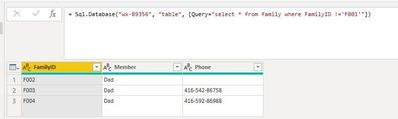
When I connect advance :

let
    Source = Sql.Database("wx-89356", "table", [Query="select * from family where FamilyID !='F001'"])
in
    Source

vyalanwumsft_1-1667894817177.png


The final show:

vyalanwumsft_0-1667894710511.jpeg

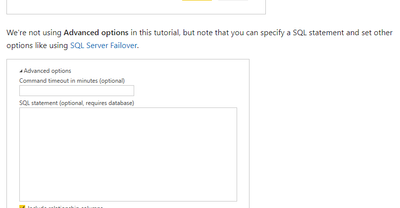
Tutorial: Connect to on-premises data in SQL Server - Power BI | Microsoft Learn
Best Regards,
Community Support Team _ Yalan Wu
If this post helps, then please consider Accept it as the solution to help the other members find it more quickly.


View solution in original post

2 REPLIES 2
v-yalanwu-msft
Community Support
Community Support

Hi, @Carlospa ;

I tested by sql service:

if i connect by basic:

let
    Source = Sql.Databases("wx-89356"),
    table = Source{[Name="table"]}[Data],
    dbo_test = table{[Schema="dbo",Item="test"]}[Data]
in
    dbo_test

When I connect advance :

let
    Source = Sql.Database("wx-89356", "table", [Query="select * from family where FamilyID !='F001'"])
in
    Source

vyalanwumsft_1-1667894817177.png


The final show:

vyalanwumsft_0-1667894710511.jpeg

Tutorial: Connect to on-premises data in SQL Server - Power BI | Microsoft Learn
Best Regards,
Community Support Team _ Yalan Wu
If this post helps, then please consider Accept it as the solution to help the other members find it more quickly.


ImkeF
Community Champion
Community Champion

Hi @Carlospa ,
many ODBC sources fold, so I'd just try to apply the filter as the second step and check if it just returns the filtered data.

Imke Feldmann (The BIccountant)

If you liked my solution, please give it a thumbs up. And if I did answer your question, please mark this post as a solution. Thanks!

How to integrate M-code into your solution -- How to get your questions answered quickly -- How to provide sample data -- Check out more PBI- learning resources here -- Performance Tipps for M-queries

Helpful resources

Announcements
Fabric Data Days is here Carousel

Data Days 2026

Don't miss out on Data Days, June 15 through August 7. Learn Fabric, Power BI, SQL, AI and more.

May Power BI Update Carousel

Power BI Monthly Update - May 2026

Check out the May 2026 Power BI update to learn about new features.

Power BI DataViz World Championships carousel

Power BI DataViz World Championships - June 2026

A new Power BI DataViz World Championship is coming this June! Don't miss out on submitting your entry.