cancel
Showing results for 
Search instead for 
Did you mean: 

Get Fabric certified for FREE! Don't miss your chance! Learn more

Reply
SarWal
Microsoft Employee
Microsoft Employee

Import Data from Excel sheet in SharePoint

Hi Power BI Community,


I am new to Power BI and hoping to get data for Power BI Desktop from an excel that lives on SharePoint. 

I tried to Get Data -> SharePoint Folder, and then entered the URL to the SharePoint.


1st Issue - I was unable to enter a URL that went to the specific file the excel lives in


2nd Issue - I was then able to filter and find the excel file I was looking for with the query, but the data from it is only the meta-data: File Name, File Path, etc - not the data inside the excel file.


In conclusion: Is it possible to access excel data from a SharePoint? And if so, how do I import said data?


Thank you in advance for your help!

1 ACCEPTED SOLUTION
SamLester
Microsoft Employee
Microsoft Employee

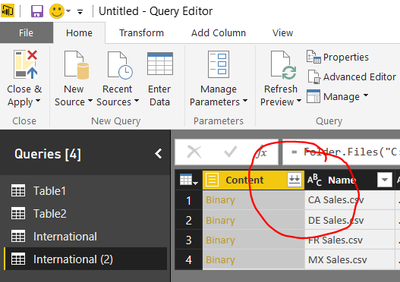
You can get the contents of the file (as opposed to the metadata) by editing the data source during import. In the query editor window, there will be a column labeled Content, along with an icon that appears to be two down arrows. Click on the icon and you'll add the actual content as opposed to the metadata.


Download.PNG 


The process is similar when you "Get Data" from a Windows folder containing spreadsheets. By clicking on "Edit" prior to loading the spreadsheets, you can then click on the download content button to bring in the full contents.


Thanks,
Sam Lester (MSFT)

View solution in original post

1 REPLY 1
SamLester
Microsoft Employee
Microsoft Employee

You can get the contents of the file (as opposed to the metadata) by editing the data source during import. In the query editor window, there will be a column labeled Content, along with an icon that appears to be two down arrows. Click on the icon and you'll add the actual content as opposed to the metadata.


Download.PNG 


The process is similar when you "Get Data" from a Windows folder containing spreadsheets. By clicking on "Edit" prior to loading the spreadsheets, you can then click on the download content button to bring in the full contents.


Thanks,
Sam Lester (MSFT)

Helpful resources

Announcements
Join our Fabric User Panel

Join our Fabric User Panel

Share feedback directly with Fabric product managers, participate in targeted research studies and influence the Fabric roadmap.

FabCon Atlanta 2026 carousel

FabCon Atlanta 2026

Join us at FabCon Atlanta, March 16-20, for the ultimate Fabric, Power BI, AI and SQL community-led event. Save $200 with code FABCOMM.