cancel
Showing results for 
Search instead for 
Did you mean: 

The Power BI Data Visualization World Championships is back! Get ahead of the game and start preparing now! Learn more

Reply
tomshaw83
Helper I
Helper I

IF Statement - Conditional Column

Hello,


I have a table of data such as the one below, I am looking to add on the final two columns if possible.


if the individual has Rank = 1 at all then apply a 1 to every row associated with that individual

if the individual has Rank = 1 on that particular account, then apply a 1 to every row that matches both the individual and account criteria


IndividualAccountRank Does the Individual have Rank = 1Does the Individual have Rank = 1 on that Account
Joe BloggsABC111
Joe BloggsABC011
Joe Bloggs123010
Joe BloggsXYZ111
Joe BloggsXYZ011
Steve StrongABC000
Steve StrongABC000
Steve StrongABC000


I'm not sure if this is possible but would welcome feedback, 


I am exploring trying to solve this using group by, and then fill down


Thanks


Tom


1 ACCEPTED SOLUTION
Jimmy801
Community Champion
Community Champion

Hello @tomshaw83 


here some more compact approach if needed

let
    Source = Table.FromRows(Json.Document(Binary.Decompress(Binary.FromText("i45W8spPVXDKyU9PL1bSUXJ0cgaShkqxOlglDDAlDI2MsUtEREZhNwoiAdERXJJalqoQXFKUn5eOZgsZUrEA", BinaryEncoding.Base64), Compression.Deflate)), let _t = ((type nullable text) meta [Serialized.Text = true]) in type table [Individual = _t, Account = _t, Rank = _t]),
    #"Changed Type" = Table.TransformColumnTypes(Source,{{"Individual", type text}, {"Account", type text}, {"Rank", Int64.Type}}),
    HasIndividualAccountRank1 = Table.Group(#"Changed Type", {"Individual", "Account"}, {{"HasRank1", each if List.Contains(_[Rank], 1) then 1 else 0, type number}}),
    HasIndividualRank1 = Table.Group(#"Changed Type", {"Individual"}, {{"HasRank1", each if List.Contains(_[Rank], 1) then 1 else 0, type number}}),
    JoinIndividualRank1 = Table.NestedJoin
    (
        #"Changed Type",
        {"Individual"},
        HasIndividualRank1,
        {"Individual"},
        "HasIndividualRank1"
    ),
    JoinIndividualAccountRank1 = Table.NestedJoin
    (
        JoinIndividualRank1,
        {"Individual", "Account"},
        HasIndividualAccountRank1,
        {"Individual", "Account"},
        "JoinIndividualAccountRank1"
    ),
    #"Expanded HasIndividualRank1" = Table.ExpandTableColumn(JoinIndividualAccountRank1, "HasIndividualRank1", {"HasRank1"}, {"Does the Individual have Rank = 1"}),
    #"Expanded JoinIndividualAccountRank1" = Table.ExpandTableColumn(#"Expanded HasIndividualRank1", "JoinIndividualAccountRank1", {"HasRank1"}, {"Does the Individual have Rank = 1 on that Account"})
in
    #"Expanded JoinIndividualAccountRank1"

Jimmy801_0-1613459676042.png

Copy paste this code to the advanced editor in a new blank query to see how the solution works.

If this post helps or solves your problem, please mark it as solution (to help other users find useful content and to acknowledge the work of users that helped you)
Kudoes are nice too

Have fun

Jimmy


View solution in original post

2 REPLIES 2
Jimmy801
Community Champion
Community Champion

Hello @tomshaw83 


here some more compact approach if needed

let
    Source = Table.FromRows(Json.Document(Binary.Decompress(Binary.FromText("i45W8spPVXDKyU9PL1bSUXJ0cgaShkqxOlglDDAlDI2MsUtEREZhNwoiAdERXJJalqoQXFKUn5eOZgsZUrEA", BinaryEncoding.Base64), Compression.Deflate)), let _t = ((type nullable text) meta [Serialized.Text = true]) in type table [Individual = _t, Account = _t, Rank = _t]),
    #"Changed Type" = Table.TransformColumnTypes(Source,{{"Individual", type text}, {"Account", type text}, {"Rank", Int64.Type}}),
    HasIndividualAccountRank1 = Table.Group(#"Changed Type", {"Individual", "Account"}, {{"HasRank1", each if List.Contains(_[Rank], 1) then 1 else 0, type number}}),
    HasIndividualRank1 = Table.Group(#"Changed Type", {"Individual"}, {{"HasRank1", each if List.Contains(_[Rank], 1) then 1 else 0, type number}}),
    JoinIndividualRank1 = Table.NestedJoin
    (
        #"Changed Type",
        {"Individual"},
        HasIndividualRank1,
        {"Individual"},
        "HasIndividualRank1"
    ),
    JoinIndividualAccountRank1 = Table.NestedJoin
    (
        JoinIndividualRank1,
        {"Individual", "Account"},
        HasIndividualAccountRank1,
        {"Individual", "Account"},
        "JoinIndividualAccountRank1"
    ),
    #"Expanded HasIndividualRank1" = Table.ExpandTableColumn(JoinIndividualAccountRank1, "HasIndividualRank1", {"HasRank1"}, {"Does the Individual have Rank = 1"}),
    #"Expanded JoinIndividualAccountRank1" = Table.ExpandTableColumn(#"Expanded HasIndividualRank1", "JoinIndividualAccountRank1", {"HasRank1"}, {"Does the Individual have Rank = 1 on that Account"})
in
    #"Expanded JoinIndividualAccountRank1"

Jimmy801_0-1613459676042.png

Copy paste this code to the advanced editor in a new blank query to see how the solution works.

If this post helps or solves your problem, please mark it as solution (to help other users find useful content and to acknowledge the work of users that helped you)
Kudoes are nice too

Have fun

Jimmy


Nathaniel_C
Community Champion
Community Champion

So, @tomshaw83 , if I understand what you are asking try this.  I did this in power query using group by. Here is the final result, and the code that you can paste into Advanced Editor. I used group by twice, once for each column.
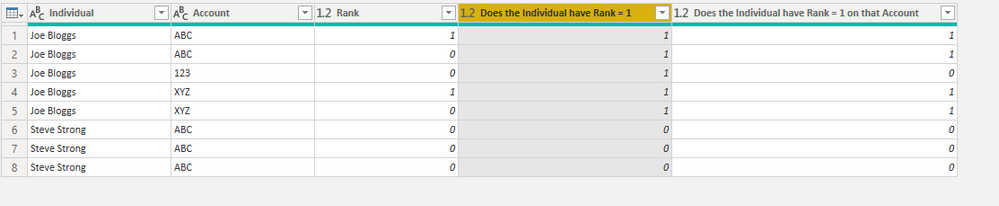
Rank.PNG


let
    Source = Table.FromRows(Json.Document(Binary.Decompress(Binary.FromText("i45W8spPVXDKyU9PL1bSUXJ0cgaShnAcq4NVgQFuBYZGxkgKDDAVRERG4bcCogDViuCS1LJUheCSovy8dBRXGMAtoYKSWAA=", BinaryEncoding.Base64), Compression.Deflate)), let _t = ((type nullable text) meta [Serialized.Text = true]) in type table [Individual = _t, Account = _t, #"Rank " = _t, #"Does the Individual have Rank = 1" = _t, #"Does the Individual have Rank = 1 on that Account" = _t]),
    #"Changed Type" = Table.TransformColumnTypes(Source,{{"Individual", type text}, {"Account", type text}, {"Rank ", Int64.Type}, {"Does the Individual have Rank = 1", Int64.Type}, {"Does the Individual have Rank = 1 on that Account", Int64.Type}}),
    #"Removed Columns" = Table.RemoveColumns(#"Changed Type",{"Does the Individual have Rank = 1", "Does the Individual have Rank = 1 on that Account"}),
    #"Grouped Rows" = Table.Group(#"Removed Columns", {"Individual"}, {{"Sum for Individual", each List.Sum([#"Rank "]), type nullable number}, {"Detail", each _, type table [Individual=nullable text, Account=nullable text, #"Rank "=nullable number]}}),
    #"Expanded Detail" = Table.ExpandTableColumn(#"Grouped Rows", "Detail", {"Account", "Rank "}, {"Detail.Account", "Detail.Rank "}),
    #"Added Conditional Column" = Table.AddColumn(#"Expanded Detail", "Does the Individual have Rank = 1", each if [Sum for Individual] > 0 then 1 else 0),
    #"Removed Columns1" = Table.RemoveColumns(#"Added Conditional Column",{"Sum for Individual"}),
    #"Changed Type1" = Table.TransformColumnTypes(#"Removed Columns1",{{"Does the Individual have Rank = 1", Int64.Type}, {"Detail.Rank ", Int64.Type}}),
    #"Grouped Rows1" = Table.Group(#"Changed Type1", {"Individual", "Detail.Account"}, {{"sum double", each List.Sum([#"Detail.Rank "]), type nullable number}, {"detail2", each _, type table [Individual=nullable text, Detail.Account=nullable text, #"Detail.Rank "=nullable number, #"Does the Individual have Rank = 1"=nullable number]}}),
    #"Expanded detail2" = Table.ExpandTableColumn(#"Grouped Rows1", "detail2", {"Detail.Rank ", "Does the Individual have Rank = 1"}, {"Detail.Rank ", "Does the Individual have Rank = 1"}),
    #"Renamed Columns" = Table.RenameColumns(#"Expanded detail2",{{"sum double", "Does the Individual have Rank = 1 on that Account"}}),
    #"Reordered Columns" = Table.ReorderColumns(#"Renamed Columns",{"Individual", "Detail.Account", "Detail.Rank ", "Does the Individual have Rank = 1 on that Account", "Does the Individual have Rank = 1"}),
    #"Renamed Columns1" = Table.RenameColumns(#"Reordered Columns",{{"Detail.Account", "Account"}, {"Detail.Rank ", "Rank"}}),
    #"Reordered Columns1" = Table.ReorderColumns(#"Renamed Columns1",{"Individual", "Account", "Rank", "Does the Individual have Rank = 1", "Does the Individual have Rank = 1 on that Account"})
in
    #"Reordered Columns1"


My table is named Table, and I inserted a copy of what you gave us to start the query.


Let me know if you have any questions.

If this solves your issues, please mark it as the solution, so that others can find it easily. Kudos 👍are nice too.
Nathaniel


Did I answer your question? Mark my post as a solution!

Proud to be a Super User!


Helpful resources

Announcements
Power BI DataViz World Championships

Power BI Dataviz World Championships

The Power BI Data Visualization World Championships is back! Get ahead of the game and start preparing now!

December 2025 Power BI Update Carousel

Power BI Monthly Update - December 2025

Check out the December 2025 Power BI Holiday Recap!

FabCon Atlanta 2026 carousel

FabCon Atlanta 2026

Join us at FabCon Atlanta, March 16-20, for the ultimate Fabric, Power BI, AI and SQL community-led event. Save $200 with code FABCOMM.

Top Solution Authors
