cancel
Showing results for 
Search instead for 
Did you mean: 

The Power BI Data Visualization World Championships is back! Get ahead of the game and start preparing now! Learn more

Reply
Girish_123
Helper I
Helper I

How to transform one column data into two column like one for runs and one for wickets

Girish_123_0-1637764866419.png


2 ACCEPTED SOLUTIONS
Nathaniel_C
Community Champion
Community Champion

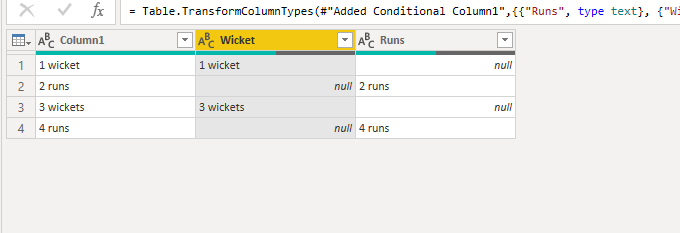
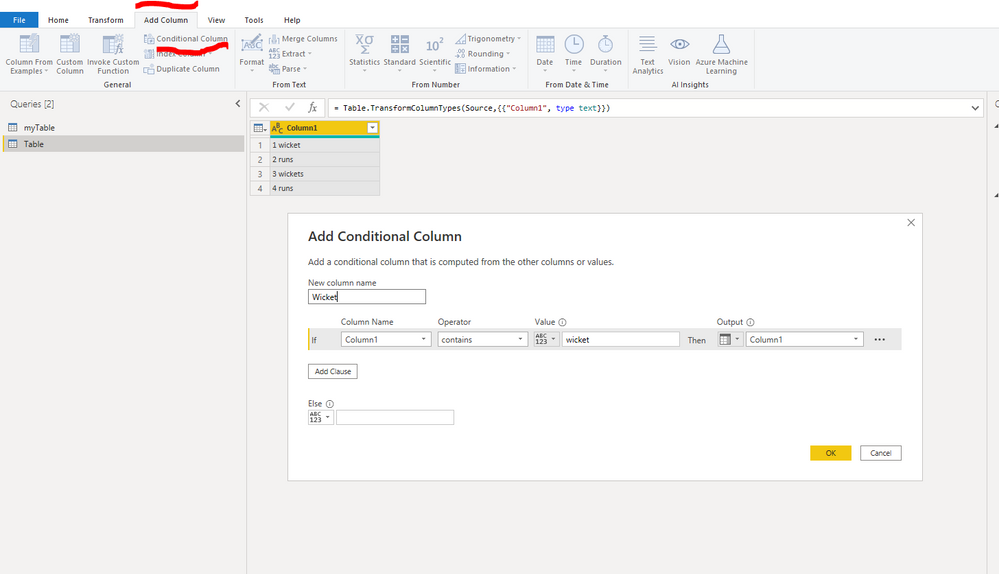
Hi @Girish_123 
In pq choose add column, conditional column.


Let me know if you have any questions.

If this solves your issues, please mark it as the solution, so that others can find it easily. Kudos 👍are nice too.
Nathaniel
wicket1.PNGwicket.PNG


Did I answer your question? Mark my post as a solution!

Proud to be a Super User!


View solution in original post

AlexisOlson
Super User
Super User

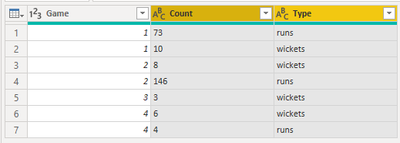
If the runs and wickets are grouped together somehow, then I'd suggest splitting the [Margin] column and then pivoting.


Start:
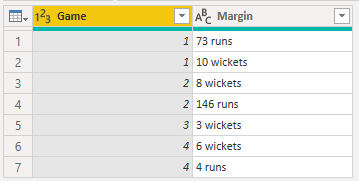
AlexisOlson_0-1637768496429.png

Split:

AlexisOlson_1-1637768521834.png

Pivot on [Type] with [Count] as values:
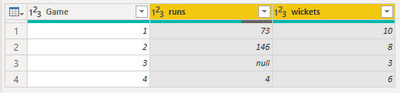
AlexisOlson_2-1637768549359.png


Sample query:

let
    Source = Table.FromRows(Json.Document(Binary.Decompress(Binary.FromText("i45WMlTSUTI3VigqzStWitWB8A0NFMozk7NTSyBCRkAhCwwRQxMzhC5joIAxihIToIgZhogJVEssAA==", BinaryEncoding.Base64), Compression.Deflate)), let _t = ((type nullable text) meta [Serialized.Text = true]) in type table [Game = _t, Margin = _t]),
    #"Changed Type" = Table.TransformColumnTypes(Source,{{"Margin", type text}, {"Game", Int64.Type}}),
    #"Split Column by Delimiter" = Table.SplitColumn(#"Changed Type", "Margin", Splitter.SplitTextByDelimiter(" ", QuoteStyle.Csv), {"Count", "Type"}),
    #"Changed Type1" = Table.TransformColumnTypes(#"Split Column by Delimiter",{{"Count", Int64.Type}, {"Type", type text}}),
    #"Pivoted Column" = Table.Pivot(#"Changed Type1", List.Distinct(#"Changed Type1"[Type]), "Type", "Count")
in
    #"Pivoted Column"


If the runs and wickets aren't related somehow, then it isn't clear how to align them in two separate columns and it would be helpful to include an example of what you want the result to look like.

View solution in original post

3 REPLIES 3
AlexisOlson
Super User
Super User

If the runs and wickets are grouped together somehow, then I'd suggest splitting the [Margin] column and then pivoting.


Start:

AlexisOlson_0-1637768496429.png

Split:

AlexisOlson_1-1637768521834.png

Pivot on [Type] with [Count] as values:

AlexisOlson_2-1637768549359.png


Sample query:

let
    Source = Table.FromRows(Json.Document(Binary.Decompress(Binary.FromText("i45WMlTSUTI3VigqzStWitWB8A0NFMozk7NTSyBCRkAhCwwRQxMzhC5joIAxihIToIgZhogJVEssAA==", BinaryEncoding.Base64), Compression.Deflate)), let _t = ((type nullable text) meta [Serialized.Text = true]) in type table [Game = _t, Margin = _t]),
    #"Changed Type" = Table.TransformColumnTypes(Source,{{"Margin", type text}, {"Game", Int64.Type}}),
    #"Split Column by Delimiter" = Table.SplitColumn(#"Changed Type", "Margin", Splitter.SplitTextByDelimiter(" ", QuoteStyle.Csv), {"Count", "Type"}),
    #"Changed Type1" = Table.TransformColumnTypes(#"Split Column by Delimiter",{{"Count", Int64.Type}, {"Type", type text}}),
    #"Pivoted Column" = Table.Pivot(#"Changed Type1", List.Distinct(#"Changed Type1"[Type]), "Type", "Count")
in
    #"Pivoted Column"


If the runs and wickets aren't related somehow, then it isn't clear how to align them in two separate columns and it would be helpful to include an example of what you want the result to look like.

Nathaniel_C
Community Champion
Community Champion

Hi @Girish_123 
In pq choose add column, conditional column.


Let me know if you have any questions.

If this solves your issues, please mark it as the solution, so that others can find it easily. Kudos 👍are nice too.
Nathaniel
wicket1.PNGwicket.PNG


Did I answer your question? Mark my post as a solution!

Proud to be a Super User!


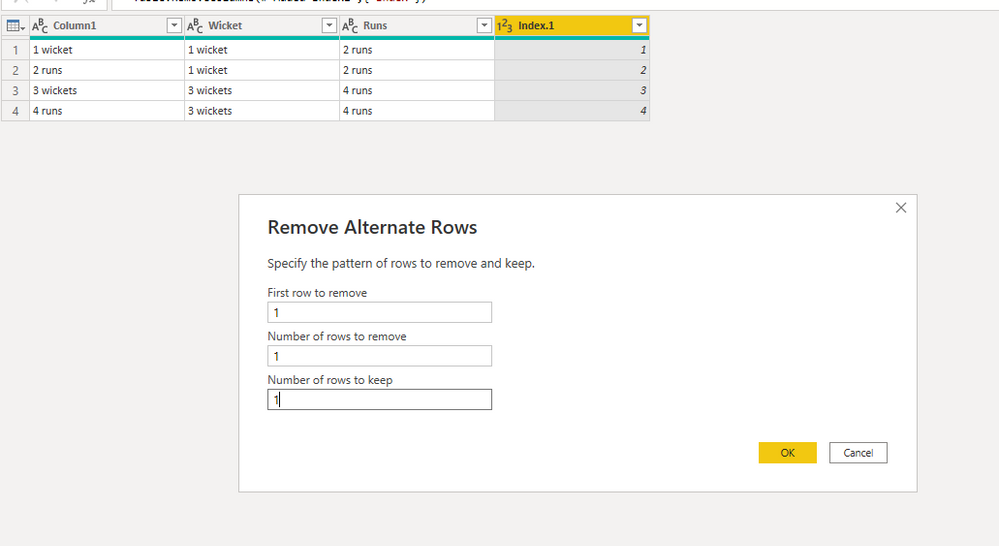
Hi @Girish_123 ,
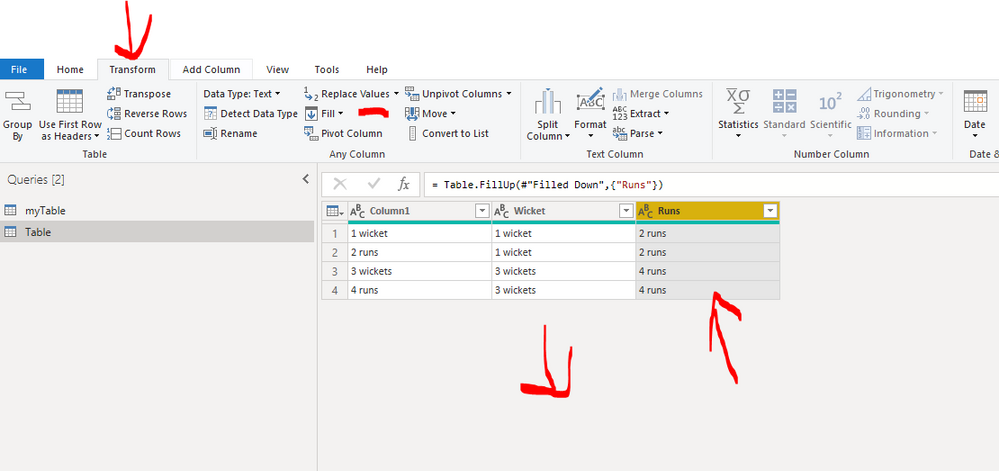
You could take this a couple of steps further: pics are in alternate order.  fill down, fill up, remove rows, add index for at bat
Let me know if you have any questions.

If this solves your issues, please mark it as the solution, so that others can find it easily. Kudos 👍are nice too.
Nathaniel

Add index and  call it at batAdd index and call it at batRemove alternate rowsRemove alternate rowsFill Down Wickets, the fill up the second col RunsFill Down Wickets, the fill up the second col Runs


Did I answer your question? Mark my post as a solution!

Proud to be a Super User!


Helpful resources

Announcements
Power BI DataViz World Championships

Power BI Dataviz World Championships

The Power BI Data Visualization World Championships is back! Get ahead of the game and start preparing now!

December 2025 Power BI Update Carousel

Power BI Monthly Update - December 2025

Check out the December 2025 Power BI Holiday Recap!

FabCon Atlanta 2026 carousel

FabCon Atlanta 2026

Join us at FabCon Atlanta, March 16-20, for the ultimate Fabric, Power BI, AI and SQL community-led event. Save $200 with code FABCOMM.