Join us at FabCon Atlanta from March 16 - 20, 2026, for the ultimate Fabric, Power BI, AI and SQL community-led event. Save $200 with code FABCOMM.
Register now!The Power BI Data Visualization World Championships is back! Get ahead of the game and start preparing now! Learn more
Hi,
I am working with
app.powerbi.com
and I would like to ask, how or where can I set the encoding of a CSV file that I import into the
@srgmat,
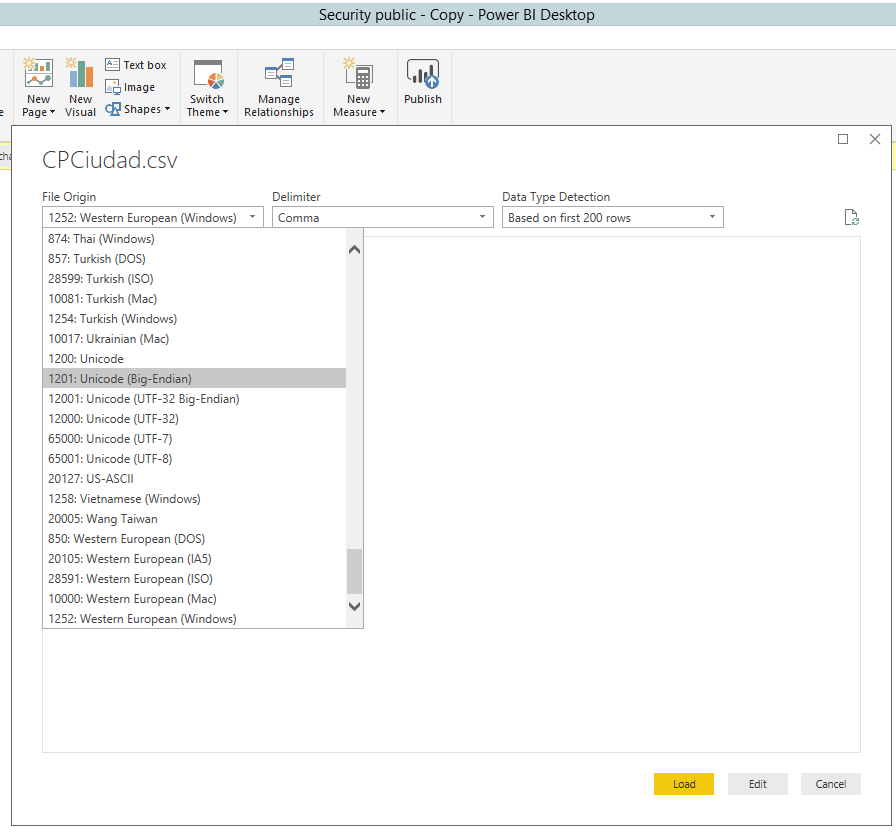
Connect to CSV file using Power BI Desktop instead, you are able to set encoding in Power BI Desktop, there is an example for your reference.
Regards,
@srgmat& @Anonymous
I had a similar issue, trying to import postal code data from http://download.geonames.org/export/zip/allCountries.zip
Using the standard encoding ended up with junk in the text columns for non-latin languages. "BigEndian" encoding resulted in a single row, single column blob of junk being returned. A bit of trial and error determined that using the "65001: Unicode (UTF-8) encoding worked.
As an example, the code below pulls in the data from the extracted file from the above link:
let
Source = Csv.Document(File.Contents("C:\Data\allCountries\allCountries.txt"),
[Delimiter="#(tab)", Columns=12, Encoding=65001, QuoteStyle=QuoteStyle.None]),
#"Changed Type" = Table.TransformColumnTypes(Source,{{"Column1", type text}, {"Column2", type text}, {"Column3", type text}, {"Column4", type text}, {"Column5", type text}, {"Column6", type text}, {"Column7", type text}, {"Column8", type text}, {"Column9", type text}, {"Column10", type number}, {"Column11", type number}, {"Column12", Int64.Type}}),
#"Renamed Columns" = Table.RenameColumns(#"Changed Type",{{"Column1", "Country Code"}, {"Column2", "Postal Code"}, {"Column3", "Place Name"}, {"Column4", "Admin Name1"}, {"Column5", "Admin Code1"}, {"Column6", "Admin Name2"}, {"Column7", "Admin Code2"}, {"Column8", "Admin Name3"}, {"Column9", "Admin Code3"}, {"Column10", "Latitude"}, {"Column11", "Longitude"}, {"Column12", "Accuracy"}})
in
#"Renamed Columns"Warm regards,
Clayton
Hi @SQLMonger ,
how can i add encoding of UT-8 for below query.
let
Source = SharePoint.Files("ABC", [ApiVersion = 15]),
#"Filtered Rows" = Table.SelectRows(Source, each ([Folder Path] = "ABCD" or [Folder Path] = "ABCD1" or [Folder Path] = "ABCD2" or [Folder Path] = "ABCD4")),
#"Filtered Hidden Files1" = Table.SelectRows(#"Filtered Rows", each [Attributes]?[Hidden]? <> true),
#"Invoke Custom Function1" = Table.AddColumn(#"Filtered Hidden Files1", "Transform File", each #"Transform File"([Content])),
#"Renamed Columns1" = Table.RenameColumns(#"Invoke Custom Function1", {"Name", "Source.Name"}),
#"Removed Other Columns1" = Table.SelectColumns(#"Renamed Columns1", {"Source.Name", "Transform File"}),
#"Expanded Table Column1" = Table.ExpandTableColumn(#"Removed Other Columns1", "Transform File", Table.ColumnNames(#"Transform File"(#"Sample File"))),
#"Changed Type" = Table.TransformColumnTypes(#"Expanded Table Column1",{{"Source.Name", type text}, {"id", type text}, {"category_level_1", type text}, {"category_level_2", type text}, {"category_level_3", type text}, {"category_level_1_old", type text}, {"category_level_2_old", type text}, {"category_level_3_old", type text}, {"parent_supplier", type text}, {"child_supplier", type text}, {"organization_level_1", type text}, {"organization_level_2", type text}, {"organization_level_3", type text}, {"organization_level_4", type text}, {"organization_level_5", type text}, {"cost_center_code", type text}, {"cost_center_name", type text}, {"general_ledger_code", type text}, {"general_ledger_name", type text}, {"line_description", type text}, {"invoice_id", type text}, {"invoice_number", type text}, {"accounting_date", type text}, {"invoice_date", type text}, {"invoice_amount", Int64.Type}, {"invoice_amount_with_tax", Int64.Type}, {"po_number", type text}, {"po_item", type text}, {"country", type text}, {"entity", type text}, {"country_code", type text}, {"supplier", type text}, {"supplier_type", type text}})
in
#"Changed Type"
you need to change it in the Helper Queries section
This helped me. Thanks
The Power BI Data Visualization World Championships is back! Get ahead of the game and start preparing now!
| User | Count |
|---|---|
| 19 | |
| 9 | |
| 8 | |
| 7 | |
| 6 |