cancel
Showing results for 
Search instead for 
Did you mean: 

The Power BI Data Visualization World Championships is back! Get ahead of the game and start preparing now! Learn more

Reply
RicardoAGdSilva
Frequent Visitor

How to query multiple REST API with pagination token and sync token in the end

Good morning,

I have been try to get some data com the Contentstack API, and yesterday I saw in the documentation that this API works with pagination tokens.


So for the first page I have:


= Json.Document(Web.Contents("https://eu-cdn.contentstack.com/v3/stacks/sync?QUERY_WITH_MULTIPLE _PARAMETERS", [Headers=[api_key="KEY", access_token="TOKEN", #"Content-Type"="application/json"]]))


I get this result:

RicardoAGdSilva_0-1711528460318.png


For the second page I use: 


= Json.Document(Web.Contents("https://eu-cdn.contentstack.com/v3/stacks/sync?pagination_token=TOKEN_FROM_PAGE_1", [Headers=[api_key="KEY", access_token="TOKEN", #"Content-Type"="application/json"]]))


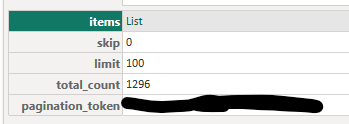
And so on and on until I have all the data(for now 13 pages, 14th page gives the Sync Token) and on the last call with no more data I get a Sync Token:


RicardoAGdSilva_1-1711528618850.png


I did all the calls creating one page for each other, but this is not very pratical since if new data comes in I will had to add them manualy.


Any way I can query all this calls taking into account the pagination token generated on the previous call and in the end the sync token?


Thank you for the help, this pagination token topic it's totally new for me.


2 REPLIES 2
Anonymous
Not applicable

Hi @RicardoAGdSilva ,

Please try this:

let
    BaseUrl = "https://eu-cdn.contentstack.com/v3/stacks/sync",
    ApiKey = "YOUR_API_KEY",
    AccessToken = "YOUR_ACCESS_TOKEN",
    Headers = [api_key=ApiKey, access_token=AccessToken, #"Content-Type"="application/json"],

    FetchData = (pagination_token as nullable text, sync_token as nullable text) as table =>
        let
            Url = BaseUrl & (if pagination_token <> null then "?pagination_token=" & pagination_token else if sync_token <> null then "?sync_token=" & sync_token else ""),
            Source = Json.Document(Web.Contents(Url, [Headers=Headers])),
            Items = try Source[items] otherwise null,
            NewPaginationToken = try Source[pagination_token] otherwise null,
            NewSyncToken = try Source[sync_token] otherwise null,
            ItemsTable = if Items <> null then Table.FromList(Items, Splitter.SplitByNothing(), null, null, ExtraValues.Error) else #table({}, {}),
            NextPage = if NewPaginationToken <> null then @FetchData(NewPaginationToken, null) else if NewSyncToken <> null then @FetchData(null, NewSyncToken) else null,
            Result = if NextPage <> null then Table.Combine({ItemsTable, NextPage}) else ItemsTable
        in
            Result,
    FinalResult = FetchData
in
    FinalResult

Best Regards,
Gao

Community Support Team


If there is any post helps, then please consider Accept it as the solution  to help the other members find it more quickly.
If I misunderstand your needs or you still have problems on it, please feel free to let us know. Thanks a lot!

How to get your questions answered quickly--How to provide sample data in the Power BI Forum--China Power BI User Group

Hi Gao,


Thank you so much for the help.


When I use the url https://eu-cdn.contentstack.com/v3/stacks/sync?QUERY_WITH_MULTIPLE_PARAMETERS, it gets only 100 lines (I should have on total 1300).


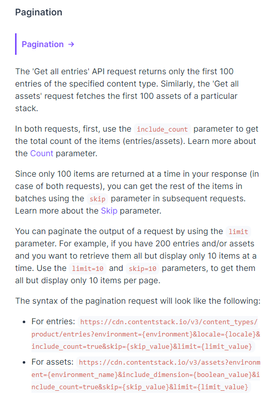
Them I saw on the API documentation that we should have one parameter: include_count=true&skip=0&limit=100, to bring all the data while use pagination. 


RicardoAGdSilva_0-1711636546942.png


But when I use the url with this adding the previous parameter: https://eu-cdn.contentstack.com/v3/stacks/sync?QUERY_WITH_MULTIPLE_PARAMETERS&include_count=true&skip=0&limit=100, it's the same only bringing the first 100 data points

Helpful resources

Announcements
Power BI DataViz World Championships

Power BI Dataviz World Championships

The Power BI Data Visualization World Championships is back! Get ahead of the game and start preparing now!

December 2025 Power BI Update Carousel

Power BI Monthly Update - December 2025

Check out the December 2025 Power BI Holiday Recap!

FabCon Atlanta 2026 carousel

FabCon Atlanta 2026

Join us at FabCon Atlanta, March 16-20, for the ultimate Fabric, Power BI, AI and SQL community-led event. Save $200 with code FABCOMM.