Join us at FabCon Atlanta from March 16 - 20, 2026, for the ultimate Fabric, Power BI, AI and SQL community-led event. Save $200 with code FABCOMM.
Register now!The Power BI Data Visualization World Championships is back! Get ahead of the game and start preparing now! Learn more
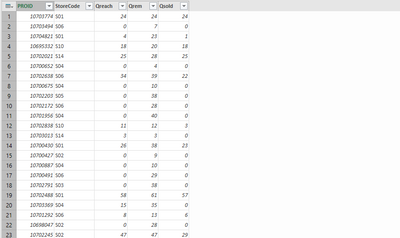
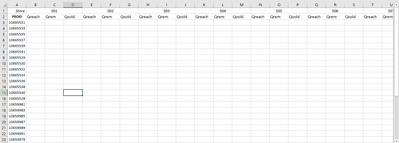
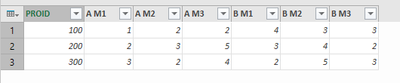
I have data in the above format. I want to convert it in the format mentioned below:
In excel I used to do it through sumifs, but that was really time consuming. I want to do it through power query. I tried pivoting, but it asks me to identify single value column, and as I have three value columns. I don't get the data in the format I want.
How to do it?
Please help and thanks.
Solved! Go to Solution.
Hi @himanshu23 ,
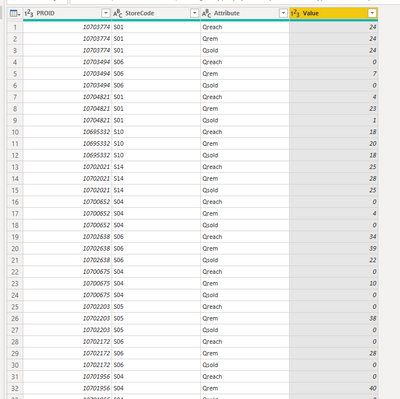
First go to query editor,select columns "Qreach,Qrem,Qsold">"unpivot columns",and you will get a table as below:
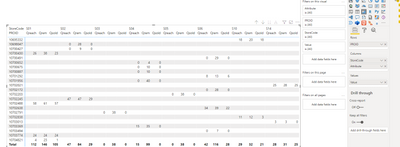
Then back to Report view,create a matrix,and you will see:
For the related .pbix file,pls see attached.
Best Regards,
Kelly
Did I answer your question? Mark my reply as a solution!
If you do decide to restructure your data, here's one way to do it in the query editor. To see how it works, just create a blank query, open the Advanced Editor and replace the text there with the M code below.
let
Source = Table.FromRows(Json.Document(Binary.Decompress(Binary.FromText("TYyxDQAgCAR3obZQXgfQNYj7ryE+hlhcwT05M2m1SpHpNEfJLiaa/jo4gx7p8bZOH53FOzZ8nfVczz7SK9v83wc=", BinaryEncoding.Base64), Compression.Deflate)), let _t = ((type nullable text) meta [Serialized.Text = true]) in type table [PROID = _t, Store = _t, M1 = _t, M2 = _t, M3 = _t]),
#"Changed Type" = Table.TransformColumnTypes(Source,{{"PROID", Int64.Type}, {"Store", type text}, {"M1", Int64.Type}, {"M2", Int64.Type}, {"M3", Int64.Type}}),
#"Added Custom" = Table.AddColumn(#"Changed Type", "Custom", each Record.RenameFields(Record.RemoveFields(_, {"PROID", "Store"}), {{"M1", [Store] & " M1"}, {"M2", [Store] & " M2"}, {"M3", [Store] & " M3"}})),
#"Removed Columns" = Table.RemoveColumns(#"Added Custom",{"M1", "M2", "M3"}),
#"Pivoted Column" = Table.Pivot(#"Removed Columns", List.Distinct(#"Removed Columns"[Store]), "Store", "Custom"),
#"Expanded A" = Table.ExpandRecordColumn(#"Pivoted Column", "A", {"A M1", "A M2", "A M3"}, {"A M1", "A M2", "A M3"}),
#"Expanded B" = Table.ExpandRecordColumn(#"Expanded A", "B", {"B M1", "B M2", "B M3"}, {"B M1", "B M2", "B M3"})
in
#"Expanded B"
Pat
To learn more about Power BI, follow me on Twitter or subscribe on YouTube.
This is coming, not what I need
Hi @himanshu23 ,
First go to query editor,select columns "Qreach,Qrem,Qsold">"unpivot columns",and you will get a table as below:
Then back to Report view,create a matrix,and you will see:
For the related .pbix file,pls see attached.
Best Regards,
Kelly
Did I answer your question? Mark my reply as a solution!
You could make that in a matrix visual, but are you sure you want to restructure your data? It is set up well for analysis now. Also, in the query editor, you won't be able to end up with the two columns with the same name.
Pat
To learn more about Power BI, follow me on Twitter or subscribe on YouTube.
I need to create reports in my organisation's format. I need to load it in excel only, that's how they want it.
The Power BI Data Visualization World Championships is back! Get ahead of the game and start preparing now!
Check out the November 2025 Power BI update to learn about new features.