Join us at FabCon Atlanta from March 16 - 20, 2026, for the ultimate Fabric, Power BI, AI and SQL community-led event. Save $200 with code FABCOMM.
Register now!Get Fabric Certified for FREE during Fabric Data Days. Don't miss your chance! Request now
Hi Community,
I have a room list
room name last name class age id student
106 Andre
106 null
107 null
108 Timo
I need to indicate whether the room is single or double. I was able to duplicate the table and group by in power query
106 -2
107 -1
108-1
but then i am merging back to the initial table, is there any other way jut to keep all the steps in one table?? without having to duplicate and merge?
Thanks
Solved! Go to Solution.
Hi there,
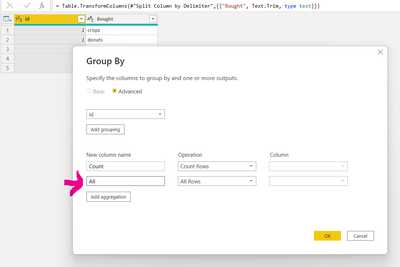
there is an option to pick all when you group by and count rows
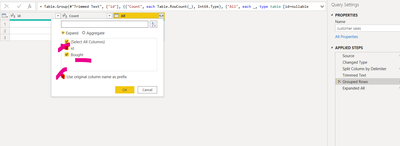
then tick your columns except for the ones your were grouping by and expand
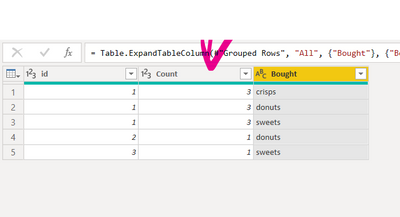
and there you have your table back as it was plus the count of rows.
Please kudo and accept the solution if it works for you.
Oh, thats a nice trick, thank you!
Hi there,
there is an option to pick all when you group by and count rows
then tick your columns except for the ones your were grouping by and expand
and there you have your table back as it was plus the count of rows.
Please kudo and accept the solution if it works for you.
Check out the November 2025 Power BI update to learn about new features.
Advance your Data & AI career with 50 days of live learning, contests, hands-on challenges, study groups & certifications and more!
| User | Count |
|---|---|
| 11 | |
| 10 | |
| 5 | |
| 4 | |
| 4 |
| User | Count |
|---|---|
| 24 | |
| 17 | |
| 13 | |
| 10 | |
| 10 |