
cancel
Showing results for 
Search instead for 
Did you mean: 

The Power BI Data Visualization World Championships is back! Get ahead of the game and start preparing now! Learn more

Reply
Daemetius
Helper II
Helper II

How to display name of Created By from Sharepoint Online?

Hello,


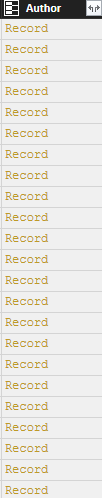
So I'm trying to bring author information from a list that is in Sharepoint Online. However when I check, all I see are UserIds and the Author field has Record link which takes me to a small table containing info on that particular user who submitted an item in the list.


Isn't there a way to just get the author as a text value from that field and display it in the graphs? 

1 ACCEPTED SOLUTION
Greg_Deckler
Community Champion
Community Champion

Use the expand arrows for the column to expand the Record to the Author's actual name.


Follow on LinkedIn
@ me in replies or I'll lose your thread!!!
Instead of a Kudo, please vote for this idea
Become an expert!: Enterprise DNA
External Tools: MSHGQM
YouTube Channel!: Microsoft Hates Greg
Latest book!:
DAX For Humans

DAX is easy, CALCULATE makes DAX hard...

View solution in original post

3 REPLIES 3
Greg_Deckler
Community Champion
Community Champion

Use the expand arrows for the column to expand the Record to the Author's actual name.


Follow on LinkedIn
@ me in replies or I'll lose your thread!!!
Instead of a Kudo, please vote for this idea
Become an expert!: Enterprise DNA
External Tools: MSHGQM
YouTube Channel!: Microsoft Hates Greg
Latest book!:
DAX For Humans

DAX is easy, CALCULATE makes DAX hard...


@Greg_Decklerwrote:

Use the expand arrows for the column to expand the Record to the Author's actual name.


What expand arrow? Is this in Query Editor? This is what I have. 


author column.png


All I can is drill down and it gives additional information, but I want to extract the drilled down data. Title gives name of the author here, so I would like to extract that information 


drill down.png

Those little arrows in the column header on the right side.


Follow on LinkedIn
@ me in replies or I'll lose your thread!!!
Instead of a Kudo, please vote for this idea
Become an expert!: Enterprise DNA
External Tools: MSHGQM
YouTube Channel!: Microsoft Hates Greg
Latest book!:
DAX For Humans

DAX is easy, CALCULATE makes DAX hard...

Helpful resources

Announcements
November Power BI Update Carousel

Power BI Monthly Update - November 2025

Check out the November 2025 Power BI update to learn about new features.

Fabric Data Days Carousel

Fabric Data Days

Advance your Data & AI career with 50 days of live learning, contests, hands-on challenges, study groups & certifications and more!

FabCon Atlanta 2026 carousel

FabCon Atlanta 2026

Join us at FabCon Atlanta, March 16-20, for the ultimate Fabric, Power BI, AI and SQL community-led event. Save $200 with code FABCOMM.