cancel
Showing results for 
Search instead for 
Did you mean: 

Try your skills in the Power BI Dataviz World Championship! Round one ends June 26. Join now

Reply
HimaBindhu
New Member

How to create query function for adding latitude and longitude to my data

I my data i am provided with country and provinces.

I dont have latitude and longitude of provinces in my dataset. I wanted to integrate bing maps with my data for pointing out provinces in maps.

How can i add lat and long to my data view and create query for pointing location.


Fast replies will be much thankful.


Regards,

Hima Bindhu


2 ACCEPTED SOLUTIONS
Anonymous
Not applicable

@HimaBindhu,

You would need to prepare latitude  and longitude data in your data source, then refresh  in Power BI Desktop to bring new columns.

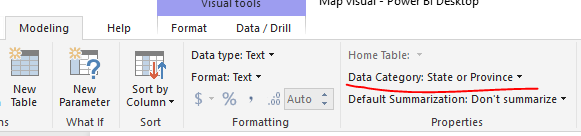
In your scenario, why not directly create map visual using country and province fields? You can set data category for your fields to proper category(country or province).
1.PNG


Regards,
Lydia

View solution in original post

Anonymous
Not applicable

As Lydia said, you will need to prepare your Lat/Long coodorindates in your data sources, even if that is a simple spreadsheet you can import and merge with your data.


To answer your question @Anonymous  the State/Province selection is problematic as it often gets the completely wrong place in the world.  A good example is the data point "Orange" which is a city in New South Wales in Australia.  Power BI commonly gets it confused with Orange County in America.  Often Lat/Long is the only method of guarenteeing the expected outcome.

View solution in original post

2 REPLIES 2
Anonymous
Not applicable

@HimaBindhu,

You would need to prepare latitude  and longitude data in your data source, then refresh  in Power BI Desktop to bring new columns.

In your scenario, why not directly create map visual using country and province fields? You can set data category for your fields to proper category(country or province).
1.PNG


Regards,
Lydia

Anonymous
Not applicable

As Lydia said, you will need to prepare your Lat/Long coodorindates in your data sources, even if that is a simple spreadsheet you can import and merge with your data.


To answer your question @Anonymous  the State/Province selection is problematic as it often gets the completely wrong place in the world.  A good example is the data point "Orange" which is a city in New South Wales in Australia.  Power BI commonly gets it confused with Orange County in America.  Often Lat/Long is the only method of guarenteeing the expected outcome.

Helpful resources

Announcements
Fabric Data Days is here Carousel

Fabric Data Days 2026

Don't miss out on Data Days, June 15 through August 7. Learn Fabric, Power BI, SQL, AI and more.

May Power BI Update Carousel

Power BI Monthly Update - May 2026

Check out the May 2026 Power BI update to learn about new features.

Power BI DataViz World Championships carousel

Power BI DataViz World Championships - June 2026

A new Power BI DataViz World Championship is coming this June! Don't miss out on submitting your entry.