
Join us at FabCon Atlanta from March 16 - 20, 2026, for the ultimate Fabric, Power BI, AI and SQL community-led event. Save $200 with code FABCOMM.
Register now!The Power BI Data Visualization World Championships is back! It's time to submit your entry. Live now!
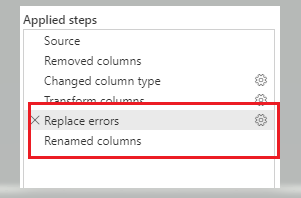
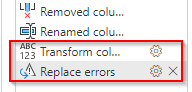
In my dataflow I note that below 2 highlighted steps (Replace Errors, Renamed Columns) are getting inserted automatically by the Power Query (I dont want those 2 steps to be added).
What I have done I removed both the steps and save the dataflow, and then when I open the dataflow again I see below 2 steps again, (being added automatically by the Power Query)
How do I avoid those 2 steps getting added automatically.
Hello,
This issue affects dataflow as well. It's simply impossible to create a reference to queries giving table that contain binary columns.
Maybe an improvement on the next versions to avoid type detection completely is due.
Best regards,
I have the same problem. It keeps transforming a date column to text.
You could try to define dataypes for each column.
I had the same situation:
and this is caused that all columns had "Any" datatype
when i converted back to the right datatype problem was resolved.
Let me know if it helps.
This was the solution for me. Once I explicitly defined the data types for all columns, the "Replace Errors" step was not being automatically generated anymore.
Did you figure out how to stop it? I have the same issue and the suggested tip didn't work.
@smjzahid
Can you try the following:
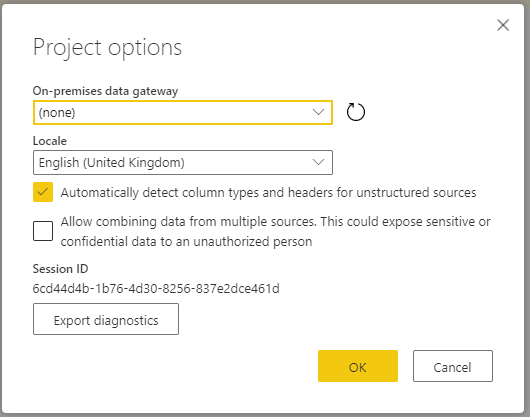
Go to Data Flow and edit, Select Project Option and Options in Home Tab, Untick "Automatic Detect column types. . . .".
It is supposed to remove automatic type change but try if it works for your issue as well.
________________________
Did I answer your question? Mark this post as a solution, this will help others!.
Click on the Thumbs-Up icon if you like this reply 🙂
⭕ Subscribe and learn Power BI from these videos
⚪ Website ⚪ LinkedIn ⚪ PBI User Group
The Power BI Data Visualization World Championships is back! It's time to submit your entry.
Check out the January 2026 Power BI update to learn about new features.
| User | Count |
|---|---|
| 16 | |
| 12 | |
| 9 | |
| 8 | |
| 7 |