Get certified for free when you join Fabric Data Days 2026 and dive into Fabric, Power BI, SQL, AI, and other essential data skills.
Join nowJuly 28 - August 9 | Final Round of the Power BI Dataviz World Championships. This is your chance. Learn more
Hello,
I am very new to Power Query and could use some help!
We have products such as Variety Packs that contain an assortment of existing products. In order to get a full count of each product, we need to account for the units in the Variety Packs as well. However, our data does not break up the Variety Pack by whats included inside, and just says "Variety Pack".
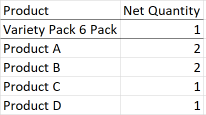
I was wondering if it were possible in Power Query to conditionally add a certain amount of rows under "Variety Pack" every time is occurs.
Desired Data: (Currently just the Variety Pack line)
This would have to be done separately for different variety packs as well.
I can elaborate more if needed! Any help is appreciated!
Hi @vcan,
This is possible. You can use something like List.Accumulate(Table.ToRecords(...), ...) and analise it or few otherstrategies, but would you be able to explain why would you need it? The data tables works in a quite different way compared to e.g. Excel. Generally, there is no guarantee that the lines will be processed in a certain sequence in DAX or visual after the data is passed from the query. What is your plan for controlling after which Variety Pack any given Product A is following?
Thanks,
John
If you love stickers, then you will definitely want to check out our community sticker challenge, Barcelona edition!
Check out the July 2026 Power BI update to learn about new features.