cancel
Showing results for 
Search instead for 
Did you mean: 

The Power BI Data Visualization World Championships is back! Get ahead of the game and start preparing now! Learn more

Reply
Anonymous
Not applicable

How can I group rows based on certain special characters

For example here is a chart


    Category               Value

   razor                         10

   disposable razor       11

   shave                         0

   razor for men            2

   shampoo                   5

   razors                       21


I want to group by rows with the key word razor, even if the colomn name is not distinctly 'razors'. The calculated value in this example would be 10+11+2+21 = 44

2 ACCEPTED SOLUTIONS
tackytechtom
Super User
Super User

Hi @Anonymous ,


How about this:

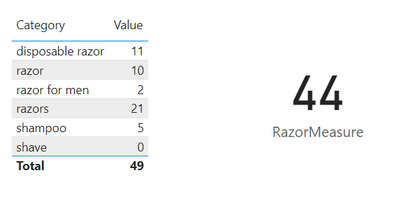
tomfox_0-1652896527895.png


And here the measure:

RazorMeasure = 
CALCULATE (
    SUM ( Table[Value] ),
    SEARCH ( "Razor", Table[Category], 1, BLANK() )
)

Does this solve your issue?


/Tom
https://www.tackytech.blog/
https://www.instagram.com/tackytechtom/


Did I answer your question➡️ Please, mark my post as a solution ✔️

Also happily accepting Kudos 🙂

Feel free to connect with me on LinkedIn! linkedIn

#proudtobeasuperuser 

View solution in original post

Hi @Anonymous ,


How about this:

RazorMeasure2 = 
CALCULATE (
    SUM ( Table[Value] ),
    SEARCH ( "Razor", Table[Category], 1, BLANK() ) || SEARCH ( "Shampoo", Table[Category], 1, BLANK() )
)


Please consider marking this reply as a solution, if it solves your issue. 🙂


/Tom
https://www.tackytech.blog/
https://www.instagram.com/tackytechtom/


Did I answer your question➡️ Please, mark my post as a solution ✔️

Also happily accepting Kudos 🙂

Feel free to connect with me on LinkedIn! linkedIn

#proudtobeasuperuser 

View solution in original post

4 REPLIES 4
jennratten
Super User
Super User

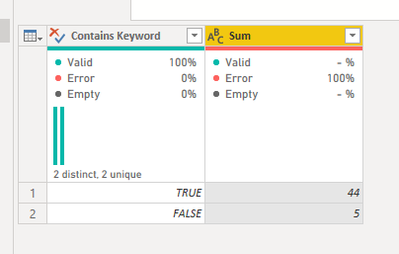
This is how you can accomplish the result using Power Query:

let
    Source = Table.FromRows(Json.Document(Binary.Decompress(Binary.FromText("i45WKkqsyi9S0lEyNFCK1YlWSsksLsgvTkzKSVWAyxiCZYozEstSgVyIOrCkQhoQ56bmAUWNYGpyC/LzgXxThKpikDTQjFgA", BinaryEncoding.Base64), Compression.Deflate)), let _t = ((type nullable text) meta [Serialized.Text = true]) in type table [Category = _t, Value = _t]),
    #"Changed Type" = Table.TransformColumnTypes(Source,{{"Category", type text}, {"Value", Int64.Type}}),
    #"Added Custom" = Table.AddColumn(#"Changed Type", "Contains Keyword", each Text.Contains ( [Category], "razor", Comparer.OrdinalIgnoreCase ), type logical ),
    #"Grouped Rows" = Table.Group(#"Added Custom", {"Contains Keyword"}, {{"Sum", each List.Sum([Value]), type nullable text}})
in
    #"Grouped Rows"

jennratten_0-1652898965534.png


tackytechtom
Super User
Super User

Hi @Anonymous ,


How about this:

tomfox_0-1652896527895.png


And here the measure:

RazorMeasure = 
CALCULATE (
    SUM ( Table[Value] ),
    SEARCH ( "Razor", Table[Category], 1, BLANK() )
)

Does this solve your issue?


/Tom
https://www.tackytech.blog/
https://www.instagram.com/tackytechtom/


Did I answer your question➡️ Please, mark my post as a solution ✔️

Also happily accepting Kudos 🙂

Feel free to connect with me on LinkedIn! linkedIn

#proudtobeasuperuser 

Anonymous
Not applicable

Do you by chance know how to do it with two searches? For example, "razor" and "shampoo" to make the razorshampoo measure as 49?


Hi @Anonymous ,


How about this:

RazorMeasure2 = 
CALCULATE (
    SUM ( Table[Value] ),
    SEARCH ( "Razor", Table[Category], 1, BLANK() ) || SEARCH ( "Shampoo", Table[Category], 1, BLANK() )
)


Please consider marking this reply as a solution, if it solves your issue. 🙂


/Tom
https://www.tackytech.blog/
https://www.instagram.com/tackytechtom/


Did I answer your question➡️ Please, mark my post as a solution ✔️

Also happily accepting Kudos 🙂

Feel free to connect with me on LinkedIn! linkedIn

#proudtobeasuperuser 

Helpful resources

Announcements
November Power BI Update Carousel

Power BI Monthly Update - November 2025

Check out the November 2025 Power BI update to learn about new features.

Fabric Data Days Carousel

Fabric Data Days

Advance your Data & AI career with 50 days of live learning, contests, hands-on challenges, study groups & certifications and more!

FabCon Atlanta 2026 carousel

FabCon Atlanta 2026

Join us at FabCon Atlanta, March 16-20, for the ultimate Fabric, Power BI, AI and SQL community-led event. Save $200 with code FABCOMM.