cancel
Showing results for 
Search instead for 
Did you mean: 

The Power BI Data Visualization World Championships is back! Get ahead of the game and start preparing now! Learn more

Reply
Anonymous
Not applicable

How can I custom UI from connector code

Hello all,


I'm developing a custom connector and it works good.

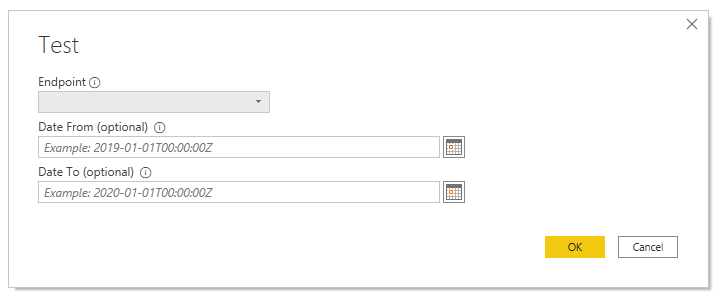
The function Contents() takes 3 parameters: Environment (required), DateFrom (optional) and DateTo (optional):
2020-07-13_11-18-32.png

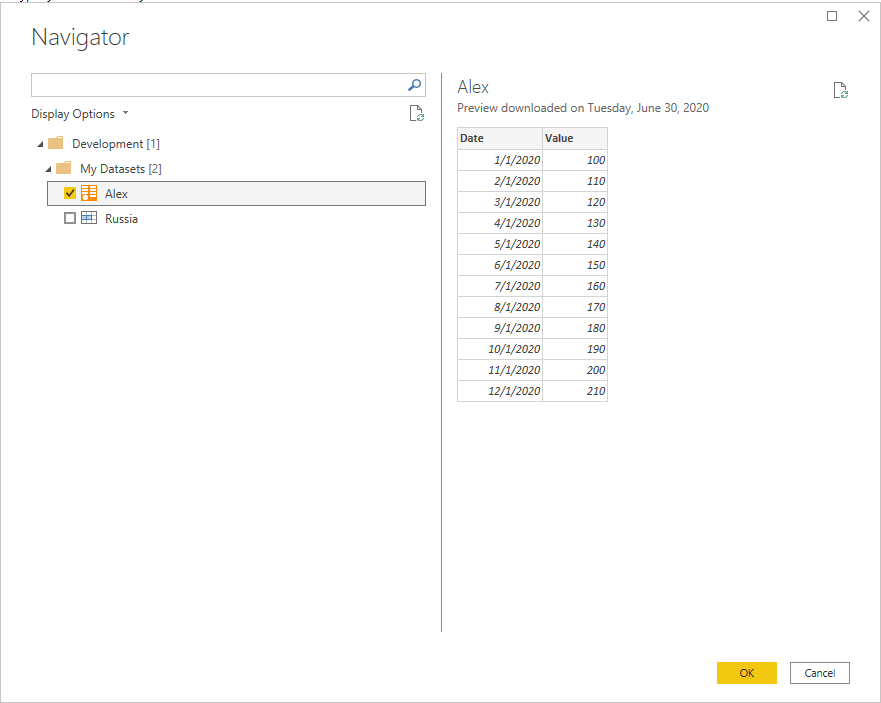
Then the function shows the Navigator window that helps user to find and select a dataset:

2020-07-13_11-06-39.png


What I want to change is behavoir of Power BI Desktop UI.

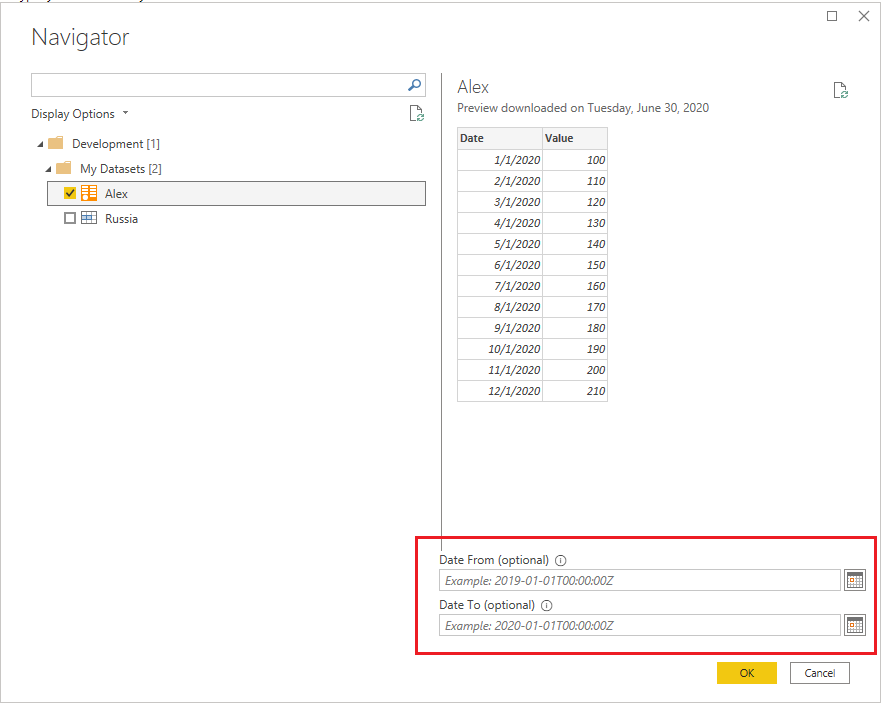
I want to place the optional parameters on the Navigator window, something like this:

2020-07-13_11-06-39 - 2.pngHow can I do that?

Is it possible?


Thanks in advance,

Alex.

1 ACCEPTED SOLUTION

You should be able to refer to it if it is in scope. Just use a function which returns a function.


DataFunction = (id as number) as function => (start, end) => // Use the id, start and end parameters


And before you ask adding documentation to the function there is a bit buggy. Also if all parameters are optional, it will load the data automatically and then let the user modify them.

View solution in original post

5 REPLIES 5
Smauro
Solution Sage
Solution Sage

Hi @Anonymous,

I don't believe you can do that. Since you've already called Table.ToNavigationTable, the data displaying there is already passed data through the connector, taking into account the user's parameter inputs if configured correctly.

The Navigation UI just reads what Table.ToNavigationTable returns and displays it in a pretty format. What you're asking is for this UI to be able to know how it got the values it got. Not really possible since we do not have access to the UI itself, nor can we change what Table.ToNavigationTable returns.

Best,
Spyros


Spyros Mavroforos

Data Consultant


Find me on LinkedIn or drop me an email

eSpyros

Anonymous
Not applicable

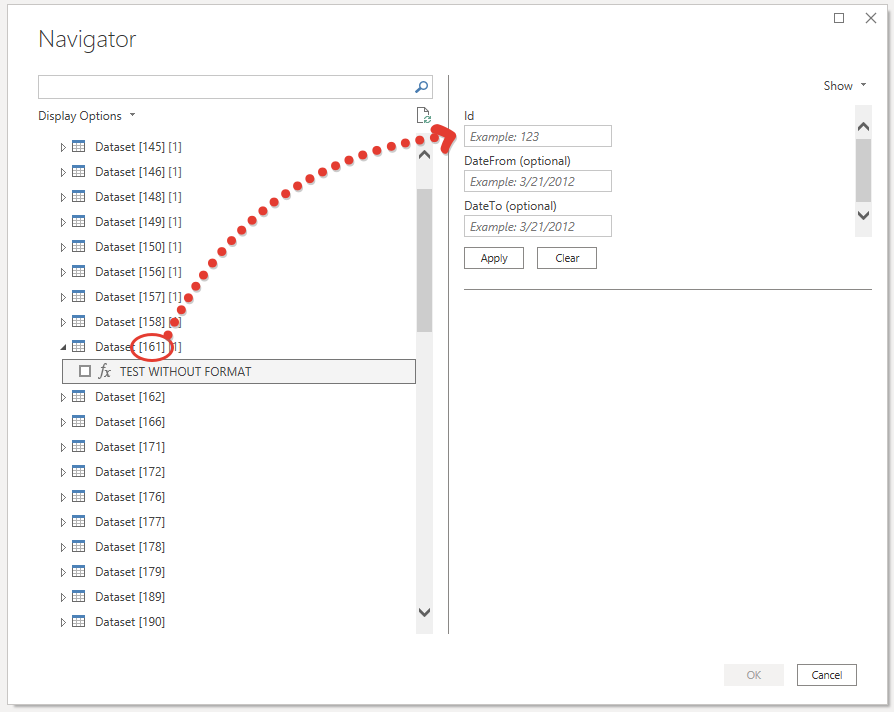
Finally, I was able to force PowerBI showing the parameters after selecting a datasource item.

The discussion which helped me is here

Now I can see the following:

89148573-47244e00-d56b-11ea-92fc-6c66c53644ce.png


What is not good is I have to pass Id of dataset as well.
Is there a way to pass that parameter to the function from connector code but leave others for user's entering?

You should be able to refer to it if it is in scope. Just use a function which returns a function.


DataFunction = (id as number) as function => (start, end) => // Use the id, start and end parameters


And before you ask adding documentation to the function there is a bit buggy. Also if all parameters are optional, it will load the data automatically and then let the user modify them.

Anonymous
Not applicable

It works for me.

Thanks a lot!


dax
Community Support
Community Support

Hi @Anonymous , 

I am not professional in UI code of custome connector, so I suggest you could @ super users in this forum or open a ticket for this problem(support ).

Best Regards,
Zoe Zhi

If this post helps, then please consider Accept it as the solution to help the other members find it more quickly.


Helpful resources

Announcements
Power BI DataViz World Championships

Power BI Dataviz World Championships

The Power BI Data Visualization World Championships is back! Get ahead of the game and start preparing now!

December 2025 Power BI Update Carousel

Power BI Monthly Update - December 2025

Check out the December 2025 Power BI Holiday Recap!

FabCon Atlanta 2026 carousel

FabCon Atlanta 2026

Join us at FabCon Atlanta, March 16-20, for the ultimate Fabric, Power BI, AI and SQL community-led event. Save $200 with code FABCOMM.

Top Solution Authors