cancel
Showing results for 
Search instead for 
Did you mean: 

The Power BI Data Visualization World Championships is back! Get ahead of the game and start preparing now! Learn more

Reply
Yrstruly2021
Helper V
Helper V

Holidays In Data Model

I brought in indexes/columns into my Invoice table to create relationships to other tables. Also brought in a date table to connect holiday day table to it and connect data table to Invoice.

I need to be able to filter on holidays etc. Is my model correct? see: https://drive.google.com/file/d/1CBpFLkw37E5aeYSG9RXMLTzOXUCdcn4m/view?usp=sharing 

6 REPLIES 6
edhans
Community Champion
Community Champion

No, not quite. You should bring your Holiday column into the calendar table. You have a 1:1 relationship there. Anytime you have a 1:1 relationship you really have 1 table split in two. Merge them.


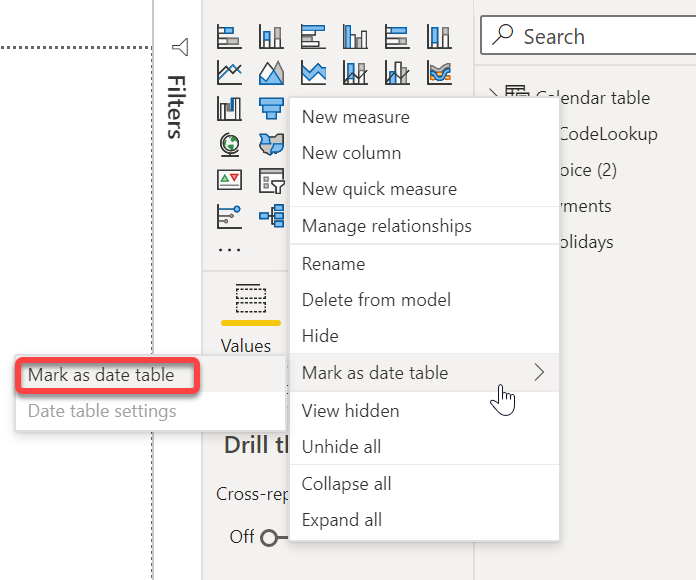
Then you need to mark your calendar table as a date table. 

edhans_0-1617897417952.png

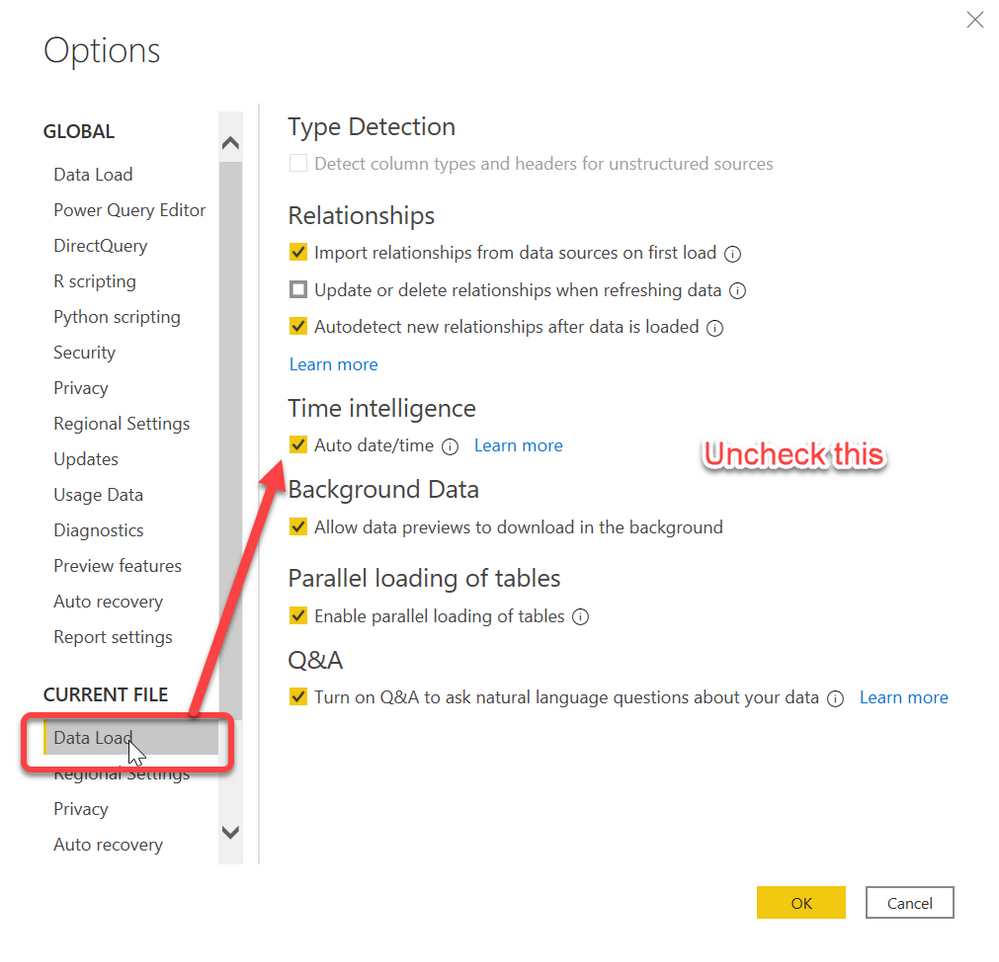
Finally, turn off auto time intelligence.

edhans_1-1617897471545.png

You should turn it off in Global settings to so it isn't on anymore - always use your own date table. 


Lastly I'd recommend you build your date table in Power Query vs using DAX. Creating a Dynamic Date Table in Power Query - it avoids issues you will eventually get with calculated columns the more you add, plus, Power Query is designed for transforming data and it has a TON of rich date table features. Here is the PQ date table I am currently using: https://bit.ly/DateTableByEd


Did I answer your question? Mark my post as a solution!
Did my answers help arrive at a solution? Give it a kudos by clicking the Thumbs Up!

DAX is for Analysis. Power Query is for Data Modeling


Proud to be a Super User!

MCSA: BI Reporting

Is my link from Pholidays to Calendar table not enough? Can you make the adjustments and please send me the pbix file?

I don't have access to your source data, so when I go into Power Query, which is where I would do this, I get a bunch of errors.


The date table is a special table in Power BI and it allows you to use Time Intellince functions with it, like PREVIOUSYEAR, DATESBETWEEN, SAMEPERIODLASTYEAR etc.

  1. You cannot do that with a table hanging off of the Date table
  2. You have 1 table split in two since it is 1:1
  3. You have the start of a Snowflake Schema by doing that, and Power BI works best with a Star Schema - meaning no sub-tables off of DIM tables as a rule, and certianly not off of the Date table. Microsoft Guidance on Importance of Star Schema

I've explained what needs to be done. Maybe someone else will do this for you, but if you will take the time to read the links I've sent and these posts, you can do it yourself. The Date table is of incredible importance to Power BI long term, so you should learn these concepts and how to build the table, not just ask for someone to do it for you, because you will be right back in the same place on the next model.


Did I answer your question? Mark my post as a solution!
Did my answers help arrive at a solution? Give it a kudos by clicking the Thumbs Up!

DAX is for Analysis. Power Query is for Data Modeling


Proud to be a Super User!

MCSA: BI Reporting

Thank you. Please confirm if my star schema is correct and suitable for filtering and cross filtering among tables? https://drive.google.com/file/d/1CBpFLkw37E5aeYSG9RXMLTzOXUCdcn4m/view?usp=sharing 

That should work. I would hide the PHolidays table so you don't inadvertently use it. Ideally you would do this merge in Power Query and never bring in the PHoliday table. But with that table hidden and not used for any future measures or visuals, that is a good Star Schema model. 😁


Did I answer your question? Mark my post as a solution!
Did my answers help arrive at a solution? Give it a kudos by clicking the Thumbs Up!

DAX is for Analysis. Power Query is for Data Modeling


Proud to be a Super User!

MCSA: BI Reporting

Helpful resources

Announcements
Power BI DataViz World Championships

Power BI Dataviz World Championships

The Power BI Data Visualization World Championships is back! Get ahead of the game and start preparing now!

December 2025 Power BI Update Carousel

Power BI Monthly Update - December 2025

Check out the December 2025 Power BI Holiday Recap!

FabCon Atlanta 2026 carousel

FabCon Atlanta 2026

Join us at FabCon Atlanta, March 16-20, for the ultimate Fabric, Power BI, AI and SQL community-led event. Save $200 with code FABCOMM.