Don't miss your chance to take the Fabric Data Engineer (DP-700) exam on us!
Learn moreWe've captured the moments from FabCon & SQLCon that everyone is talking about, and we are bringing them to the community, live and on-demand. Starts on April 14th. Register now
Hi everyone,
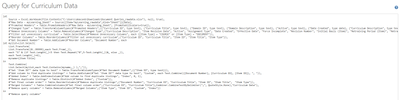
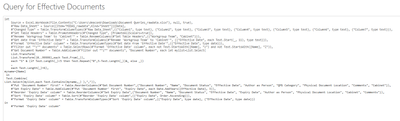
I have three queries which stem from two raw data worksheets. The total number of rows from the raw data worksheets is about 15,000 and the three queries produce is about 10,000 rows of total data. It's currently taking about 30 minutes for each query to refresh (I don't run the queries in parallel) which isn't an exorbitantly long time, but I think it could be faster based on my research of using either the List.Buffer or the Table.Buffer command.
I'm fairly new to power query so I'm hoping some one with more experience with the Buffer command can recommend where to place it within the my three queries. I've attached pictures of the queries to this thread. Additionally, if you have any recommendations of other changes I should make to my queries, I'm open to that information!
Thanks in advance!
Hi @deaconb
Read these articles to learn how to use Buffer function.
Performance tip for List.Generate (1): Buffer your tables in Power BI and Power Query
Table.Buffer for cashing intermediate query results or how workaround Unnecessary Queries Issue
Best Regards
Maggie
Community Support Team _ Maggie Li
If this post helps, then please consider Accept it as the solution to help the other members find it more quickly.
If you have recently started exploring Fabric, we'd love to hear how it's going. Your feedback can help with product improvements.
A new Power BI DataViz World Championship is coming this June! Don't miss out on submitting your entry.
Share feedback directly with Fabric product managers, participate in targeted research studies and influence the Fabric roadmap.
| User | Count |
|---|---|
| 5 | |
| 4 | |
| 3 | |
| 3 | |
| 2 |
| User | Count |
|---|---|
| 8 | |
| 8 | |
| 6 | |
| 6 | |
| 5 |