cancel
Showing results for 
Search instead for 
Did you mean: 

The Power BI Data Visualization World Championships is back! Get ahead of the game and start preparing now! Learn more

Reply
Ravi123
Frequent Visitor

Getting Error message while expanding the table after passing URL to invoke custom function

Hi Experts,


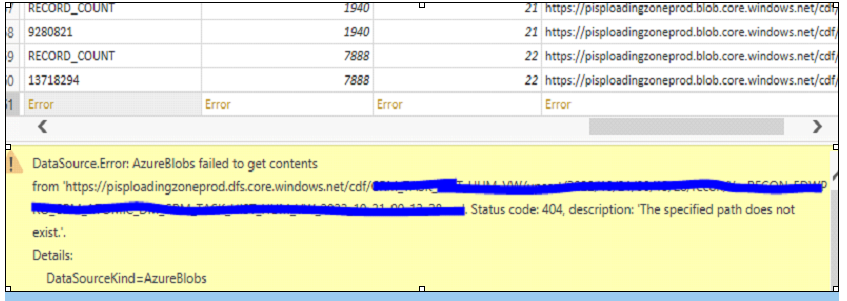
I have a column which contain URL and i passed it to invoke custom function, when i tried to expand the table i am getting an error message and getting stuck in the row which has error message, i need to handle exception message and continue fetching  the data for all the other rows.

My Custom function :
= (Url as text) as table =>
let
Source = Table.FromColumns({Lines.FromBinary(AzureStorage.BlobContents("" & Url), null, null, 1252)})
in
Source

Table-1Table-1Actual Data from URL  - 2Actual Data from URL - 2Error Details  -3Error Details -3

2 REPLIES 2
PhilipTreacy
Super User
Super User

Hi @Ravi123 


Use try .. otherwise to handle the error


= (Url as text) as table =>
let
Source = try Table.FromColumns({Lines.FromBinary(AzureStorage.BlobContents("" & Url), null, null, 1252)}) otherwise null
in
Source


Further reading if you wish


Handling errors in power query with try otherwise


regards


Phil


Did I answer your question? Then please mark my post as the solution.
If I helped you, click on the Thumbs Up to give Kudos.


Blog :: YouTube Channel :: Connect on Linkedin


Proud to be a Super User!


Hi @PhilipTreacy I tried it but it is not working getting the same error.

Helpful resources

Announcements
Power BI DataViz World Championships

Power BI Dataviz World Championships

The Power BI Data Visualization World Championships is back! Get ahead of the game and start preparing now!

December 2025 Power BI Update Carousel

Power BI Monthly Update - December 2025

Check out the December 2025 Power BI Holiday Recap!

FabCon Atlanta 2026 carousel

FabCon Atlanta 2026

Join us at FabCon Atlanta, March 16-20, for the ultimate Fabric, Power BI, AI and SQL community-led event. Save $200 with code FABCOMM.