cancel
Showing results for 
Search instead for 
Did you mean: 

The Power BI Data Visualization World Championships is back! Get ahead of the game and start preparing now! Learn more

Reply
Anonymous
Not applicable

Getting Data from ODBC using SQL statement

I'm receiving this error when I try to use a SQL statement to parse the data by date. (Using ODBC connection)


ODBC Error 3.PNG


Here's my current SQL Statement: 


SELECT fv_v_allocated_time_view_all_modules_lem_filtered.timesheet_fmt_dt, fv_v_allocated_time_view_all_modules_lem_filtered.last_name, fv_v_allocated_time_view_all_modules_lem_filtered.first_name, fv_v_allocated_time_view_all_modules_lem_filtered.skill_type, fv_v_allocated_time_view_all_modules_lem_filtered.rate_1_rate, fv_v_allocated_time_view_all_modules_lem_filtered.project_id, fv_v_allocated_time_view_all_modules_lem_filtered.work_unit_id, fv_v_allocated_time_view_all_modules_lem_filtered.company_code,fv_v_allocated_time_view_all_modules_lem_filtered.employee_or_equipment_id, fv_v_allocated_time_view_all_modules_lem_filtered.equipment_ind, fv_v_allocated_time_view_all_modules_lem_filtered.rate_1_hours, fv_v_allocated_time_view_all_modules_lem_filtered.company_name, fv_v_allocated_time_view_all_modules_lem_filtered.net_billable_time, fv_v_allocated_time_view_all_modules_lem_filtered.last_modified_by, fv_v_allocated_time_view_all_modules_lem_filtered.extra_charges
FROM vdb_track.fv_v_allocated_time_view_all_modules_lem_filtered
WHERE timesheet_fmt_dt > '12/31/2017'

1 ACCEPTED SOLUTION
Anonymous
Not applicable

The table or view name was too long, so I tried to give it an alias like below:


SELECT v.timesheet_fmt_dt

FROM vdb_fv_v_allocated_time_view_all_modules_lem_filtered v

WHERE v.timesheet_fmt_dt > '12/31/2017'


This worked for me.

View solution in original post

3 REPLIES 3
dax
Community Support
Community Support

Hi JakeRyan11,

You said when you use SQL, it will cause this problem, if you write "select *  from table", will this work ? Or if you don't write sql query, will this work? In addition, I am not sure whether this is caused by sql query or other  factors. And whicy type file you are using in ODBC? And you also could check which step will cause error in Edit Queries.


Best Regards,
Zoe Zhi

If this post helps, then please consider Accept it as the solution to help the other members find it more quickly.


Anonymous
Not applicable

The table or view name was too long, so I tried to give it an alias like below:


SELECT v.timesheet_fmt_dt

FROM vdb_fv_v_allocated_time_view_all_modules_lem_filtered v

WHERE v.timesheet_fmt_dt > '12/31/2017'


This worked for me.

Anonymous
Not applicable

Thanks dax, 


The ODBC is connecting to our data lake through Denodo. 


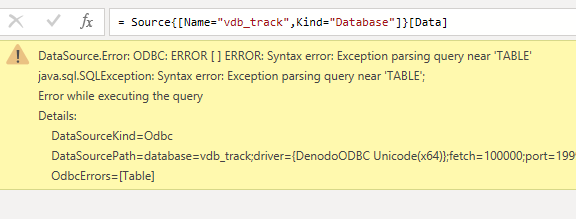
I've added "SELECT * FROM TABLE" but now receive this error: 

ODBC Error 5.PNG


If I do not type in the word "TABLE", then it runs this error: 

ODBC Error 6.PNG

Helpful resources

Announcements
Power BI DataViz World Championships

Power BI Dataviz World Championships

The Power BI Data Visualization World Championships is back! Get ahead of the game and start preparing now!

December 2025 Power BI Update Carousel

Power BI Monthly Update - December 2025

Check out the December 2025 Power BI Holiday Recap!

FabCon Atlanta 2026 carousel

FabCon Atlanta 2026

Join us at FabCon Atlanta, March 16-20, for the ultimate Fabric, Power BI, AI and SQL community-led event. Save $200 with code FABCOMM.