Join us at FabCon Atlanta from March 16 - 20, 2026, for the ultimate Fabric, Power BI, AI and SQL community-led event. Save $200 with code FABCOMM.
Register now!The Power BI Data Visualization World Championships is back! Get ahead of the game and start preparing now! Learn more
Hi all,
I am new to PowerBI.
In my project, I have an Attendance table with 2 Columns as Date and SubProject.
Dates will have dates and SubProject will have a variety of values.
I want to get number of rows with the value InOut in SubProject for the selected dates.
Please let me know how to start.
Thank you in advance.
Solved! Go to Solution.
Hello@Anonymous
For what I have understood your query, you may use Power Query for this.
Post loading the table to Power Query Editor, you may apply the following steps:
The sample data I have created for this purpose:
Go to Transform > Group By
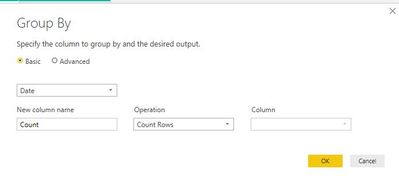
Select the Date column in the Group By window & select Count Rows in the Operation & click Ok
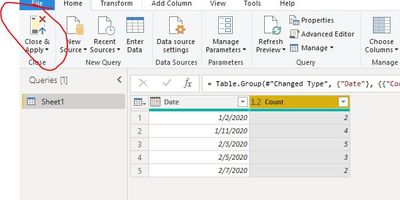
This will give you a summary table with date wise count
Close & Apply
Regards,
Vivek
If it helps, please mark it as a solution
Kudos would be a cherry on the top 🙂
https://www.vivran.in/
Hello@Anonymous
For what I have understood your query, you may use Power Query for this.
Post loading the table to Power Query Editor, you may apply the following steps:
The sample data I have created for this purpose:
Go to Transform > Group By
Select the Date column in the Group By window & select Count Rows in the Operation & click Ok
This will give you a summary table with date wise count
Close & Apply
Regards,
Vivek
If it helps, please mark it as a solution
Kudos would be a cherry on the top 🙂
https://www.vivran.in/
The Power BI Data Visualization World Championships is back! Get ahead of the game and start preparing now!