cancel
Showing results for 
Search instead for 
Did you mean: 

The Power BI Data Visualization World Championships is back! Get ahead of the game and start preparing now! Learn more

Reply
EvertonRosa
Helper I
Helper I

Get next line from Related Table (Table.)

I need a little help to write a Power Query function in order to get the next line (id) from a related table.


Actual code is:

let data = Table.Column(dCalendarA, "Month/Year") in
if [FiscalPeriod] = null then null
else if [FiscalPeriod] = "Actual" then [dCalendarA.CloseDate]
else data + 1)

Problem:

Variable data is returning month + 1, but what i do need is to return next line register.

Example:
Table dCalendarA
id Month/Year CloseDate
1  012021         29/01/2021
2  022021         26/02/2021

So in concrete case, ELSE (data + 1) must return 26/02/2021.

Data Image:

EvertonRosa_0-1627415855424.png


@Vera_33 @Jakinta ?

1 ACCEPTED SOLUTION
Vera_33
Resident Rockstar
Resident Rockstar

Hi @EvertonRosa 


I don't see your original code working...based on my understanding, you have a table like the screenshot, another table called dCalendarA. While you fetch the dCalendarA.CloseDate, you are looking at Month/Year in both tables to match? I modified your code a little bit, let me know if you want something else
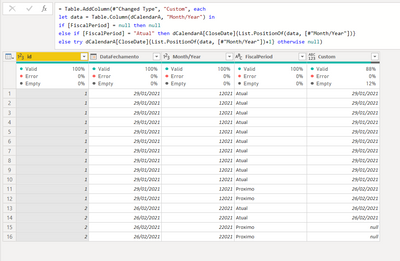
Vera_33_0-1627434848751.png

let
    Source = Table.FromRows(Json.Document(Binary.Decompress(Binary.FromText("i45WMjy0QElH6dACI0t9A0N9IwMjQyDXwBDEAMs4lpQm5ijF6oyqHLwqA4ryKzJz80lWawRTa6ZvYARXa4TFBdRTSYr9cLWxAA==", BinaryEncoding.Base64), Compression.Deflate)), let _t = ((type nullable text) meta [Serialized.Text = true]) in type table [id = _t, DataFechamento = _t, #"Month/Year" = _t, FiscalPeriod = _t]),
    #"Changed Type" = Table.TransformColumnTypes(Source,{{"id", Int64.Type}, {"DataFechamento", type date}, {"Month/Year", Int64.Type}}),
    #"Added Custom" = Table.AddColumn(#"Changed Type", "Custom", each 
let data = Table.Column(dCalendarA, "Month/Year") in
if [FiscalPeriod] = null then null
else if [FiscalPeriod] = "Atual" then dCalendarA[CloseDate]{List.PositionOf(data, [#"Month/Year"])}
else try dCalendarA[CloseDate]{List.PositionOf(data, [#"Month/Year"])+1} otherwise null)
in
    #"Added Custom"


View solution in original post

3 REPLIES 3
Vera_33
Resident Rockstar
Resident Rockstar

Hi @EvertonRosa 


I don't see your original code working...based on my understanding, you have a table like the screenshot, another table called dCalendarA. While you fetch the dCalendarA.CloseDate, you are looking at Month/Year in both tables to match? I modified your code a little bit, let me know if you want something else

Vera_33_0-1627434848751.png

let
    Source = Table.FromRows(Json.Document(Binary.Decompress(Binary.FromText("i45WMjy0QElH6dACI0t9A0N9IwMjQyDXwBDEAMs4lpQm5ijF6oyqHLwqA4ryKzJz80lWawRTa6ZvYARXa4TFBdRTSYr9cLWxAA==", BinaryEncoding.Base64), Compression.Deflate)), let _t = ((type nullable text) meta [Serialized.Text = true]) in type table [id = _t, DataFechamento = _t, #"Month/Year" = _t, FiscalPeriod = _t]),
    #"Changed Type" = Table.TransformColumnTypes(Source,{{"id", Int64.Type}, {"DataFechamento", type date}, {"Month/Year", Int64.Type}}),
    #"Added Custom" = Table.AddColumn(#"Changed Type", "Custom", each 
let data = Table.Column(dCalendarA, "Month/Year") in
if [FiscalPeriod] = null then null
else if [FiscalPeriod] = "Atual" then dCalendarA[CloseDate]{List.PositionOf(data, [#"Month/Year"])}
else try dCalendarA[CloseDate]{List.PositionOf(data, [#"Month/Year"])+1} otherwise null)
in
    #"Added Custom"
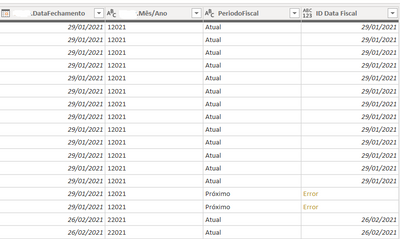
 

It did work!!! Thanks a lot 😉

Jakinta
Solution Sage
Solution Sage

You are almost there, you can go with else null, then FillUp column [ID Data Fiscal].

Helpful resources

Announcements
Power BI DataViz World Championships

Power BI Dataviz World Championships

The Power BI Data Visualization World Championships is back! Get ahead of the game and start preparing now!

December 2025 Power BI Update Carousel

Power BI Monthly Update - December 2025

Check out the December 2025 Power BI Holiday Recap!

FabCon Atlanta 2026 carousel

FabCon Atlanta 2026

Join us at FabCon Atlanta, March 16-20, for the ultimate Fabric, Power BI, AI and SQL community-led event. Save $200 with code FABCOMM.

Top Solution Authors