Hi,
I have two tables, one with accounting and one with forcasts.
I need to use both in order to create a view with some information I need for my accounting.
The problem is mainly with the forecasts as I need one row for each month since the start of the project until the current month.
I appreciate all help and pointers to a good read is also much appreciated.
Problem 1: There's not a forcast during some months (mainly summer) and that forecast needs to be the same at the previous one.
Problem 2: After the project is completed I still need to have the last forecast on a new row for each month after that as I always need a running total.
Link: .pbix link
My first thought was to use a date calendar which matched the forecast to the correct dates but as I want to use the numbers in calculated columns that didn't work out.
My second thought was to make one row for each month and project and then add calculated columns. I tried with a foor loop using generate series but I could only get that to work for one dimention and not two (month and project).
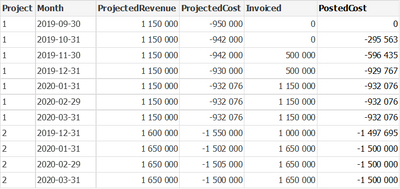
In the picture below:
Nov, Feb & Mar is not included in the datasef of the forecast table and is therefore the same as previous date for project 1
ProjectedRevenue: Ssum of type revenue in the foercast table grouped by date and project.
ProjectedCost: Sum of type cost in the foercast table grouped by date and project.
Invoiced: Sum of all invoices in the accounting table until the date in the month column.
PostedCost: Sum of all posted costs in the accounting table until the date in the month column.