Hi @mcolbert
If my previous answer is not a solution to your scenario, you could check my suggestions below:
1. Assume you have name column in "Table", "Table(2)"
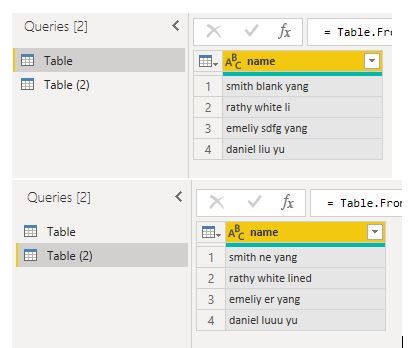
2.
You could "split columns" in for two columns
Split columns by Delimiter " "(space)
Then change columns names
Table.RenameColumns(#"Changed Type1",{{"name.1", "First name"}, {"name.2", "Middle name"}, {"name.3", "Last name"}})
3.
In "Table", Merge columns for "First name" and "Last name" columns
The same for "Table(2)"
 4. Merge queries, then expand
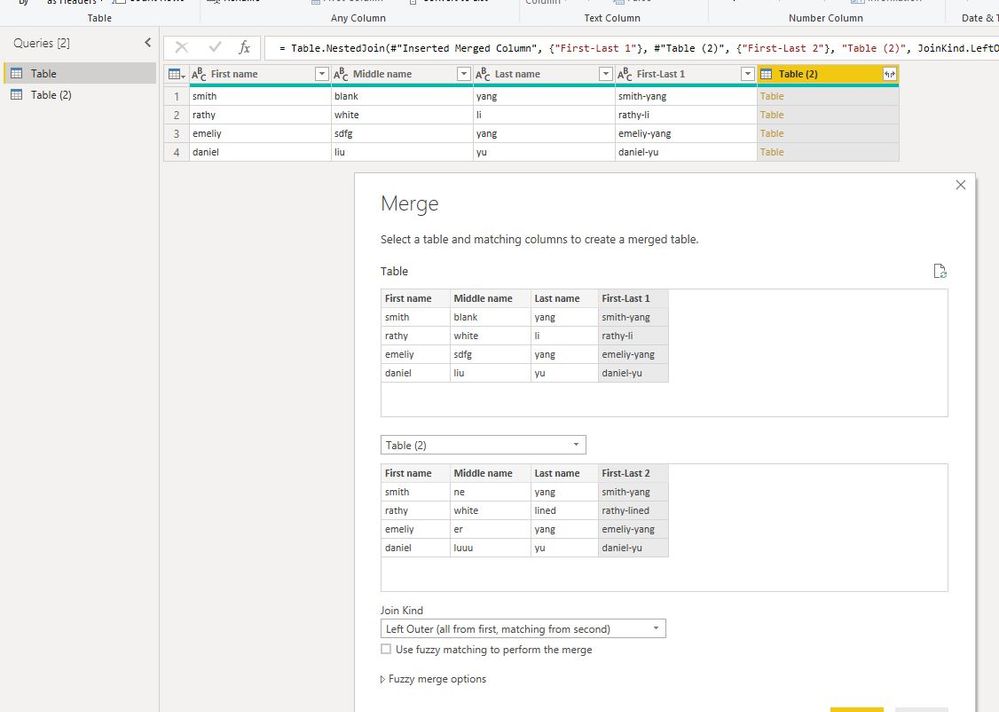
5. finally, merge columns "First name", "Middle name", "Last name" to "Merged",
merge columns "Table (2).First name", "Table (2).Middle name", "Table (2).Last name" to "Merged2",
Remove other columns

Best Regards
Maggie
Community Support Team _ Maggie Li
If this post helps, then please consider Accept it as the solution to help the other members find it more quickly.


